Showing posts with label json. Show all posts

Wednesday, February 21, 2018

Using the Slack webhook API from PL/SQL

Slack is a web-based chat room popular with many companies. Slack also has an API that can be used to post messages to a given "channel" or chat room. The simplest API offered is the "webhook" integration, which is "a simple way to post messages from external sources into Slack. They make use of normal HTTP requests with a JSON payload that includes the message text and some options."


To create a new Slack webhook, login to Slack and go to "Apps" in the left sidebar menu. Click "Manage apps..." and click "Custom Integrations" and then "Incoming Webhooks". Click on "Add Configuration" to create a new webhook. Specify the channel the webhook will post in, and click "Add incoming webhooks integration".


Next, take a note of the Webhook URL:


Then go to the Alexandria PL/SQL Utility Library and install the SLACK_UTIL_PKG package in your database schema. Modify your database Network ACL settings to include "hooks.slack.com" (port 443) to allow connections to the Slack site from the database.

Then use the package like this (see also demo script):


In addition to application-specific messages you could perhaps also set up the database (via a background job) to notify you when you are about to run out of disk space, when the number of APEX page views reach a certain threshold, when a specific user logs in, and so on. Use your imagination! :-)


Saturday, February 10, 2018

Pivot Table plugin for APEX (Updated)

Some years ago I created an APEX region plugin for displaying the results of a query as a Pivot Table. You can read the original blog post about that here.

The plugin proved quite popular, but people were having problems using it with APEX 5 due to a jQuery versioning conflict.

I've now updated the plugin so it works with APEX, both 5.0 and 5.1.


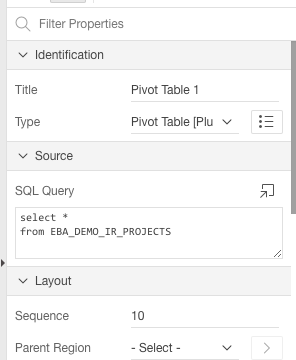
To use it, simply add a region to the page, change the region type to "Pivot Table" and write an SQL query as the region source:


On the region attributes page, specify the options. I've added some help text to explain the various options. Note that you can have more than one Pivot Table region on the same page, but be sure to use a unique name in the "DOM Element Name" attribute for each pivot table.


I've also added/enabled some extra features such as spreadsheet export (via TSV - tab separated values) and charting.


It should be noted that the plugin is just an APEX wrapper for the Javascript Pivot Table component by Nicolas Kruchten who did all the hard work. I merely packaged it up for use with APEX.

You can download the plugin from my APEX plugins page. Enjoy! :-)


Saturday, August 13, 2016

Using the PayPal REST API from PL/SQL

Do you need to accept payments for goods and services via your (APEX) application and would you prefer to handle the payments in the database via PL/SQL? Then this blog post is for you... :-)

Almost a decade ago (in 2007), Oracle released a whitepaper on Integrating Application Express with PayPal Payments Pro which used PayPal's Name Value Pair (NVP) API.

In the years since then, PayPal has made available a new API which is based on REST principles.

I've created a package called PAYPAL_UTIL_PKG to use the PayPal REST API from PL/SQL.


Note: For an alternative to PayPal, check out Trent Schafer's posts on using Stripe from PL/SQL.

Sign up for a PayPal Developer Account

To use the PayPal API you need to sign up for a PayPal account. Go to https://developer.paypal.com/ and sign up. After logging in as a developer, you must register your app to get an API key that you can use for calls to the API. Follow the instructions in the Making your first call article and run the samples using curl to get a feel for how the API works, before you start on the PL/SQL integration.

Note that PayPal provides both a so-called "sandbox" environment for testing, as well as a "live" environment for production. Each environment has its own set of API keys.

See also the PayPal API docs for further reference and troubleshooting.

Installing the PL/SQL package

The PAYPAL_UTIL_PKG is part of the Alexandria Utility Library for PL/SQL. Download the source or clone the repository from GitHub and install the package in your database. (Note: To install with minimal dependencies, run the scripts install_core.sql and install_paypal.sql from the /setup folder.)

A note about the code: To support usage in APEX 4, the PAYPAL_UTIL_PKG package does not currently use the APEX_JSON package provided with APEX 5. For the time being, the package uses its own JSON-parsing routines. In the future, the package might be refactored to use APEX_JSON.


Using the PayPal PL/SQL API

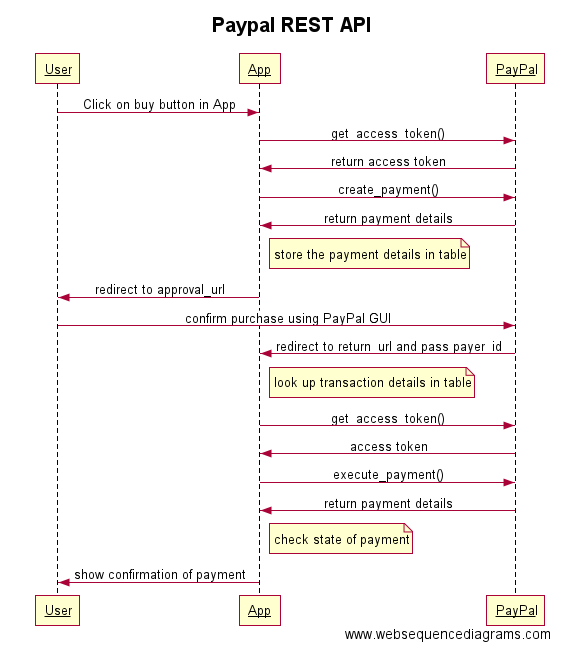
The following diagram (made with websequencediagrams.com) illustrates a typical process flow for accepting a payment. The process is further explained below.


First, the user somehow initiates the payment process, typically by clicking a button in your APEX application that runs a PL/SQL process. It is recommended that you create your own package for your application-specific payment logic (in other words, don't put the PL/SQL code inline in the APEX process, just call a procedure in your package and maintain all the logic in your package instead of in the APEX user interface).

Note: While developing and testing, you may want to use PayPal's sandbox environment, in that case call the switch_to_sandbox procedure before any other call to the API.


Next, we call get_access_token with your API key (which actually consists of both a client_id and a secret) to get a valid OAuth token to use for subsequent calls to the API.


Then, we call create_payment with the details of the transaction (amount, currency, description) as well as the URLs that we want PayPal to return the user to after he has confirmed the payment (return_url) or cancelled the transaction (cancel_url). These URLs will typically be REST endpoints that you have created using ORDS (more about this later).


The create_payment function will return a t_payment record. You should save the returned fields in a database table associated with the user's purchase, so you can retrieve the information later.


The approval_url field is a PayPal page. We need to redirect the user from our APEX application to this PayPal URL so that the user can login to PayPal and confirm the payment. To do the redirect, add owa_util.redirect_url(approval_url) as the final statement in your procedure.

The browser redirects the user to PayPal, which shows the details of the transaction to the user. If the user approves the transaction, PayPal redirects the user to the URL that you specified as the return_url parameter in the call to create_payment() above. If the user instead decides to cancel the transaction, PayPal will redirect the user to the cancel_url that you specified.

Let's assume that the user approves the payment, and PayPal redirects the user to the return_url that was specified when the payment was created. A payer ID is appended to the return URL, as PayerID. The URL looks like this:

http://return_url?token=EC-60U79048BN7819909&PayerID=7E7KGXCWTTMU2

To execute the payment after the user's approval, make a call to execute_payment and pass the payer_id received via the return URL. You also need to pass the payment_id, which was returned from the previous call to create_payment (and which you stored in a database table for use later, right?). But how do you know which payment_id is identified with this specific transaction? You would typically generate a unique URL which includes some kind of identifier (such as https://servername/payments/confirm/1234 where 1234 is some internal ID that you use to keep track of your user's different purchases). Using this example, PayPal would redirect the user to the following URL:

http://servername/payments/confirm/1234?token=EC-60U79048BN7819909&PayerID=7E7KGXCWTTMU2

To handle requests to this URL, you would set up a GET handler in ORDS so you can parse out the various parts of the request URL, including your own id (1234) which you can use to look up the payment_id, as well as the payer_id.

Confused? Perhaps PayPal's description here will clarify the process.


 When you execute the payment, the user's PayPal account is charged, and you get a t_payment record returned.


You can then check the value of the state field in the payment record.


If the state is equal to "approved", then the payment is OK and you can provide whatever goods or services the user has purchased (or at least show a confirmation page to notify the user that the transaction has succeeded).

The money should already be in your PayPal account! :-) 


Sunday, July 13, 2014

The APEX_JSON package: Generating JSON from PL/SQL

In my previous blog post, I took a look at the new APEX_JSON package that ships with Apex 5.0 and its capabilities for parsing JSON.

In this blog post, I am going to look at how the APEX_JSON package can be used to generate JSON from data in your database using PL/SQL.

There are multiple ways of creating JSON output using the APEX_JSON package. There are several overloaded write() procedures which can output simple types (like varchars, numbers, and dates), as well as those that print complex types (such as xmltype and ref cursors).

First, a simple example which prints a simple JSON structure with some hard-coded values combined with a value based on user input. The page setup in the Apex Page Designer looks like this:


Note the call to apex_json.initialize_output() which disables the automatic sending of JSON headers in the HTTP response. This is normally desirable when you are sending (just) JSON back to the client, but in my test application I want to output the JSON inside a normal HTML page, so I need to disable the JSON headers. The rest of the code consists of simple calls to open/close_object and write() to write the name/value pairs.

The output looks like this:


Next up is the very useful ability to generate JSON based on a ref cursor. This means that basically any SQL query, dynamic or static, can be transformed into JSON output, with just a single line of code. In my simple test application I've set up a PL/SQL region that opens a ref cursor based on user input, and then passes the cursor to the write() procedure.
NOTE: Using dynamic SQL based on unsanitized user input makes your application vulnerable to SQL injection. If possible, you should always use static SQL instead of dynamic SQL. Also, never trust user input and always validate it (see, for example, the dbms_assert package) before using it in a dynamic SQL statement. The example code below does not follow these security best practices, in order to keep the example simple.


Here's the result in the running application. Note that the output even supports nested queries (via the CURSOR statement), which makes it possible to generate complex/nested JSON from a single SQL statement.


Lastly, the APEX_JSON package also supports output of JSON via XML, by passing an xmltype value to the write() procedure. This is very useful in itself, but can also be combined with other PL/SQL features, such as the ability to convert any database object type to XML via the XMLType constructor.

Consider this example, where I create a database object type called T_CAR, with multiple attributes. The example SQL statement shows I can instantiate a T_CAR object and then convert the object into XML.


I can then pass the resulting XML into the write() procedure of the APEX_JSON package to generate a JSON representation of the T_CAR object type.


Here's the output:


This quick look at the APEX_JSON package from Apex 5.0 shows that this new package gives developers a lot of power and flexibility in terms of parsing and generating JSON from PL/SQL.

Monday, June 30, 2014

The APEX_JSON package: Parsing JSON in PL/SQL


As I mentioned a year ago, it looks like Apex 5.0 will include a new package called APEX_JSON for parsing and generating JSON. In this blog post, I will take a quick look at the parsing, and the next blog post will be about generating JSON output.

Since Apex 5.0 is still in Early Adopter (beta) mode and not yet released for download, we can run a query against the data dictionary (ALL_SOURCE) to view the specification of the APEX_JSON pacakge, like this:


To test the new APIs, I created a very simple test application in Apex 5.0. Here is the setup of the page in the new page designer:


And here is the running application, which allows you to enter some arbitrary JSON string and specify what part of it you want to parse out:


For those who still prefer (or need) to process the data as XML instead of JSON, there is a useful to_xmltype() function in the APEX_JSON package that can be used to turn any JSON into XML.

Simple example:


That was a quick look at the JSON parsing capabilities of Apex 5.0, yet another reason to look forward to its production release! :-)


Sunday, October 20, 2013

Pivot Table plugin for Apex

UPDATE 10.02.2018: A new version of the plugin has been released, see this blog post.

An interactive Pivot Table lets the user analyze a data set by selecting which fields to use as rows and columns in a grid. You've probably seen this in Excel, something like this:


I've created a region plugin for Apex which turns any SQL query into an interactive pivot table. The plugin is a simple wrapper for a pivot table written in Javascript by Nicolas Kruchten. There's also a nice tutorial page that explains the user interface.

This animated screenshot shows how the plugin is set up and used in Apex:


Note that you can have multiple Pivot tables on the same page if you want. You can also turn off the interactive features if you just want to display a preset summary.

You can download the plugin here. Enjoy!

Saturday, May 18, 2013

JSON parser for PL/SQL in Apex 5 ?

I was looking at the Apex 4.2.2 installation script (coreins.sql), and noticed the mention of a new package, wwv_flow_json, which is apparently being worked on but was removed at the last minute "as no longer required for 4.2.2".

Even though the package is not installed into the database in Apex 4.2.2, the source code files are still present in the download. Looking at wwv_flow_json.sql we can see that this is a "JSON lexer and parser":


Now, obviously there is no guarantee of this package appearing in the next Apex release (5.0?), and the package spec even says it is not a public package and not for runtime deployment.

However, I would love to see an APEX_JSON package (that is, a synonym to the wwv_flow_json package) being bundled with Apex as an official, supported package. (It would obviously also need to be part of the runtime deployment to be of any use.)

Of course, there's already the excellent PL/JSON project which implements a JSON parser as an object type (and comes with a number of JSON-related utilities), but it would be great to have JSON parsing capabilities built-in to any Apex application (ie any database with Apex installed).

Also, it would make sense to move the JSON-generating procedures (json_from_items, json_from_sql, etc.) from APEX_UTIL to APEX_JSON. Those procedures, by the way, are still undocumented as of Apex 4.2.2.

So, dear Apex team, please consider adding the APEX_JSON package as a supported, documented, runtime-deployed package in the next Apex release!

And dear blog reader, if you think this is a good idea, go to the Apex Feature Request application and vote for my request with identifier "AFZU".

Monday, May 21, 2012

jQGrid Integration Kit for PL/SQL and Apex version 1.2 available

It's been over two years since I released the initial version of the jQGrid Integration Kit for PL/SQL and Apex.


Since then, I've added some additional features and fixed a few bugs:


Version 1.1


  • Procedure include_static_files_once will make sure required JS and CSS files are correctly included
  • Support for "popup_lov" column edit type
  • Procedure render_grid supports p_read_only parameter that can be used to set read-only dynamically
  • Support for some jQGrid built-in formatters based on Oracle column data type
  • Lists of values (select list variety, not Popup LOV) now support bind variables and Static LOVs
  • Date parser handles dates and times
  • Bug Fix: JSON generator now handles NULL parameter values (Thanks to Matt Nolan for spotting this one)


Version 1.2


  • Popup LOV now handles Apex bind variables and arbitrary LOV column names
  • Support for jQGrid grouping (experimental)


The latest version can be downloaded here.

New installation: Run the install.sql script. Then run all scripts in the upg folder. Copy the files in the js folder to your web server.

Upgrade from previous version: Run all scripts in the upg folder. Copy the files in the js folder to your web server (overwriting any previous version of the same files; or copy to a different folder and change references accordingly).

Note on jQuery and jQGrid versions: The Integration Kit (via the include_static_files_once procedure) references a specific jQuery version (1.3.2). If your web page includes a more recent version of jQuery, you should modify/remove the reference in the Integration Kit to avoid conflicts.

The version of jQGrid bundled with the Integration Kit is version 3.6. At the time of writing, the latest jQGrid version available is 4.3.2; this has not been tested with the Integration Kit.

Have fun, and please put any bug reports into the project issue list.

Sunday, March 7, 2010

jQGrid Integration Kit for PL/SQL and Apex

I started developing applications back in the good (?) old client/server days. I was fortunate enough to discover Delphi quite early. Even from the start, the lowly 16-bit Delphi version 1 had a kick-ass DBGrid control which allowed you to quickly and easily build data-centric applications. Just write a SQL statement in a TDataSet component, connect it to the grid, and voila! Instant multi-row display and editing out of the box, without any coding.


Fast forward a decade. While I do enjoy building web applications (with PL/SQL and Apex) these days, I've always missed the simplicity of that DBGrid in Delphi. Creating updateable grids with Apex is pretty tedious work (not being entirely satisfied with the built-in updateable tabular forms, I've employed a combination of the apex_item API, page processes for updates and deletes, and custom-made Javascript helpers). It doesn't help that you have to refer to the tabular form arrays by number, rather than by name (g_f01, g_f02, etc.), and that you are restricted to a total of 50 columns per page.

Enter jQGrid, "an Ajax-enabled JavaScript control that provides solutions for representing and manipulating tabular data on the web".

jQGrid can be integrated with any server-side technology, so I decided to integrate it with PL/SQL and Apex.


Features


As of version 1.0, the jQGrid for PL/SQL and Apex has the following features:


  • Single line of PL/SQL code to render grid

  • Populate data based on REF CURSOR or SQL text (with or without bind variables). The REF CURSOR support is based on my REF Cursor to JSON utility package.

  • Define display modes (read only, sortable, editable) and edit types (checkbox, textarea, select list) per column

  • Store grid configuration in database, or specify settings via code (for read-only grids)

  • Ajax updates (insert, update, delete) based on either automatic row processing (dynamic SQL) or against your own package API

  • Multiple grids per page

  • Integrated logging and instrumentation

  • Usable without Apex (for stand-alone PL/SQL Web Toolkit applications) or with Apex, optionally integrated with Apex session security


The jQGrid Integration Kit for PL/SQL is free and open source. Download and try it now!.

Thursday, February 11, 2010

REF Cursor to JSON

REF Cursors are cool. They allow you to encapsulate SQL queries behind a PL/SQL package API. For example, you can create a function called GET_EMPLOYEES that returns a SYS_REFCURSOR containing the employees in a specific department:

function get_employees (p_deptno in number) return sys_refcursor
as
l_returnvalue sys_refcursor;
begin

open l_returnvalue
for
select empno, ename, job, sal
from emp
where deptno = p_deptno;

return l_returnvalue;

end get_employees;


The client (an application written in Java, .NET, PHP, etc.) can call your API and process the returned REF Cursor just as if it was a normal result set from a SQL query. The benefits are legion. The client no longer needs to contain embedded SQL statements, or indeed know anything about the actual database structure and query text. Privileges on the underlying tables can be revoked. The API can be shared and reused among different clients, whether they are written in Java, .NET, or any number of other languages.

That is, unless your client is Oracle Application Express (Apex). Apex unfortunately lacks the ability to process REF Cursors, or, more accurately, you cannot create report regions in Apex based on REF Cursors. For standard reports, you have to either embed the SQL statement in the region definition, or return the SQL text string from a function (and hope that the string you built is valid SQL when it gets executed). For interactive reports, only embedded SQL statements are supported.

I dislike having to scatter literal SQL statements all around my Apex applications, and not be able to take advantage of a package-based, shared and reusable PL/SQL API to encapsulate queries. I submitted a feature request to the Apex team back in 2007, asking for the ability to base report regions on REF Cursors, but so far this has not been implemented.

The problem, as far as I know, is that Apex uses (and must use) DBMS_SQL to "describe" a SQL statement in order to get the metadata (column names, data types, etc.) for a report region. But not until Oracle 11g did DBMS_SQL include a function (TO_CURSOR_NUMBER) that allows you to convert a REF Cursor into a DBMS_SQL cursor handle. So, as long as the minimum supported database version for Apex is Oracle 10g, support for REF Cursors is unlikely to be implemented.

In the meantime, there are a couple of alternatives:

Option 1: Pipelined functions


It's possible to encapsulate your queries behind a PL/SQL API by using pipelined functions. For example, the above example could be rewritten as...

create type t_employee as object (
empno number(4),
ename varchar2(10),
job varchar2(9),
sal number
);

create type t_employee_tab as table of t_employee;

function get_employees (p_deptno in number) return t_employee_tab pipelined
as
begin

for l_rec in (select empno, ename, job, sal from emp where deptno = p_deptno) loop
pipe row (t_employee (l_rec.empno, l_rec.ename, l_rec.job, l_rec.sal));
end loop;

return;

end get_employees;


And used from Apex (in a report region) via the TABLE statement:
select *
from table(employee_pkg.get_employees (:p1_deptno))


Option 2: XML from REF Cursor


The DBMS_XMLGEN package can generate XML based on a REF Cursor. While this does not "describe" the REF Cursor per se, it does give us a way (from PL/SQL) to find the column names of an arbitrary REF Cursor query, and perhaps infer the data types from the data itself. A couple of blog posts from Tom Kyte explain how this can be used to generate HTML based on a REF Cursor.

So back to Apex, you could generate a "report" based on a PL/SQL region with code similar to this:

declare
l_clob clob;
l_rc   sys_refcursor;
begin
l_rc := get_employees (:p1_deptno);
l_clob := fncRefCursor2HTML (l_rc);
htp_print_clob (l_clob);
end;


It would also be possible to pass your own XLST stylesheet into the conversion function (perhaps an Apex report region template fetched from the Apex data dictionary?) to control the appearance of the report.

I put "report" in quotes above, because until the Apex team implements report regions based on REF Cursors, you will miss all the nice built-in features of standard (and interactive) reports, such as sorting, paging, column formatting, linking, etc.

Option 3: JSON from REF Cursor


Bear with me, I am finally getting to the point of this blog post.

JSON is cool, too, just like REF Cursors. It's the fat-free alternative to XML, and JSON data is really easy to work with in Javascript.

For triple coolness, I want to use an API based on REF Cursors in PL/SQL, client-side data manipulation based on JSON, and Apex to glue the two together.

What I need is the ability to generate JSON based on a REF Cursor.

Apex does include a few JSON-related procedures in the APEX_UTIL package, including JSON_FROM_SQL. Although this procedure does support bind variables, it cannot generate JSON from a REF Cursor. (Also, the fact that is is a procedure rather than a function makes it less flexible than it could be. Dear Apex Team, can we please have overloaded (function) versions of these JSON procedures?)

REF Cursor to JSON: The (10g) solution


So I came up with this solution: Use DBMS_XMLGEN to generate XML based on a REF Cursor, and then transform the XML into JSON by using an XSLT stylesheet.

Note: As mentioned above, in Oracle 11g you can use DBMS_SQL to describe a REF Cursor, so you could write your own function to generate JSON from a REF Cursor, without going through XML first. (And perhaps in Oracle 12g the powers that be at Redwood Shores will provide us with a built-in DBMS_JSON package that can both generate and parse JSON?)

In the meantime, for Oracle 10g, I created the JSON_UTIL_PKG package.

Here is the code for the REF_CURSOR_TO_JSON function:

function ref_cursor_to_json (p_ref_cursor in sys_refcursor,
p_max_rows in number := null,
p_skip_rows in number := null) return clob
as
l_ctx         dbms_xmlgen.ctxhandle;
l_num_rows    pls_integer;
l_xml         xmltype;
l_json        xmltype;
l_returnvalue clob;
begin

/*

Purpose:    generate JSON from REF Cursor

Remarks:

Who     Date        Description
------  ----------  -------------------------------------
MBR     30.01.2010  Created

*/

l_ctx := dbms_xmlgen.newcontext (p_ref_cursor);

dbms_xmlgen.setnullhandling (l_ctx, dbms_xmlgen.empty_tag);

-- for pagination
if p_max_rows is not null then
dbms_xmlgen.setmaxrows (l_ctx, p_max_rows);
end if;

if p_skip_rows is not null then
dbms_xmlgen.setskiprows (l_ctx, p_skip_rows);
end if;

-- get the XML content
l_xml := dbms_xmlgen.getxmltype (l_ctx, dbms_xmlgen.none);

l_num_rows := dbms_xmlgen.getnumrowsprocessed (l_ctx);

dbms_xmlgen.closecontext (l_ctx);

close p_ref_cursor;

if l_num_rows > 0 then
-- perform the XSL transformation
l_json := l_xml.transform (xmltype(get_xml_to_json_stylesheet));
l_returnvalue := l_json.getclobval();
else
l_returnvalue := g_json_null_object;
end if;

l_returnvalue := dbms_xmlgen.convert (l_returnvalue, dbms_xmlgen.entity_decode);

return l_returnvalue;

end ref_cursor_to_json;


Examples of usage


Get a small dataset

declare
l_clob clob;
l_cursor sys_refcursor;
begin
l_cursor := employee_pkg.get_employees (10);
l_clob := json_util_pkg.ref_cursor_to_json (l_cursor);
dbms_output.put_line (substr(l_clob, 1, 200));
end;

{"ROWSET":[{"EMPNO":7782,"ENAME":"CLARK","JOB":"MANAGER","MGR":7839,"HIREDATE":"09.06.1981","SAL":2450,"COMM":null,"DEPTNO":10},{"EMPNO":7839,"ENAME":"KING","JOB":"PRESIDENT","MGR":null,"HIREDATE":"31.01.2005","SAL":5000,"COMM":null,"DEPTNO":10},{"EMPNO":7934,"ENAME":"MILLER","JOB":"CLERK","MGR":7782,"HIREDATE":"23.01.1982","SAL":1300,"COMM":null,"DEPTNO":10}]}


A large dataset, with paging

declare
l_clob clob;
l_cursor sys_refcursor;
begin
l_cursor := test_pkg.get_all_objects;
l_clob := json_util_pkg.ref_cursor_to_json (l_cursor, p_max_rows => 3, p_skip_rows => 5000);
dbms_output.put_line (substr(l_clob, 1, 1000));
end;


{"ROWSET":[{"OBJECT_ID":5660,"OBJECT_NAME":"LOGMNRT_SEED$","OBJECT_TYPE":"TABLE","LAST_DDL_TIME":"07.02.2006"},{"OBJECT_ID":5661,"OBJECT_NAME":"LOGMNRT_MDDL$","OBJECT_TYPE":"TABLE","LAST_DDL_TIME":"07.02.2006"},{"OBJECT_ID":5662,"OBJECT_NAME":"LOGMNRT_MDDL$_PK","OBJECT_TYPE":"INDEX","LAST_DDL_TIME":"07.02.2006"}]}


It works with nested datasets, too.. !

select d.deptno, d.dname,
cursor (select e.*
from emp e
where e.deptno = d.deptno) as the_emps
from dept d

declare
l_json clob;
begin
l_json := json_util_pkg.sql_to_json ('select d.deptno, d.dname,
cursor (select e.*
from emp e
where e.deptno = d.deptno) as the_emps
from dept d');
dbms_output.put_line (substr(l_json, 1, 10000));
end;

{"ROWSET":[{"DEPTNO":10,"DNAME":"ACCOUNTING",
"THE_EMPS":[{"EMPNO":7782,"ENAME":"CLARK","JOB":"MANAGER","MGR":7839,"HIREDATE":"09.06.1981","SAL":2450,"COMM":null,"DEPTNO":10},
{"EMPNO":7839,"ENAME":"KING","JOB":"PRESIDENT","MGR":null,"HIREDATE":"31.01.2005","SAL":5000,"COMM":null,"DEPTNO":10},
{"EMPNO":7934,"ENAME":"MILLER","JOB":"CLERK","MGR":7782,"HIREDATE":"23.01.1982","SAL":1300,"COMM":null,"DEPTNO":10}]},
{"DEPTNO":20,"DNAME":"RESEARCH",
"THE_EMPS":[{"EMPNO":7369,"ENAME":"SMITH","JOB":"SALESMAN","MGR":7902,"HIREDATE":"17.12.1980","SAL":880,"COMM":null,"DEPTNO":20},
{"EMPNO":7566,"ENAME":"JONES","JOB":"MANAGER","MGR":7839,"HIREDATE":"02.04.1981","SAL":2975,"COMM":null,"DEPTNO":20},
{"EMPNO":7788,"ENAME":"SCOTT","JOB":"ANALYST","MGR":7566,"HIREDATE":"09.12.1982","SAL":3000,"COMM":null,"DEPTNO":20},
{"EMPNO":7876,"ENAME":"ADAMS","JOB":"CLERK","MGR":7788,"HIREDATE":"12.01.1983","SAL":1100,"COMM":null,"DEPTNO":20},
{"EMPNO":7902,"ENAME":"FORD","JOB":"ANALYST","MGR":7566,"HIREDATE":"03.12.1981","SAL":3000,"COMM":null,"DEPTNO":20},
{"EMPNO":9999,"ENAME":"BRATEN","JOB":"CLERK","MGR":7902,"HIREDATE":"05.05.2009","SAL":1000,"COMM":null,"DEPTNO":20},
{"EMPNO":9998,"ENAME":"DOE","JOB":"CLERK","MGR":7902,"HIREDATE":"25.04.2009","SAL":500,"COMM":null,"DEPTNO":20}]},
{"DEPTNO":30,"DNAME":"SALES",
"THE_EMPS":[{"EMPNO":7499,"ENAME":"ALLEN","JOB":"SALESMAN","MGR":7698,"HIREDATE":"20.02.1981","SAL":1600,"COMM":300,"DEPTNO":30},
{"EMPNO":7521,"ENAME":"WARD","JOB":"SALESMAN","MGR":7698,"HIREDATE":"22.02.1981","SAL":3200,"COMM":500,"DEPTNO":30},
{"EMPNO":7654,"ENAME":"MARTIN","JOB":"SALESMAN","MGR":7698,"HIREDATE":"28.09.1981","SAL":1250,"COMM":1400,"DEPTNO":30},
{"EMPNO":7698,"ENAME":"BLAKE","JOB":"MANAGER","MGR":7839,"HIREDATE":"01.05.1981","SAL":2850,"COMM":null,"DEPTNO":30},
{"EMPNO":7844,"ENAME":"TURNER","JOB":"SALESMAN","MGR":7698,"HIREDATE":"08.09.1981","SAL":1500,"COMM":0,"DEPTNO":30},
{"EMPNO":7900,"ENAME":"JAMES","JOB":"CLERK","MGR":7788,"HIREDATE":"03.12.1981","SAL":950,"COMM":null,"DEPTNO":30}]},
{"DEPTNO":40,"DNAME":"OPERATIONS",
"THE_EMPS":null}]}


Passing a REF Cursor directly to the function call by using the CURSOR function:

select json_util_pkg.ref_cursor_to_json(cursor(select * from emp))
from dual

{"ROWSET":[{"EMPNO":7369,"ENAME":"SMITH","JOB":"SALESMAN","MGR":7902,"HIREDATE":"17.12.1980","SAL":880,"COMM":null,"DEPTNO":20},{"EMPNO":7499,"ENAME":"ALLEN","JOB":"SALESMAN","MGR":7698,"HIREDATE":"20.02.1981","SAL":1600,"COMM":300,"DEPTNO":30},{"EMPNO":7521,"ENAME":"WARD","JOB":"SALESMAN","MGR":7698,"HIREDATE":"22.02.1981","SAL":3200,"COMM":500,"DEPTNO":30},{"EMPNO":7566,"ENAME":"JONES","JOB":"MANAGER","MGR":7839,"HIREDATE":"02.04.1981","SAL":2975,"COMM":null,"DEPTNO":20},{"EMPNO":7654,"ENAME":"MARTIN","JOB":"SALESMAN","MGR":7698,"HIREDATE":"28.09.1981","SAL":1250,"COMM":1400,"DEPTNO":30},{"EMPNO":7698,"ENAME":"BLAKE","JOB":"MANAGER","MGR":7839,"HIREDATE":"01.05.1981","SAL":2850,"COMM":null,"DEPTNO":30},{"EMPNO":7782,"ENAME":"CLARK","JOB":"MANAGER","MGR":7839,"HIREDATE":"09.06.1981","SAL":2450,"COMM":null,"DEPTNO":10},{"EMPNO":7788,"ENAME":"SCOTT","JOB":"ANALYST","MGR":7566,"HIREDATE":"09.12.1982","SAL":3000,"COMM":null,"DEPTNO":20},{"EMPNO":7839,"ENAME":"KING","JOB":"PRESIDENT","MGR":null,"HIREDATE":"31.01.2005","SAL":5000,"COMM":null,"DEPTNO":10},{"EMPNO":7844,"ENAME":"TURNER","JOB":"SALESMAN","MGR":7698,"HIREDATE":"08.09.1981","SAL":1500,"COMM":0,"DEPTNO":30},{"EMPNO":7876,"ENAME":"ADAMS","JOB":"CLERK","MGR":7788,"HIREDATE":"12.01.1983","SAL":1100,"COMM":null,"DEPTNO":20},{"EMPNO":7900,"ENAME":"JAMES","JOB":"CLERK","MGR":7788,"HIREDATE":"03.12.1981","SAL":950,"COMM":null,"DEPTNO":30},{"EMPNO":7902,"ENAME":"FORD","JOB":"ANALYST","MGR":7566,"HIREDATE":"03.12.1981","SAL":3000,"COMM":null,"DEPTNO":20},{"EMPNO":7934,"ENAME":"MILLERø","JOB":"CLERK","MGR":7782,"HIREDATE":"23.01.1982","SAL":1300,"COMM":null,"DEPTNO":10},{"EMPNO":9999,"ENAME":"BRATEN","JOB":"CLERK","MGR":7902,"HIREDATE":"05.05.2009","SAL":1000,"COMM":null,"DEPTNO":20},{"EMPNO":9998,"ENAME":"DOE","JOB":"CLERK","MGR":7902,"HIREDATE":"25.04.2009","SAL":500,"COMM":null,"DEPTNO":20}]}


Download the package


You can download the complete package, including the XSLT stylsheet, here (spec) and here (body).

Update 12.02.2011: This package can now be downloaded as part of the Alexandria library for PL/SQL.

Note that to compile the packages you need the following SQL type defined in your schema:

create type t_str_array as table of varchar2(4000);
/