Showing posts with label pivot. Show all posts

Saturday, February 10, 2018

Pivot Table plugin for APEX (Updated)

Some years ago I created an APEX region plugin for displaying the results of a query as a Pivot Table. You can read the original blog post about that here.

The plugin proved quite popular, but people were having problems using it with APEX 5 due to a jQuery versioning conflict.

I've now updated the plugin so it works with APEX, both 5.0 and 5.1.


To use it, simply add a region to the page, change the region type to "Pivot Table" and write an SQL query as the region source:
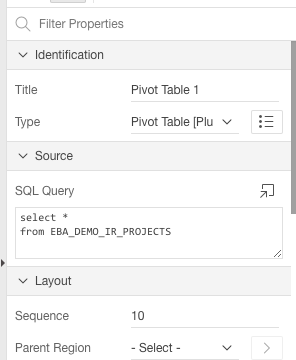


On the region attributes page, specify the options. I've added some help text to explain the various options. Note that you can have more than one Pivot Table region on the same page, but be sure to use a unique name in the "DOM Element Name" attribute for each pivot table.


I've also added/enabled some extra features such as spreadsheet export (via TSV - tab separated values) and charting.


It should be noted that the plugin is just an APEX wrapper for the Javascript Pivot Table component by Nicolas Kruchten who did all the hard work. I merely packaged it up for use with APEX.

You can download the plugin from my APEX plugins page. Enjoy! :-)


Sunday, October 20, 2013

Pivot Table plugin for Apex

UPDATE 10.02.2018: A new version of the plugin has been released, see this blog post.

An interactive Pivot Table lets the user analyze a data set by selecting which fields to use as rows and columns in a grid. You've probably seen this in Excel, something like this:


I've created a region plugin for Apex which turns any SQL query into an interactive pivot table. The plugin is a simple wrapper for a pivot table written in Javascript by Nicolas Kruchten. There's also a nice tutorial page that explains the user interface.

This animated screenshot shows how the plugin is set up and used in Apex:


Note that you can have multiple Pivot tables on the same page if you want. You can also turn off the interactive features if you just want to display a preset summary.

You can download the plugin here. Enjoy!