Showing posts with label Alexandria. Show all posts

Wednesday, February 21, 2018

Using the Slack webhook API from PL/SQL

Slack is a web-based chat room popular with many companies. Slack also has an API that can be used to post messages to a given "channel" or chat room. The simplest API offered is the "webhook" integration, which is "a simple way to post messages from external sources into Slack. They make use of normal HTTP requests with a JSON payload that includes the message text and some options."


To create a new Slack webhook, login to Slack and go to "Apps" in the left sidebar menu. Click "Manage apps..." and click "Custom Integrations" and then "Incoming Webhooks". Click on "Add Configuration" to create a new webhook. Specify the channel the webhook will post in, and click "Add incoming webhooks integration".


Next, take a note of the Webhook URL:


Then go to the Alexandria PL/SQL Utility Library and install the SLACK_UTIL_PKG package in your database schema. Modify your database Network ACL settings to include "hooks.slack.com" (port 443) to allow connections to the Slack site from the database.

Then use the package like this (see also demo script):


In addition to application-specific messages you could perhaps also set up the database (via a background job) to notify you when you are about to run out of disk space, when the number of APEX page views reach a certain threshold, when a specific user logs in, and so on. Use your imagination! :-)


Saturday, August 13, 2016

Using the PayPal REST API from PL/SQL

Do you need to accept payments for goods and services via your (APEX) application and would you prefer to handle the payments in the database via PL/SQL? Then this blog post is for you... :-)

Almost a decade ago (in 2007), Oracle released a whitepaper on Integrating Application Express with PayPal Payments Pro which used PayPal's Name Value Pair (NVP) API.

In the years since then, PayPal has made available a new API which is based on REST principles.

I've created a package called PAYPAL_UTIL_PKG to use the PayPal REST API from PL/SQL.


Note: For an alternative to PayPal, check out Trent Schafer's posts on using Stripe from PL/SQL.

Sign up for a PayPal Developer Account

To use the PayPal API you need to sign up for a PayPal account. Go to https://developer.paypal.com/ and sign up. After logging in as a developer, you must register your app to get an API key that you can use for calls to the API. Follow the instructions in the Making your first call article and run the samples using curl to get a feel for how the API works, before you start on the PL/SQL integration.

Note that PayPal provides both a so-called "sandbox" environment for testing, as well as a "live" environment for production. Each environment has its own set of API keys.

See also the PayPal API docs for further reference and troubleshooting.

Installing the PL/SQL package

The PAYPAL_UTIL_PKG is part of the Alexandria Utility Library for PL/SQL. Download the source or clone the repository from GitHub and install the package in your database. (Note: To install with minimal dependencies, run the scripts install_core.sql and install_paypal.sql from the /setup folder.)

A note about the code: To support usage in APEX 4, the PAYPAL_UTIL_PKG package does not currently use the APEX_JSON package provided with APEX 5. For the time being, the package uses its own JSON-parsing routines. In the future, the package might be refactored to use APEX_JSON.


Using the PayPal PL/SQL API

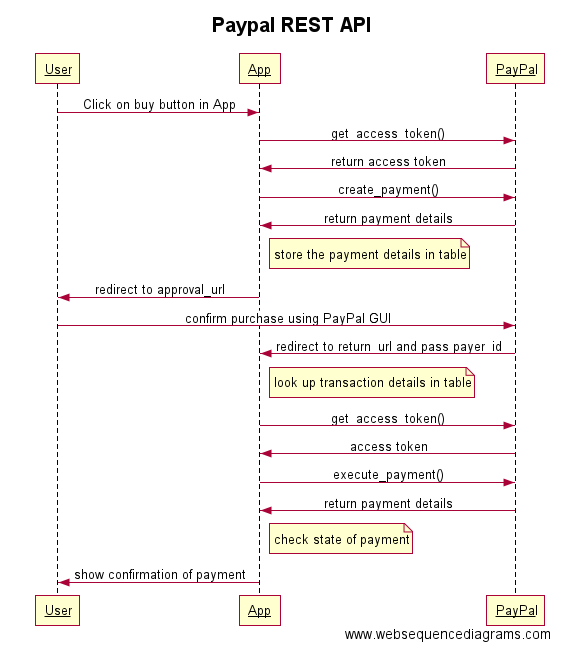
The following diagram (made with websequencediagrams.com) illustrates a typical process flow for accepting a payment. The process is further explained below.


First, the user somehow initiates the payment process, typically by clicking a button in your APEX application that runs a PL/SQL process. It is recommended that you create your own package for your application-specific payment logic (in other words, don't put the PL/SQL code inline in the APEX process, just call a procedure in your package and maintain all the logic in your package instead of in the APEX user interface).

Note: While developing and testing, you may want to use PayPal's sandbox environment, in that case call the switch_to_sandbox procedure before any other call to the API.


Next, we call get_access_token with your API key (which actually consists of both a client_id and a secret) to get a valid OAuth token to use for subsequent calls to the API.


Then, we call create_payment with the details of the transaction (amount, currency, description) as well as the URLs that we want PayPal to return the user to after he has confirmed the payment (return_url) or cancelled the transaction (cancel_url). These URLs will typically be REST endpoints that you have created using ORDS (more about this later).


The create_payment function will return a t_payment record. You should save the returned fields in a database table associated with the user's purchase, so you can retrieve the information later.


The approval_url field is a PayPal page. We need to redirect the user from our APEX application to this PayPal URL so that the user can login to PayPal and confirm the payment. To do the redirect, add owa_util.redirect_url(approval_url) as the final statement in your procedure.

The browser redirects the user to PayPal, which shows the details of the transaction to the user. If the user approves the transaction, PayPal redirects the user to the URL that you specified as the return_url parameter in the call to create_payment() above. If the user instead decides to cancel the transaction, PayPal will redirect the user to the cancel_url that you specified.

Let's assume that the user approves the payment, and PayPal redirects the user to the return_url that was specified when the payment was created. A payer ID is appended to the return URL, as PayerID. The URL looks like this:

http://return_url?token=EC-60U79048BN7819909&PayerID=7E7KGXCWTTMU2

To execute the payment after the user's approval, make a call to execute_payment and pass the payer_id received via the return URL. You also need to pass the payment_id, which was returned from the previous call to create_payment (and which you stored in a database table for use later, right?). But how do you know which payment_id is identified with this specific transaction? You would typically generate a unique URL which includes some kind of identifier (such as https://servername/payments/confirm/1234 where 1234 is some internal ID that you use to keep track of your user's different purchases). Using this example, PayPal would redirect the user to the following URL:

http://servername/payments/confirm/1234?token=EC-60U79048BN7819909&PayerID=7E7KGXCWTTMU2

To handle requests to this URL, you would set up a GET handler in ORDS so you can parse out the various parts of the request URL, including your own id (1234) which you can use to look up the payment_id, as well as the payer_id.

Confused? Perhaps PayPal's description here will clarify the process.


 When you execute the payment, the user's PayPal account is charged, and you get a t_payment record returned.


You can then check the value of the state field in the payment record.


If the state is equal to "approved", then the payment is OK and you can provide whatever goods or services the user has purchased (or at least show a confirmation page to notify the user that the transaction has succeeded).

The money should already be in your PayPal account! :-) 


Wednesday, October 14, 2015

Mockup Table region plugin for Apex


Today's post is about a new plugin that I developed for Oracle Application Express (Apex).

The plugin was inspired by a product called Balsamiq, which is a tool for creating mockups (or "wireframes") of web pages and web applications. Balsamiq is used as a drawing tool to quickly sketch out your user interface before building it using whatever technology.


Balsamiq is a nice tool, but so is Apex! :-) Why spend time mocking up screens in Balsamiq when you can use Apex to quickly lay out pages and regions? With Balsamiq, the end result is a set of fake, static wireframes. With Apex, you actually get a real, live, responsive web application that you can iterate and build upon until it is ready to use. You don't have to throw away anything.

However, that doesn't mean that we can't steal any good ideas from Balsamiq! :-)


Balsamiq has a nice Data Grid/Table widget that allows you to quickly mock up a table.

The plugin I created for Apex, called the Table Mockup Region plugin, allows you to do just that -- to quickly mock up table data on an Apex page without having to create database tables and write queries.


Which means you can quickly throw in some data, show it to your potential users, and then create tables and write queries later, when the design has been settled. Using the Apex 5 page designer, it is really easy to change the region type from the Table Mockup type to a classic or interactive report.

I made a short video (my first screencast ever, yay!) to demonstrate how easy it is to use:


Hope you find this useful, I had fun creating it. (The plugin code is actually less than 100 lines of PL/SQL! That's because all the hard work of parsing the delimited data is done using the CSV parsing package from the Alexandria Library.)

Download the plugin here.


Thursday, September 24, 2015

Sending SMS text messages from PL/SQL

Do you need to send SMS (Short Message Service) text messages from your Oracle database using PL/SQL? This is actually quite easy to do, the only hard part is deciding on which SMS gateway to use. You need to sign up with a gateway provider to get a username and password to use the gateway, and you typically pay some cents for each message you send.


Do a google search for "sms gateway api" to find a suitable gateway provider. I won't provide any specific recommendations or endorsements; for this blog post I just picked a random provider to use in the code example below. I have no idea if they offer a good/cheap/reliable service or not. (Leave a comment below if you have any recommendations that you would like to share.)

Most gateways offer an API that takes a HTTP(S) GET or POST request with some parameters in the query string to specify the recipient and the message itself, and then returns some kind of status back in some format (XML, JSON, plain text). The concept is usually the same, but the specifics vary.

I've added a new package called SMS_UTIL_PKG to the Alexandria PL/SQL Utility Library that provides a generic interface to any SMS gateway.

To use the package, you need to check the API documentation of your chosen gateway provider, and set up the URL template accordingly. You can use tags like #username# and #password# and #message#, etc. in the template, which will be replaced with actual values when sending a message.

Here is an example of using the package to set up a gateway and send a message:


There's also support for adding a callback to a custom error handler that you can use to determine if the gateway returns an error message. This should be a function that accepts a clob as an input parameter (this will contain the response message from the gateway) and returns a varchar2 with an error message, or return null if successful.

Remember that you might have to modify your database Network ACL settings to open traffic to the gateway's hostname. And if the SMS gateway requires HTTPS, you need to set up an Oracle wallet with the certificate and call the set_wallet procedure before you send the message.

Happy texting! :-)

Tuesday, February 24, 2015

Alexandria PL/SQL Utility Library moved to GitHub

The PL/SQL Utility Library, codenamed "Alexandria", now has a new home at GitHub. This will make it easier to collaborate on the project. If you want to contribute, just fork and submit a pull request.


The liibrary contains around 50 PL/SQL packages as well as a few types. There are no table dependencies, which reflects the general-purpose nature of the utilities. Jeffrey Kemp has a great guided tour of the library which highlights some of the packages.

Before the move to GitHub, the latest version (1.7.0) had been downloaded almost 7,000 times, and all versions a total of 12,000 times. So I guess it's being pretty widely used...


You can download, clone or fork the library at https://github.com/mortenbra/alexandria-plsql-utils

Sunday, February 17, 2013

Version 1.7 of Alexandria Utility Library for PL/SQL

The latest version of Alexandria, the utility library for PL/SQL, is now available for download. The previous version has been downloaded more than 2,000 times in the last 8 months.


The docs/readme.txt file contains a fairly detailed list of additions, enhancements and bug fixes. Below are some of the more noteworthy changes:

Improved installation script


You can now choose between installing the full library (close to 50 packages as of this version), by running the main /setup/install.sql script, or you can install just the core set of packages via setup/install_core.sql and then choose additional sets of packages on top of that (for example, /setup/install_microsoft.sql or /setup/install_inet.sql and so on).

Amazon S3 package enhancements


Jeffrey Kemp has submitted several functional enhancements to the S3 package which are incorporated into this version. Jeffrey has also done talks on the Alexandria Library in general and the S3 package in particular; the slides from these presentations are available here. Thanks for spreading the word, Jeff!

New packages: Icalendar, URI templates, and image utilities


A couple of new kids on the block:

  • ICALENDAR_UTIL_PKG: Lets you create Icalendar files from the database.
  • IMAGE_UTIL_PKG: Get information (such as image width and height) from JPG/GIF/PNG image files. This package is based on code from Anton Scheffer.
  • URI_TEMPLATE_UTIL_PKG: Use URI Templates to deal with "nice URLs" in PL/SQL and Apex web applications. 
I might get back to some of these topics later, in separate blog posts; here is a screenshot of the URI_TEMPLATE_UTIL_PKG package in action. (In real life, you would get the actual URI from a web request, for example via mod_plsql, and do something useful after parsing the request.)


Monday, August 13, 2012

Database (schema) backup to the cloud with PL/SQL

In my last blog post I described using the DBMS_DATAPUMP and DBMS_JOB packages to automate database schema backups from the database itself, rather than using batch files to do so. I also mentioned that "since the files are written to the database server itself, you need some kind of process to move the files to another server or storage location, so the backups don't disappear along with the database if the database server itself is somehow lost or corrupted. [One] option is to upload the backup file from the database to some online ("cloud") storage service, such as Amazon S3."

Since I have previously written a PL/SQL API for Amazon S3, uploading your backup files to S3 is not very difficult. The high-level steps are:


  1. Create an export (dump file) of your database schema using DBMS_DATAPUMP (or the DATAPUMP_UTIL_PKG wrapper described in my last blog post).
  2. Save the export file to disk on the server.
  3. Upload the export file to S3.
  4. (Optionally) Delete the export file from the server.
  5. (Optionally) Send an email notification indicating if the upload was successful or not.
In the "demos" folder of the Alexandria Utility Library for PL/SQL you can find a package called DATAPUMP_CLOUD_PKG which does the work described above in a procedure called BACKUP_SCHEMA_TO_S3.

Here is how you can set up a call to DBMS_JOB to schedule regular backups of your database schema to Amazon S3 (note the double quoting of the string values):

declare
  l_job number;
  l_what varchar2(4000);
begin

  l_what := 'datapump_cloud_pkg.backup_schema_to_s3(''your_amazon_id'', ''your_amazon_password'', ''your_amazon_bucket'', ''your_amazon_folder'', ''YOUR_ORACLE_BACKUP_DIR'', ''your_backup_file_name_'' || to_char(sysdate, ''yyyymmddhh24miss''), p_email_failure => ''your_email_address@domain'', p_email_success => ''your_email_address@domain'', p_version => ''10.2'', p_gmt_offset => 0);';

  -- run job at the end of each day

  dbms_job.submit (job => l_job, what => l_what, next_date => sysdate, interval => 'trunc(sysdate + 1) + 23/24');

  commit;

end;
/

Security Tip: You may not like to expose your Amazon password in the job definition. What you can do to reduce the risk is to use the AWS Identity and Access Management (IAM) tools to define a separate backup user which only has upload ("put") permissions on your S3 folder, and no privileges to list file contents, delete or download files. This will limit the damage that someone with a stolen password can do.

Monday, July 23, 2012

Simple database (schema) backup using PL/SQL

Usually, database backups are the responsibility of DBAs, and not something that developers really care or think too much about. However, if you are a lone developer, or part of a small team that doesn't have the luxury of having a dedicated DBA, then you might have to deal with backups yourself.

There are several ways to make Oracle backups; what I will be concentrating on here is the "Data Pump Export" method. You may already be familiar with the command-line "expdp" command which allows you to create a dump (.dmp) file containing your database objects (schemas, tables, procedures, etc.).

To perform a regular backup, one could create a simple batch file to run "expdp" and schedule it using the Windows Task Scheduler or a Unix Cron job. While this certainly works, it means that you have one more "moving part" to think about (the OS scheduler), and you may have to hardcode database passwords in the batch file unless you use OS authentication.

However, the "expdp" command-line utility is actually just a "front-end" to a PL/SQL package called DBMS_DATAPUMP, as can be seen in this diagram:


This means that we can call the DBMS_DATAPUMP package directly from our own PL/SQL code to create dump files, and use DBMS_JOB to schedule this backup at regular intervals. We avoid the dependence on batch files, and we don't have to expose any passwords.

The API for DBMS_DATAPUMP is flexible and, as mentioned, supports everything that can be done from the command line (both exports and imports), but it can sometimes be a bit tricky to get the (filtering) syntax correct.

I've written a wrapper package called DATAPUMP_UTIL_PKG, which you can download as part of the Alexandria PL/SQL Utility Library. This package makes it really easy to perform the most common use case: Exporting a single schema to a file on disk. This can be accomplished with the following code:


-- export current schema to file, use default file name, and make the export compatible with XE 10g
-- include a custom message


begin
  debug_pkg.debug_on;
  datapump_util_pkg.export_schema_to_file ('DEVTEST_TEMP_DIR', p_version => '10.2', p_log_message => 'it is possible to include custom messages in the log');
end;
/

To schedule this as a regular job, use the following code:

declare
  l_job number;
  l_what varchar2(4000);
begin

  l_what := 'datapump_util_pkg.export_schema_to_file(''DEVTEST_TEMP_DIR'', p_version => ''10.2'');';

  -- run job at the end of each day

  dbms_job.submit (job => l_job, what => l_what, next_date => sysdate, interval => 'trunc(sysdate + 1) + 23/24');

  commit;

end;
/

For this to work, you also need to set up a directory on the database server:

-- run as SYS
create directory devtest_temp_dir as 'c:\some_folder\backup\';
grant read, write on directory devtest_temp_dir to your_database_schema;


Obviously, since the files are written to the database server itself, you need some kind of process to move the files to another server or storage location, so the backups don't disappear along with the database if the database server itself is somehow lost or corrupted. Unlike the "hot" database files, these dump files can be safely copied by normal backup software.

Another option is to upload the backup file from the database to some online ("cloud") storage service, such as Amazon S3. I will talk about that in my next blog post...

PS. Don't forget to regularly test a restore (import) of your backup files. The only thing worse than not having a backup is having a backup that can't be restored... !

Saturday, May 26, 2012

MS Exchange API for PL/SQL

As mentioned in my earlier post, I've been working on a PL/SQL wrapper for the Microsoft Exchange Web Services (EWS) API. The code is now ready for an initial release!


Features


Using this pure PL/SQL package, you will be able not just to search for and retrieve emails and download attachments, but you will also be able to create emails and upload attachments to existing emails. You can move emails between folders, and delete emails. You can read and create calendar items. You can get the email addresses of the people in a distribution (mailing) list, and more.

Prerequisites


  • You need access to an Exchange server, obviously! I've done my testing against an Exchange 2010 server, but should also work against Exchange 2007.
  • If the Exchange server uses HTTPS, then you need to add the server's SSL certificate to an Oracle Wallet. See this page for step-by-step instructions.


Usage


The API should be fairly self-explanatory. The only thing you need to do is to call the INIT procedure at least once per session (but remember that in Apex, each page view is a new session, so place the initialization code in a before-header process or a page 0 process).


begin
  ms_ews_util_pkg.init('https://thycompany.com/ews/Exchange.asmx', 'domain\user.name', 'your_password', 'file:c:\path\to\Oracle\wallet\folder\on\db\server', 'wallet_password');
end;


Note also that there are two varieties of most functions: One pipelined function intended for use from plain SQL, and a twin function suffixed with "AS_LIST" that returns a list intended for use with PL/SQL code.

Code Examples


-- resolve names


declare
  l_names ms_ews_util_pkg.t_resolution_list;
begin
  debug_pkg.debug_on;
  l_names := ms_ews_util_pkg.resolve_names_as_list('john');
  for i in 1 .. l_names.count loop
    debug_pkg.printf('name %1, name = %2, email = %3', i, l_names(i).mailbox.name, l_names(i).mailbox.email_address);
  end loop;
end;


-- resolve names (via SQL)


select *
from table(ms_ews_util_pkg.resolve_names ('john'))


-- expand distribution list


declare
  l_names ms_ews_util_pkg.t_dl_expansion_list;
begin
  debug_pkg.debug_on;
  l_names := ms_ews_util_pkg.expand_public_dl_as_list('some_mailing_list@your.company');
  for i in 1 .. l_names.count loop
    debug_pkg.printf('name %1, name = %2, email = %3', i, l_names(i).name, l_names(i).email_address);
  end loop;
end;


-- get folder


declare
  l_folder ms_ews_util_pkg.t_folder;
begin
  debug_pkg.debug_on;
  l_folder := ms_ews_util_pkg.get_folder (ms_ews_util_pkg.g_folder_id_inbox);
  debug_pkg.printf('folder id = %1, display name = %2', l_folder.folder_id, l_folder.display_name);
  debug_pkg.printf('total count = %1', l_folder.total_count);
  debug_pkg.printf('child folder count = %1', l_folder.child_folder_count);
  debug_pkg.printf('unread count = %1', l_folder.unread_count);
end;


-- find up to 3 items in specified folder


declare
  l_items ms_ews_util_pkg.t_item_list;
begin
  debug_pkg.debug_on;
  l_items := ms_ews_util_pkg.find_items_as_list('inbox', p_max_rows => 3);
  for i in 1 .. l_items.count loop
    debug_pkg.printf('item %1, subject = %2', i, l_items(i).subject);
  end loop;
end;


-- get items in predefined folder


select *
from table(ms_ews_util_pkg.find_folders('inbox'))


-- get items in predefined folder, and search subject


select *
from table(ms_ews_util_pkg.find_items('inbox', 'the search term'))


-- get items in user-defined folder


select *
from table(ms_ews_util_pkg.find_items('the_folder_id'))


-- get items in user-defined folder, by name


select *
from table(ms_ews_util_pkg.find_items(
             ms_ews_util_pkg.get_folder_id_by_name('Some Folder Name', 'inbox')
            )
          )


-- get item (email message)


declare
  l_item ms_ews_util_pkg.t_item;
begin
  debug_pkg.debug_on;
  l_item := ms_ews_util_pkg.get_item ('the_item_id', p_include_mime_content => true);
  debug_pkg.printf('item %1, subject = %2', l_item.item_id, l_item.subject);
  debug_pkg.printf('body = %1', substr(l_item.body,1,2000));
  debug_pkg.printf('length of MIME content = %1', length(l_item.mime_content));
end;


-- get item (calendar item)


declare
  l_item ms_ews_util_pkg.t_item;
begin
  debug_pkg.debug_on;
  l_item := ms_ews_util_pkg.get_item ('the_item_id', p_body_type => 'Text', p_include_mime_content => true);
  debug_pkg.printf('item %1, class = %2, subject = %3', l_item.item_id, l_item.item_class, l_item.subject);
  debug_pkg.printf('body = %1', substr(l_item.body,1,2000));
  debug_pkg.printf('length of MIME content = %1', length(l_item.mime_content));
  debug_pkg.printf('start date = %1, location = %2, organizer = %3', l_item.start_date, l_item.location, l_item.organizer_mailbox_name);
end;


-- create calendar item


declare
  l_item ms_ews_util_pkg.t_item;
begin
  debug_pkg.debug_on;
  l_item.subject := 'Appointment added via PL/SQL';
  l_item.body := 'Some text here...';
  l_item.start_date := sysdate + 1;
  l_item.end_date := sysdate + 2;
  l_item.item_id := ms_ews_util_pkg.create_calendar_item (l_item);
  debug_pkg.printf('created item with id = %1', l_item.item_id);
end;


-- create task item


declare
  l_item ms_ews_util_pkg.t_item;
begin
  debug_pkg.debug_on;
  l_item.subject := 'Task added via PL/SQL';
  l_item.body := 'Some text here...';
  l_item.due_date := sysdate + 1;
  l_item.status := ms_ews_util_pkg.g_task_status_in_progress;
  l_item.item_id := ms_ews_util_pkg.create_task_item (l_item);
  debug_pkg.printf('created item with id = %1', l_item.item_id);
end;


-- create message item


declare
  l_item ms_ews_util_pkg.t_item;
begin
  debug_pkg.debug_on;
  l_item.subject := 'Message added via PL/SQL';
  l_item.body := 'Some text here...';
  l_item.item_id := ms_ews_util_pkg.create_message_item (l_item, p_to_recipients => t_str_array('recipient1@some.company', 'recipient2@another.company'));
  debug_pkg.printf('created item with id = %1', l_item.item_id);
end;


-- update item
-- item id and change key can be retrieved with following query:
-- select item_id, change_key, subject, is_read from table(ms_ews_util_pkg.find_items('inbox'))


declare
  l_item_id varchar2(2000) := 'the_item_id';
  l_change_key varchar2(2000) := 'the_change_key';
begin
  ms_ews_util_pkg.update_item_is_read (l_item_id, l_change_key, p_is_read => true);
end;


-- get list of attachments


select *
from table(ms_ews_util_pkg.get_file_attachments('the_item_id'))


-- download and save 1 attachment


declare
  l_attachment ms_ews_util_pkg.t_file_attachment;
begin
  debug_pkg.debug_on;
  l_attachment := ms_ews_util_pkg.get_file_attachment ('the_attachment_id');
  file_util_pkg.save_blob_to_file('DEVTEST_TEMP_DIR', l_attachment.name, l_attachment.content);
end;


-- create attachment (attach file to existing item/email)


declare
  l_attachment ms_ews_util_pkg.t_file_attachment;
begin
  debug_pkg.debug_on;
  l_attachment.item_id := 'the_item_id';
  l_attachment.name := 'Attachment added via PL/SQL';
  l_attachment.content := file_util_pkg.get_blob_from_file('DEVTEST_TEMP_DIR', 'some_file_such_as_a_nice_picture.jpg');
  l_attachment.attachment_id := ms_ews_util_pkg.create_file_attachment (l_attachment);
  debug_pkg.printf('created attachment with id = %1', l_attachment.attachment_id);
end;


Download


The MS_EWS_UTIL_PKG package is included in the Alexandria Utility Library for PL/SQL.

Known Issues


The CREATE_ITEM functions don't seem to return the ID of the created item (which do get created in Exchange). I think the issue is with the XML parsing of the returned results; I will look into this later.

Please report any bugs found via the issue list.

Tuesday, May 1, 2012

Select * from Inbox

... or how to read your (Microsoft Exchange) email using SQL and PL/SQL.

Introduction


You are probably familiar with sending email using PL/SQL; there's the UTL_SMTP package, the APEX_MAIL package, and various other utilities that do this.

But what about reading email using PL/SQL? You need to investigate the POP and IMAP protocols. A quick search on Google turns up some sample code and even a feature-rich package, although the latter requires Java in the database (which I try to avoid whenever possible, and which is not available in Oracle XE in any case).

Approaching this from a different angle, a lot of companies use Microsoft Exchange as their mail server. Exchange has (since at least Exchange 2007) a robust set of web services that expose its features:

Exchange Web Services (EWS) provides the functionality to enable client applications to communicate with the Exchange server. EWS provides access to much of the same data that is made available through Microsoft Office Outlook. EWS clients can integrate Outlook data into Line-of-Business (LOB) applications. SOAP provides the messaging framework for messages sent between the client application and the Exchange server. The SOAP messages are sent by HTTP.

This figure from Microsoft shows the steps involved in calling the web service:


So it's basically SOAP (XML) over HTTP. We can easily do that in PL/SQL!

Use Cases

Of course, you can use Exchange Web Services for lots of things besides just reading your email, for example:


  • Integration with other systems via email messages (your PL/SQL program checks email periodically and processes the contents of the email and/or attachments)
  • Searching email archives, combining the search results with search results from the database
  • Checking availability of people for scheduling
  • Adding or updating appointments and tasks
  • Sending emails
  • And lots more

You are welcome to add a comment below if you have more good examples of how the Oracle Database and Microsoft Exchange can work together.

Prerequisites

The building blocks we need to work with Exchange Web Services in PL/SQL are:


  • For building and parsing the SOAP messages we can use the built-in XMLTYPE data type.
  • For calling the web service we can use the APEX_WEB_SERVICE package, or alternatively the FLEX_WS_API package (which is more or less the same package as that included in Apex, but the code is not wrapped, so you can study and modify it).
  • Your Microsoft Exchange server is very likely set up with Integrated Windows Authentication, which means we need to authenticate to the web service using NTLM. I wrote a package last year called NTLM_UTIL_PKG which allows us to do just that.
  • Your Microsoft Exchange server is probably also set up with SSL security, in which case you need to set up an Oracle Wallet with the SSL certificate of the Exchange server. There is a good explanation of that here and here. (By the way, there has been some confusion as to whether you can use Oracle Wallets with Oracle XE, as the Wallet Manager is a feature of the Advanced Security Option not included in XE, but this old thread states that "only the latter [call ins (i.e client to database network encryption)] requires ASO, SSL call outs don't". Since we are doing callouts from the database to Exchange that should be okay then.)

The MS_EWS_UTIL_PKG package


Given the above building blocks, I have started implementing a PL/SQL package that offers an easy-to-use API for working with Exchange Web Services (EWS). The name, unsurprisingly, is MS_EWS_UTIL_PKG.


Currently, the quite-not-yet-ready-for-public-consumption package handles the following operations:


  • Get Folder Id By Name
  • Find Folders
  • Find Items
  • Get Item
  • Get File Attachment
  • Move Item
  • Delete Item


Note that an "Item" in Exchange can be an email item, a calendar entry, a task, and so on. Currently, the package handles email items and calendar entries.

So here's me, checking my inbox from SQL*Plus....


Of course, if you wanted an actual inbox in your database, you could just run "create or replace view my_inbox_v as select * from table (ms_ews_util_pkg.find_items(...) )".

Or create an Interactive Report on top of it in Apex. Or create a Region Plugin for Apex that displays a mail folder. Or create an Apex calendar on top of the calendar entries.

The possibilities are many!

References


Next Steps

When I get this polished enough for an initial public release, I'm going to include it in the Alexandria Utility Library for PL/SQL.

Leave a comment below if you are interested in this package, and if there are any specific parts of the EWS API that you would like to see implemented (and why).

Wednesday, August 3, 2011

NTLM for PL/SQL

NTLM, or more properly NTLMSSP is a protocol used on Microsoft Windows system as part of the so-called Integrated Windows Authentication.

Integrated Windows Authentication is also known as HTTP Negotiate authentication, NT Authentication, NTLM Authentication, Domain authentication, Windows Integrated Authentication, Windows NT Challenge/Response authentication, or simply Windows Authentication.


In Microsoft Internet Information Server (IIS), the system administrator can protect a website or folder with "Integrated Windows Authentication". When you browse to this website or folder, you must enter your Windows (domain) username and password to get access (although Internet Explorer will, depending on your security settings, send your credentials automatically without showing a login dialog box). Note that unlike Basic Authentication, which sends the password as plaintext to the web server, the NTLM protocol does not send the password but rather performs a cryptographic "handshake" with the server to establish your identity.

Use of Integrated Windows Authentication via NTLM on IIS is very common inside many companies (ie on intranets and internal web servers), where both the client and web server computers are part of the same, or trusting, domains.


Using NTLM from PL/SQL with UTL_HTTP

Unfortunately, from the PL/SQL developer's perspective, Oracle's UTL_HTTP package does not support NTLM authentication (it only supports Basic authentication via the SET_AUTHENTICATION procedure).

So, if you wanted to retrieve information from your intranet or call a web service (protected by Integrated Windows Authentication) from the database via PL/SQL and UTL_HTTP, you were out of luck.

Until now, that is... :-)


A pure PL/SQL implementation of the NTLM protocol

I came across a Python implementation of the NTLM protocol, and I decided that it should be possible to port this code to PL/SQL. Assisted by a couple of good friends and colleagues, and after a lot of bit-fiddling, reverse-engineering, study of protocol specifications, and liberal use of network packet sniffers, we got it working!

A pure PL/SQL implementation of the NTLM protocol is now available and included in the Alexandria Utility Library for PL/SQL.

The code is organized into two packages: NTLM_UTIL_PKG, which contains protocol-specific functions, and NTLM_HTTP_PKG, which is the package you actually use to make HTTP callouts, and which handles the initial NTLM "handshaking" with the web server.


Example 1: Simple request

This code simply grabs the page you direct it towards, and returns the contents as a CLOB. (What is really going on behind the scenes is a series of requests and responses to establish the authenticated connection, before the actual URL contents is served.)


declare
  l_clob clob;
begin
  debug_pkg.debug_on;
  l_clob := ntlm_http_pkg.get_response_clob('http://servername/page', 'domain\username', 'password');
  debug_pkg.print(substr(l_clob, 1, 32000));
end;


Example 2: Web service call

Here, a (persistent) connection is explicitly established before making one or more requests to the server. Note the returnvalue from the BEGIN_REQUEST function, which is the authorization string which must be passed along in the "Authorization" HTTP header on any subsequent requests. The connection is then is closed. Note that NTLM is a connection-based protocol, and will not work without the use of persistent connections.


declare
  l_url           varchar2(2000) := 'http://servername/page';
  l_ntlm_auth_str varchar2(2000);
  l_xml           xmltype;
  l_soap_env      clob := 'your_soap_envelope_here';
  
begin
  debug_pkg.debug_on;


  -- perform the initial request to set up a persistent, authenticated connection
  l_ntlm_auth_str := ntlm_http_pkg.begin_request (l_url, 'domain\username', 'password');


  -- pass authorization header to next call(s)
  apex_web_service.g_request_headers(1).name := 'Authorization';
  apex_web_service.g_request_headers(1).value := l_ntlm_auth_str;


  -- perform the actual call
  -- NOTE: for this to work, you must be using a version of apex_web_service that allows persistent connections (fixed in Apex 4.1 ???)
  --       see http://jastraub.blogspot.com/2008/06/flexible-web-service-api.html?showComment=1310198286769#c8685039598916415836
  l_xml := apex_web_service.make_request(l_url, 'soap_action_name_here', '1.1', l_soap_env);


  -- or use the latest version of flex_ws_api
  -- flex_ws_api.g_request_headers(1).name := 'Authorization';
  -- flex_ws_api.g_request_headers(1).value := l_ntlm_auth_str;
  -- l_xml := flex_ws_api.make_request(l_url, 'soap_action_name_here', '1.1', l_soap_env);


  -- this will close the persistent connection
  ntlm_http_pkg.end_request;


  debug_pkg.print('XML response from webservice', l_xml);
end;


Remarks


  • Tested successfully on Oracle 10g XE (with AL32UTF8 character set) and Oracle 10g EE (with WE8MSWIN1252 character set).
  • Tested successfully against IIS 6.0 with non-SSL "plain" website and SSL-enabled Sharepoint website (both set up with Integrated Windows Authentication, obviously).
  • The current version ignores cookies when setting up the connection. If you depend on cookies being present, you may have to deal with this specifically.


Given the diverse nature of network configuration, there may be bugs or unhandled cases in the code. So please test the code in your environment and leave a comment below, letting me me know if it works for you or not.

New version of Alexandria Utility Library for PL/SQL

I've just uploaded a new version of the Alexandria Utility Library for PL/SQL.

Updates include both small bug fixes and some major new features (which I'll return to in another post).

Among the improvements are:


  • Additional functions in OOXML_UTIL_PKG for working with Excel 2007 and Powerpoint 2007 files.
  • Kris Scorup has contributed improved CSV parsing to the CSV_UTIL_PKG. It now handles double quotes and separator characters inside strings.
  • Anton Scheffer's packages for building PDF and XLSX files have been included in the library.
  • The PL_FPDF library by Pierre-Gilles Levallois is a port of the FPDF library for PHP. Pierre-Gilles Levallois has his own website, but his package (which is open source under the GNU license) does not appear to have been updated for several years, and several indivuals have been making their own fixes and enhancements to this package. Rob Duke and Brian McGinity have both contributed bug fixes and enhancements (such as internal document links, Javascript support, using clobs to work around the 32k limit, etc.). These changes as well as some of my own have been merged and included in the Alexandria library as PDFGEN_PKG. You'll find this package in the "extras" folder (it is not installed by default if you run the install script).

Monday, March 28, 2011

Amazon S3 API for PL/SQL


Amazon S3 is part of Amazon's Web Service offering and the name is an abbreviation for Simple Storage Service:
"Amazon S3 provides a simple web services interface that can be used to store and retrieve any amount of data, at any time, from anywhere on the web. It gives any developer access to the same highly scalable, reliable, secure, fast, inexpensive infrastructure that Amazon uses to run its own global network of web sites. The service aims to maximize benefits of scale and to pass those benefits on to developers."
A few months ago, Jason Straub published an Oracle whitepaper on how to integrate Oracle Application Express (Apex) with Amazon S3.

As Jason points out, Amazon has a Free Usage Tier which allows you to get started using Amazon S3 for free. If you have ever bought a book from Amazon, they already have your credit card on file, so signing up for Amazon Web Services is quick and easy (and they won't start charging your credit card until the free trial period is over).

Introducing the S3 API for PL/SQL

Inspired by Jason's whitepaper, I decided to write a stand-alone PL/SQL API for Amazon S3. This API can be used in any PL/SQL solution, with or without Apex.

The API supports all common S3 operations, including

  • Authentication
  • Creating new buckets
  • Listing existing buckets
  • Listing existing objects (with or without filtering)
  • Creating (uploading) new objects (and setting an Access Control List - ACL)
  • Generating download links (with or without expiry dates)
  • Downloading objects
  • Deleting objects


See the examples below for more details.

Use Cases

So what can you do with Amazon's S3 service in combination with a PL/SQL API?

I can think of several interesting use cases, some of which I might explore further in future posts:

  • Backing up your database (use DBMS_DATAPUMP to dump a file to disk, then compress it using ZIP_UTIL_PKG, then encrypt it using CRYPTO_UTIL_PKG, and upload it to S3)
  • Backing up your PL/SQL source code (use data dictionary views or DBMS_METADATA to extract the source code, optionally zip and/or encrypt it, and upload to S3)
  • Backing up your Apex applications (use WWV_FLOW_UTILITIES.EXPORT_APPLICATION_TO_CLOB to generate export file, optionally zip and/or encrypt it, and upload to S3)
  • Cloud storage for file uploads (instead of storing [large] files inside your database, store them in the cloud and download them on demand -- especially relevant for Oracle XE which has a file size limit)
  • Serve static content (generate static [text, CSV, HTML, PDF] files from the database and upload to S3)
  • Replication or shared storage (upload from one machine/database, download to another)
  • Data loading or message processing (set up to poll for new incoming files - uploaded by other S3 clients - and process them)

Remember that all these things can be scheduled to run in the database using DBMS_JOB or DBMS_SCHEDULER.


Where to get the Amazon S3 API for PL/SQL

You can download the API as part of the Alexandria Utility Library for PL/SQL.


Getting started

Download and compile the relevant PL/SQL API packages. Then register with Amazon for an S3 account and get your AWS keys (key and secret key), and login to the AWS Management Console to get familiar with the basic operations.


If you are unfamiliar with Amazon S3, I recommend that you read this short getting started guide that describes the common operations.

In the following examples we shall see how you can do the same operations using PL/SQL.


Authentication

From your Amazon account control panel, you'll get the key strings you need to use the Amazon web services.

Before you call any of the following API methods, you must initialize the authentication package. You only have to do this once per database session (but remember, on the web, every page view is a separate database session, so in Apex you'll need to run this code for every page, typically as a Before Header page process).


Creating new buckets

Buckets are what you use to organize your objects (files) in Amazon S3. Think of them as top-level folders, but note that you cannot create more than 100 buckets in a single account, and the bucket name must be unique across all user accounts on Amazon S3. So creating buckets is not really something you'd do very often, and usually it will be done manually (to resolve any name conflicts with existing buckets).

A bucket is associated with a specific region where your objects will be stored. For reasons of latency/speed and possibly legal issues, it makes sense to select a region that's close to you and your users (although you may actually want to locate it far away if the purpose is backup for a major disaster in your own area).

Here's how to create a new bucket via PL/SQL code:


Checking the AWS management console to verify that the bucket has indeed been created (in the specified region):


Listing existing buckets

With one or more buckets created in your account, you can list the bucket names.

There are two way to do this, either by retrieving an index-by PL/SQL table using the GET_BUCKET_LIST function:


or, alternatively, via SQL using a pipelined function named GET_BUCKET_TAB:


Creating (uploading) new objects

An "object" is a file, and this is really what the S3 service is all about, storing files. So let's upload a file or two to our new bucket!

The API lets you upload any BLOB data to S3 using the NEW_OBJECT procedure.


When you upload a file to S3, the default Access Control List (ACL) makes sure that only the owner of the file (you!) can access (download) it.

Others get an "Access Denied" message (but see the "Generating download links" section for how to generate special time-limited download links):


There are a number of predefined ACLs that you can specify if, for example, you want to make the file publicly available.


Which can then be freely downloaded by anyone (the use of HTTPS is optional).


A note about "folders": S3 has no concept of "folders", but you can simulate folders by using a forward slash in your file names (as seen in the previous example). Some S3 clients, such as the AWS management console, will present such files in a folder structure. As far as the PL/SQL API is concerned, the slash is simply part of the file name and has no special meaning.

Listing existing objects

Now that we have uploaded a couple of files, we can list the contents of the bucket via the GET_OBJECT_LIST function:


You can also get a list in SQL via a pipelined function named GET_OBJECT_TAB:


In both cases, you can optionally specify a prefix that acts as a search filter for the file names you want to return, and/or the maximum number of items you want to return.


Generating download links

You can access a file that has been protected by an ACL by including a special checksum parameter in the URL.

The GET_DOWNLOAD_URL function lets you generate the URL needed to access the file. You can specify when the link should expire, so this means you can share a download link that will stop working after a specified amount of time, which can obviously be useful in a number of scenarios.


Pasting the generated URL into the browser allows us to access the file:


Downloading objects

Downloading a file from S3 using PL/SQL is straightforward with a call to the GET_OBJECT function which returns a BLOB:


Deleting objects

Removing a file is likewise very simple, just call the DELETE_OBJECT procedure:


Summary

The ability to upload and download any file from the Oracle database to "the cloud" (and vice versa) via PL/SQL is extremely useful for a number of purposes.

Let me know if you find this API useful!