Showing posts with label web services. Show all posts

Saturday, August 13, 2016

Using the PayPal REST API from PL/SQL

Do you need to accept payments for goods and services via your (APEX) application and would you prefer to handle the payments in the database via PL/SQL? Then this blog post is for you... :-)

Almost a decade ago (in 2007), Oracle released a whitepaper on Integrating Application Express with PayPal Payments Pro which used PayPal's Name Value Pair (NVP) API.

In the years since then, PayPal has made available a new API which is based on REST principles.

I've created a package called PAYPAL_UTIL_PKG to use the PayPal REST API from PL/SQL.


Note: For an alternative to PayPal, check out Trent Schafer's posts on using Stripe from PL/SQL.

Sign up for a PayPal Developer Account

To use the PayPal API you need to sign up for a PayPal account. Go to https://developer.paypal.com/ and sign up. After logging in as a developer, you must register your app to get an API key that you can use for calls to the API. Follow the instructions in the Making your first call article and run the samples using curl to get a feel for how the API works, before you start on the PL/SQL integration.

Note that PayPal provides both a so-called "sandbox" environment for testing, as well as a "live" environment for production. Each environment has its own set of API keys.

See also the PayPal API docs for further reference and troubleshooting.

Installing the PL/SQL package

The PAYPAL_UTIL_PKG is part of the Alexandria Utility Library for PL/SQL. Download the source or clone the repository from GitHub and install the package in your database. (Note: To install with minimal dependencies, run the scripts install_core.sql and install_paypal.sql from the /setup folder.)

A note about the code: To support usage in APEX 4, the PAYPAL_UTIL_PKG package does not currently use the APEX_JSON package provided with APEX 5. For the time being, the package uses its own JSON-parsing routines. In the future, the package might be refactored to use APEX_JSON.


Using the PayPal PL/SQL API

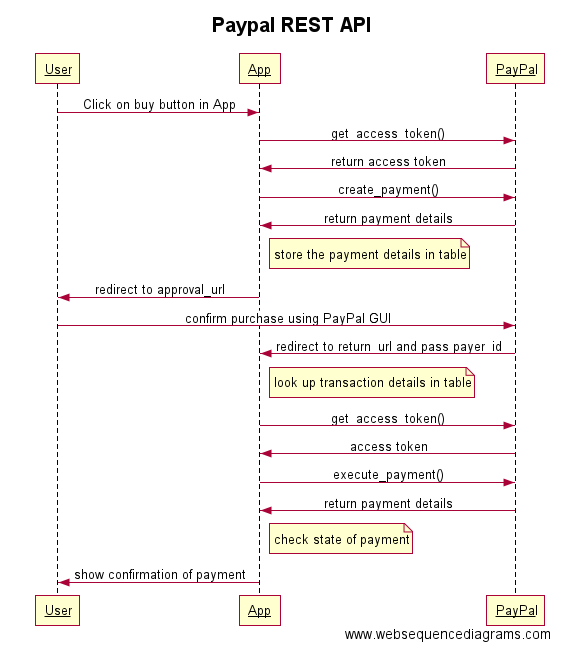
The following diagram (made with websequencediagrams.com) illustrates a typical process flow for accepting a payment. The process is further explained below.


First, the user somehow initiates the payment process, typically by clicking a button in your APEX application that runs a PL/SQL process. It is recommended that you create your own package for your application-specific payment logic (in other words, don't put the PL/SQL code inline in the APEX process, just call a procedure in your package and maintain all the logic in your package instead of in the APEX user interface).

Note: While developing and testing, you may want to use PayPal's sandbox environment, in that case call the switch_to_sandbox procedure before any other call to the API.


Next, we call get_access_token with your API key (which actually consists of both a client_id and a secret) to get a valid OAuth token to use for subsequent calls to the API.


Then, we call create_payment with the details of the transaction (amount, currency, description) as well as the URLs that we want PayPal to return the user to after he has confirmed the payment (return_url) or cancelled the transaction (cancel_url). These URLs will typically be REST endpoints that you have created using ORDS (more about this later).


The create_payment function will return a t_payment record. You should save the returned fields in a database table associated with the user's purchase, so you can retrieve the information later.


The approval_url field is a PayPal page. We need to redirect the user from our APEX application to this PayPal URL so that the user can login to PayPal and confirm the payment. To do the redirect, add owa_util.redirect_url(approval_url) as the final statement in your procedure.

The browser redirects the user to PayPal, which shows the details of the transaction to the user. If the user approves the transaction, PayPal redirects the user to the URL that you specified as the return_url parameter in the call to create_payment() above. If the user instead decides to cancel the transaction, PayPal will redirect the user to the cancel_url that you specified.

Let's assume that the user approves the payment, and PayPal redirects the user to the return_url that was specified when the payment was created. A payer ID is appended to the return URL, as PayerID. The URL looks like this:

http://return_url?token=EC-60U79048BN7819909&PayerID=7E7KGXCWTTMU2

To execute the payment after the user's approval, make a call to execute_payment and pass the payer_id received via the return URL. You also need to pass the payment_id, which was returned from the previous call to create_payment (and which you stored in a database table for use later, right?). But how do you know which payment_id is identified with this specific transaction? You would typically generate a unique URL which includes some kind of identifier (such as https://servername/payments/confirm/1234 where 1234 is some internal ID that you use to keep track of your user's different purchases). Using this example, PayPal would redirect the user to the following URL:

http://servername/payments/confirm/1234?token=EC-60U79048BN7819909&PayerID=7E7KGXCWTTMU2

To handle requests to this URL, you would set up a GET handler in ORDS so you can parse out the various parts of the request URL, including your own id (1234) which you can use to look up the payment_id, as well as the payer_id.

Confused? Perhaps PayPal's description here will clarify the process.


 When you execute the payment, the user's PayPal account is charged, and you get a t_payment record returned.


You can then check the value of the state field in the payment record.


If the state is equal to "approved", then the payment is OK and you can provide whatever goods or services the user has purchased (or at least show a confirmation page to notify the user that the transaction has succeeded).

The money should already be in your PayPal account! :-) 


Friday, July 26, 2013

Thoth Gateway version 1.3.7 available, including source code

There is a new version of the Thoth Gateway, a mod_plsql replacement for IIS, available for download. The latest version is 1.3.7.

This version also includes the source code for the gateway. The project has been "open source" (under a BSD license) since day 1, but I never got around to actually publishing the source code, until now that is! :-)


This version fixes an issue with page rendering that was only impacting Apex 4.2 installations. Thanks to Patrick and Christian on the Apex developer team who responded quickly to my inquiries about the underlying changes in Apex that caused this problem to appear (the problem was caused by improper CGI setup in IIS/Thoth, not a problem with Apex itself).

Note also that this version removes support for OWA basic authentication (see the release notes in the downloaded archive for details). This should not have any impact on Apex applications at all (but may impact older, "pure OWA" applications).

Upgrades: For existing installations, simply overwrite the existing PLSQLGatewayModule.dll file in the "bin" folder with the latest version from the downloaded archive.

Roadmap for the Thoth Gateway


The goal for the next release of the gateway (tentatively called version 1.4.0) is to change the Oracle Data Provider for .NET (ODP.NET) from the "Unmanaged" to the "Managed" driver. By using the Managed (pure .NET) driver, the installation of the Thoth Gateway becomes even simpler, because it removes the need to have the full Oracle client (or even the Instant Client) on the system. Note that this will change the minimum system requirements from .NET Framework 3.5 to 4.0 (the version that the managed driver requires).


For Thoth Gateway version 2.0, it might be fun to implement RESTful Web Services, to catch up feature-wise with the Apex Listener. (The Thoth Gateway already has automatic SOAP Web Services built-in, though.) By the way, now that the source code is available, anyone can pick up the challenge and contribute new features to the gateway!


Monday, August 13, 2012

Database (schema) backup to the cloud with PL/SQL

In my last blog post I described using the DBMS_DATAPUMP and DBMS_JOB packages to automate database schema backups from the database itself, rather than using batch files to do so. I also mentioned that "since the files are written to the database server itself, you need some kind of process to move the files to another server or storage location, so the backups don't disappear along with the database if the database server itself is somehow lost or corrupted. [One] option is to upload the backup file from the database to some online ("cloud") storage service, such as Amazon S3."

Since I have previously written a PL/SQL API for Amazon S3, uploading your backup files to S3 is not very difficult. The high-level steps are:


  1. Create an export (dump file) of your database schema using DBMS_DATAPUMP (or the DATAPUMP_UTIL_PKG wrapper described in my last blog post).
  2. Save the export file to disk on the server.
  3. Upload the export file to S3.
  4. (Optionally) Delete the export file from the server.
  5. (Optionally) Send an email notification indicating if the upload was successful or not.
In the "demos" folder of the Alexandria Utility Library for PL/SQL you can find a package called DATAPUMP_CLOUD_PKG which does the work described above in a procedure called BACKUP_SCHEMA_TO_S3.

Here is how you can set up a call to DBMS_JOB to schedule regular backups of your database schema to Amazon S3 (note the double quoting of the string values):

declare
  l_job number;
  l_what varchar2(4000);
begin

  l_what := 'datapump_cloud_pkg.backup_schema_to_s3(''your_amazon_id'', ''your_amazon_password'', ''your_amazon_bucket'', ''your_amazon_folder'', ''YOUR_ORACLE_BACKUP_DIR'', ''your_backup_file_name_'' || to_char(sysdate, ''yyyymmddhh24miss''), p_email_failure => ''your_email_address@domain'', p_email_success => ''your_email_address@domain'', p_version => ''10.2'', p_gmt_offset => 0);';

  -- run job at the end of each day

  dbms_job.submit (job => l_job, what => l_what, next_date => sysdate, interval => 'trunc(sysdate + 1) + 23/24');

  commit;

end;
/

Security Tip: You may not like to expose your Amazon password in the job definition. What you can do to reduce the risk is to use the AWS Identity and Access Management (IAM) tools to define a separate backup user which only has upload ("put") permissions on your S3 folder, and no privileges to list file contents, delete or download files. This will limit the damage that someone with a stolen password can do.

Saturday, May 26, 2012

MS Exchange API for PL/SQL

As mentioned in my earlier post, I've been working on a PL/SQL wrapper for the Microsoft Exchange Web Services (EWS) API. The code is now ready for an initial release!


Features


Using this pure PL/SQL package, you will be able not just to search for and retrieve emails and download attachments, but you will also be able to create emails and upload attachments to existing emails. You can move emails between folders, and delete emails. You can read and create calendar items. You can get the email addresses of the people in a distribution (mailing) list, and more.

Prerequisites


  • You need access to an Exchange server, obviously! I've done my testing against an Exchange 2010 server, but should also work against Exchange 2007.
  • If the Exchange server uses HTTPS, then you need to add the server's SSL certificate to an Oracle Wallet. See this page for step-by-step instructions.


Usage


The API should be fairly self-explanatory. The only thing you need to do is to call the INIT procedure at least once per session (but remember that in Apex, each page view is a new session, so place the initialization code in a before-header process or a page 0 process).


begin
  ms_ews_util_pkg.init('https://thycompany.com/ews/Exchange.asmx', 'domain\user.name', 'your_password', 'file:c:\path\to\Oracle\wallet\folder\on\db\server', 'wallet_password');
end;


Note also that there are two varieties of most functions: One pipelined function intended for use from plain SQL, and a twin function suffixed with "AS_LIST" that returns a list intended for use with PL/SQL code.

Code Examples


-- resolve names


declare
  l_names ms_ews_util_pkg.t_resolution_list;
begin
  debug_pkg.debug_on;
  l_names := ms_ews_util_pkg.resolve_names_as_list('john');
  for i in 1 .. l_names.count loop
    debug_pkg.printf('name %1, name = %2, email = %3', i, l_names(i).mailbox.name, l_names(i).mailbox.email_address);
  end loop;
end;


-- resolve names (via SQL)


select *
from table(ms_ews_util_pkg.resolve_names ('john'))


-- expand distribution list


declare
  l_names ms_ews_util_pkg.t_dl_expansion_list;
begin
  debug_pkg.debug_on;
  l_names := ms_ews_util_pkg.expand_public_dl_as_list('some_mailing_list@your.company');
  for i in 1 .. l_names.count loop
    debug_pkg.printf('name %1, name = %2, email = %3', i, l_names(i).name, l_names(i).email_address);
  end loop;
end;


-- get folder


declare
  l_folder ms_ews_util_pkg.t_folder;
begin
  debug_pkg.debug_on;
  l_folder := ms_ews_util_pkg.get_folder (ms_ews_util_pkg.g_folder_id_inbox);
  debug_pkg.printf('folder id = %1, display name = %2', l_folder.folder_id, l_folder.display_name);
  debug_pkg.printf('total count = %1', l_folder.total_count);
  debug_pkg.printf('child folder count = %1', l_folder.child_folder_count);
  debug_pkg.printf('unread count = %1', l_folder.unread_count);
end;


-- find up to 3 items in specified folder


declare
  l_items ms_ews_util_pkg.t_item_list;
begin
  debug_pkg.debug_on;
  l_items := ms_ews_util_pkg.find_items_as_list('inbox', p_max_rows => 3);
  for i in 1 .. l_items.count loop
    debug_pkg.printf('item %1, subject = %2', i, l_items(i).subject);
  end loop;
end;


-- get items in predefined folder


select *
from table(ms_ews_util_pkg.find_folders('inbox'))


-- get items in predefined folder, and search subject


select *
from table(ms_ews_util_pkg.find_items('inbox', 'the search term'))


-- get items in user-defined folder


select *
from table(ms_ews_util_pkg.find_items('the_folder_id'))


-- get items in user-defined folder, by name


select *
from table(ms_ews_util_pkg.find_items(
             ms_ews_util_pkg.get_folder_id_by_name('Some Folder Name', 'inbox')
            )
          )


-- get item (email message)


declare
  l_item ms_ews_util_pkg.t_item;
begin
  debug_pkg.debug_on;
  l_item := ms_ews_util_pkg.get_item ('the_item_id', p_include_mime_content => true);
  debug_pkg.printf('item %1, subject = %2', l_item.item_id, l_item.subject);
  debug_pkg.printf('body = %1', substr(l_item.body,1,2000));
  debug_pkg.printf('length of MIME content = %1', length(l_item.mime_content));
end;


-- get item (calendar item)


declare
  l_item ms_ews_util_pkg.t_item;
begin
  debug_pkg.debug_on;
  l_item := ms_ews_util_pkg.get_item ('the_item_id', p_body_type => 'Text', p_include_mime_content => true);
  debug_pkg.printf('item %1, class = %2, subject = %3', l_item.item_id, l_item.item_class, l_item.subject);
  debug_pkg.printf('body = %1', substr(l_item.body,1,2000));
  debug_pkg.printf('length of MIME content = %1', length(l_item.mime_content));
  debug_pkg.printf('start date = %1, location = %2, organizer = %3', l_item.start_date, l_item.location, l_item.organizer_mailbox_name);
end;


-- create calendar item


declare
  l_item ms_ews_util_pkg.t_item;
begin
  debug_pkg.debug_on;
  l_item.subject := 'Appointment added via PL/SQL';
  l_item.body := 'Some text here...';
  l_item.start_date := sysdate + 1;
  l_item.end_date := sysdate + 2;
  l_item.item_id := ms_ews_util_pkg.create_calendar_item (l_item);
  debug_pkg.printf('created item with id = %1', l_item.item_id);
end;


-- create task item


declare
  l_item ms_ews_util_pkg.t_item;
begin
  debug_pkg.debug_on;
  l_item.subject := 'Task added via PL/SQL';
  l_item.body := 'Some text here...';
  l_item.due_date := sysdate + 1;
  l_item.status := ms_ews_util_pkg.g_task_status_in_progress;
  l_item.item_id := ms_ews_util_pkg.create_task_item (l_item);
  debug_pkg.printf('created item with id = %1', l_item.item_id);
end;


-- create message item


declare
  l_item ms_ews_util_pkg.t_item;
begin
  debug_pkg.debug_on;
  l_item.subject := 'Message added via PL/SQL';
  l_item.body := 'Some text here...';
  l_item.item_id := ms_ews_util_pkg.create_message_item (l_item, p_to_recipients => t_str_array('recipient1@some.company', 'recipient2@another.company'));
  debug_pkg.printf('created item with id = %1', l_item.item_id);
end;


-- update item
-- item id and change key can be retrieved with following query:
-- select item_id, change_key, subject, is_read from table(ms_ews_util_pkg.find_items('inbox'))


declare
  l_item_id varchar2(2000) := 'the_item_id';
  l_change_key varchar2(2000) := 'the_change_key';
begin
  ms_ews_util_pkg.update_item_is_read (l_item_id, l_change_key, p_is_read => true);
end;


-- get list of attachments


select *
from table(ms_ews_util_pkg.get_file_attachments('the_item_id'))


-- download and save 1 attachment


declare
  l_attachment ms_ews_util_pkg.t_file_attachment;
begin
  debug_pkg.debug_on;
  l_attachment := ms_ews_util_pkg.get_file_attachment ('the_attachment_id');
  file_util_pkg.save_blob_to_file('DEVTEST_TEMP_DIR', l_attachment.name, l_attachment.content);
end;


-- create attachment (attach file to existing item/email)


declare
  l_attachment ms_ews_util_pkg.t_file_attachment;
begin
  debug_pkg.debug_on;
  l_attachment.item_id := 'the_item_id';
  l_attachment.name := 'Attachment added via PL/SQL';
  l_attachment.content := file_util_pkg.get_blob_from_file('DEVTEST_TEMP_DIR', 'some_file_such_as_a_nice_picture.jpg');
  l_attachment.attachment_id := ms_ews_util_pkg.create_file_attachment (l_attachment);
  debug_pkg.printf('created attachment with id = %1', l_attachment.attachment_id);
end;


Download


The MS_EWS_UTIL_PKG package is included in the Alexandria Utility Library for PL/SQL.

Known Issues


The CREATE_ITEM functions don't seem to return the ID of the created item (which do get created in Exchange). I think the issue is with the XML parsing of the returned results; I will look into this later.

Please report any bugs found via the issue list.

Tuesday, May 1, 2012

Select * from Inbox

... or how to read your (Microsoft Exchange) email using SQL and PL/SQL.

Introduction


You are probably familiar with sending email using PL/SQL; there's the UTL_SMTP package, the APEX_MAIL package, and various other utilities that do this.

But what about reading email using PL/SQL? You need to investigate the POP and IMAP protocols. A quick search on Google turns up some sample code and even a feature-rich package, although the latter requires Java in the database (which I try to avoid whenever possible, and which is not available in Oracle XE in any case).

Approaching this from a different angle, a lot of companies use Microsoft Exchange as their mail server. Exchange has (since at least Exchange 2007) a robust set of web services that expose its features:

Exchange Web Services (EWS) provides the functionality to enable client applications to communicate with the Exchange server. EWS provides access to much of the same data that is made available through Microsoft Office Outlook. EWS clients can integrate Outlook data into Line-of-Business (LOB) applications. SOAP provides the messaging framework for messages sent between the client application and the Exchange server. The SOAP messages are sent by HTTP.

This figure from Microsoft shows the steps involved in calling the web service:


So it's basically SOAP (XML) over HTTP. We can easily do that in PL/SQL!

Use Cases

Of course, you can use Exchange Web Services for lots of things besides just reading your email, for example:


  • Integration with other systems via email messages (your PL/SQL program checks email periodically and processes the contents of the email and/or attachments)
  • Searching email archives, combining the search results with search results from the database
  • Checking availability of people for scheduling
  • Adding or updating appointments and tasks
  • Sending emails
  • And lots more

You are welcome to add a comment below if you have more good examples of how the Oracle Database and Microsoft Exchange can work together.

Prerequisites

The building blocks we need to work with Exchange Web Services in PL/SQL are:


  • For building and parsing the SOAP messages we can use the built-in XMLTYPE data type.
  • For calling the web service we can use the APEX_WEB_SERVICE package, or alternatively the FLEX_WS_API package (which is more or less the same package as that included in Apex, but the code is not wrapped, so you can study and modify it).
  • Your Microsoft Exchange server is very likely set up with Integrated Windows Authentication, which means we need to authenticate to the web service using NTLM. I wrote a package last year called NTLM_UTIL_PKG which allows us to do just that.
  • Your Microsoft Exchange server is probably also set up with SSL security, in which case you need to set up an Oracle Wallet with the SSL certificate of the Exchange server. There is a good explanation of that here and here. (By the way, there has been some confusion as to whether you can use Oracle Wallets with Oracle XE, as the Wallet Manager is a feature of the Advanced Security Option not included in XE, but this old thread states that "only the latter [call ins (i.e client to database network encryption)] requires ASO, SSL call outs don't". Since we are doing callouts from the database to Exchange that should be okay then.)

The MS_EWS_UTIL_PKG package


Given the above building blocks, I have started implementing a PL/SQL package that offers an easy-to-use API for working with Exchange Web Services (EWS). The name, unsurprisingly, is MS_EWS_UTIL_PKG.


Currently, the quite-not-yet-ready-for-public-consumption package handles the following operations:


  • Get Folder Id By Name
  • Find Folders
  • Find Items
  • Get Item
  • Get File Attachment
  • Move Item
  • Delete Item


Note that an "Item" in Exchange can be an email item, a calendar entry, a task, and so on. Currently, the package handles email items and calendar entries.

So here's me, checking my inbox from SQL*Plus....


Of course, if you wanted an actual inbox in your database, you could just run "create or replace view my_inbox_v as select * from table (ms_ews_util_pkg.find_items(...) )".

Or create an Interactive Report on top of it in Apex. Or create a Region Plugin for Apex that displays a mail folder. Or create an Apex calendar on top of the calendar entries.

The possibilities are many!

References


Next Steps

When I get this polished enough for an initial public release, I'm going to include it in the Alexandria Utility Library for PL/SQL.

Leave a comment below if you are interested in this package, and if there are any specific parts of the EWS API that you would like to see implemented (and why).

Thursday, February 4, 2010

My first Apex 4 plugin: Flight Info from Web Service

One of the exciting new features in Apex 4 is the support for plugin regions and items. This feature has huge potential, and will make development with Apex even more efficient, productive, and fun. There are already several plugins out there, and I think we will see a lot of interesting work in this area after Apex 4 is released.

Here is my own first attempt at a (useful) plugin: A region plugin that displays up-to-date flight information for airports in Norway, based on public flight data provided by Avinor, the company that operates the Norwegian airport network.

Avinor has a simple web service that provides flight information in XML format.

I am sure there are similar (web) services for flight information in other countries (feel free to leave a comment below if you know of any).

Here is the PL/SQL code behind the plugin:

procedure render_my_plugin (
p_region              in apex_plugin.t_region,
p_plugin              in apex_plugin.t_plugin,
p_is_printer_friendly in boolean )
as
l_clob clob;
l_airport_code varchar2(20) := p_region.attribute_01;
l_direction    varchar2(20) := p_region.attribute_02;
begin

l_clob := apex_web_service.make_rest_request(
p_url => 'http://flydata.avinor.no/XmlFeed.asp',
p_http_method => 'GET',
p_parm_name => apex_util.string_to_table('airport:direction'),
p_parm_value => apex_util.string_to_table(l_airport_code || ':' || l_direction )
);

if l_direction = 'D' then
htp.p('<p><b>Departures from ' || l_airport_code || '</b></p>');
else
htp.p('<p><b>Arrivals to ' || l_airport_code || '</b></p>');
end if;

htp.p('<table width="100%">');
htp.p('<tr><td>AIRLINE</td><td>FLIGHT</td><td>AIRPORT</td><td>TIME</td><td>GATE</td></tr>');

for l_rec in (
SELECT *
FROM XMLTABLE ('//airport/flights/flight'
PASSING XMLTYPE(l_clob)
COLUMNS unique_id       varchar2(100) path '@uniqueID',
airline         varchar2(10) path 'airline',
flight_id       varchar2(20) path 'flight_id',
airport         varchar2(20) path 'airport',
schedule_time   varchar2(100) path 'schedule_time',
gate            varchar2(100) path 'gate')
ORDER BY airline, flight_id) loop

htp.p('<tr><td>' || l_rec.airline || '</td><td>' || l_rec.flight_id || '</td><td>' || l_rec.airport || '</td><td>' || l_rec.schedule_time || '</td><td>' || l_rec.gate || '</td></tr>');

end loop;

htp.p('</table>');

htp.p('<a href="http://www.avinor.no">Flight data from Avinor.</a> Last updated: ' || to_char(sysdate, 'dd.mm.yyyy hh24:mi:ss'));


end render_my_plugin;


The code illustrates several concepts:
  • How to render a region plugin using the PL/SQL Web Toolkit (HTP.P) calls
  • How to retrieve values from the attributes defined for the plugin
  • Using the new APEX_WEB_SERVICE.MAKE_REST_REQUEST function to retrieve a web page as a CLOB
  • Using the XMLTABLE function to transform XML into a recordset that can be used in a SELECT

An export of my plugin can be downloaded here, and installed into your own Apex 4 application.

After the plugin has been installed, using the plugin is as simple as adding a Region (of type Plugin) to the page, and configuring the values for Airport and Direction (the plugin attributes) in the region definition.


You can see a live demo of the plugin here (public page, does not require authentication):

http://tryapexnow.com/apex/f?p=test4ea:plugin_demo:0

Note that for this page, I've also taken advantage of the built-in region caching feature of Apex. The region cache duration is set to 10 minutes, which prevents us from hitting the remote web service for every page view. I really like that you can switch on region caching in Apex without writing a single line of code.

Conclusion: Apex 4 plugins rock!

Sunday, December 27, 2009

Using Google Translate from PL/SQL

UPDATE, JANUARY 2013: Google no longer offers the Translate API for free: "Google Translate API v1 is no longer available as of December 1, 2011 and has been replaced by Google Translate API v2. Google Translate API v1 was officially deprecated on May 26, 2011. The decision to deprecate the API and replace it with the paid service was made due to the substantial economic burden caused by extensive abuse.More information.


In today's globalized world, being able to communicate in different languages is important. Personally, I'm struggling to get my level of Spanish above the "una cerveza, por favor" level, and Google Translate is a great tool that I use often.


Wouldn't it be great to have the power of Google Translate directly from SQL? Google exposes the translation service via a RESTful (JSON) API, so I decided to write a small PL/SQL wrapper for it.

Here is the package specification:

create or replace package google_translate_pkg
as

/*

Purpose:    PL/SQL wrapper package for Google Translate API

Remarks:   see http://code.google.com/apis/ajaxlanguage/documentation/ 

Who     Date        Description
------  ----------  -------------------------------------
MBR     25.12.2009  Created

*/

-- http://code.google.com/apis/ajaxlanguage/documentation/reference.html#LangNameArray
g_lang_AFRIKAANS               constant varchar2(5) := 'af';
g_lang_ALBANIAN                constant varchar2(5) := 'sq';
g_lang_AMHARIC                 constant varchar2(5) := 'am';
g_lang_ARABIC                  constant varchar2(5) := 'ar';
g_lang_ARMENIAN                constant varchar2(5) := 'hy';
g_lang_AZERBAIJANI             constant varchar2(5) := 'az';
g_lang_BASQUE                  constant varchar2(5) := 'eu';
g_lang_BELARUSIAN              constant varchar2(5) := 'be';
g_lang_BENGALI                 constant varchar2(5) := 'bn';
g_lang_BIHARI                  constant varchar2(5) := 'bh';
g_lang_BULGARIAN               constant varchar2(5) := 'bg';
g_lang_BURMESE                 constant varchar2(5) := 'my';
g_lang_CATALAN                 constant varchar2(5) := 'ca';
g_lang_CHEROKEE                constant varchar2(5) := 'chr';
g_lang_CHINESE                 constant varchar2(5) := 'zh';
g_lang_CHINESE_SIMPLIFIED      constant varchar2(5) := 'zh-CN';
g_lang_CHINESE_TRADITIONAL     constant varchar2(5) := 'zh-TW';
g_lang_CROATIAN                constant varchar2(5) := 'hr';
g_lang_CZECH                   constant varchar2(5) := 'cs';
g_lang_DANISH                  constant varchar2(5) := 'da';
g_lang_DHIVEHI                 constant varchar2(5) := 'dv';
g_lang_DUTCH                   constant varchar2(5) := 'nl';  
g_lang_ENGLISH                 constant varchar2(5) := 'en';
g_lang_ESPERANTO               constant varchar2(5) := 'eo';
g_lang_ESTONIAN                constant varchar2(5) := 'et';
g_lang_FILIPINO                constant varchar2(5) := 'tl';
g_lang_FINNISH                 constant varchar2(5) := 'fi';
g_lang_FRENCH                  constant varchar2(5) := 'fr';
g_lang_GALICIAN                constant varchar2(5) := 'gl';
g_lang_GEORGIAN                constant varchar2(5) := 'ka';
g_lang_GERMAN                  constant varchar2(5) := 'de';
g_lang_GREEK                   constant varchar2(5) := 'el';
g_lang_GUARANI                 constant varchar2(5) := 'gn';
g_lang_GUJARATI                constant varchar2(5) := 'gu';
g_lang_HEBREW                  constant varchar2(5) := 'iw';
g_lang_HINDI                   constant varchar2(5) := 'hi';
g_lang_HUNGARIAN               constant varchar2(5) := 'hu';
g_lang_ICELANDIC               constant varchar2(5) := 'is';
g_lang_INDONESIAN              constant varchar2(5) := 'id';
g_lang_INUKTITUT               constant varchar2(5) := 'iu';
g_lang_IRISH                   constant varchar2(5) := 'ga';
g_lang_ITALIAN                 constant varchar2(5) := 'it';
g_lang_JAPANESE                constant varchar2(5) := 'ja';
g_lang_KANNADA                 constant varchar2(5) := 'kn';
g_lang_KAZAKH                  constant varchar2(5) := 'kk';
g_lang_KHMER                   constant varchar2(5) := 'km';
g_lang_KOREAN                  constant varchar2(5) := 'ko';
g_lang_KURDISH                 constant varchar2(5) := 'ku';
g_lang_KYRGYZ                  constant varchar2(5) := 'ky';
g_lang_LAOTHIAN                constant varchar2(5) := 'lo';
g_lang_LATVIAN                 constant varchar2(5) := 'lv';
g_lang_LITHUANIAN              constant varchar2(5) := 'lt';
g_lang_MACEDONIAN              constant varchar2(5) := 'mk';
g_lang_MALAY                   constant varchar2(5) := 'ms';
g_lang_MALAYALAM               constant varchar2(5) := 'ml';
g_lang_MALTESE                 constant varchar2(5) := 'mt';
g_lang_MARATHI                 constant varchar2(5) := 'mr';
g_lang_MONGOLIAN               constant varchar2(5) := 'mn';
g_lang_NEPALI                  constant varchar2(5) := 'ne';
g_lang_NORWEGIAN               constant varchar2(5) := 'no';
g_lang_ORIYA                   constant varchar2(5) := 'or';
g_lang_PASHTO                  constant varchar2(5) := 'ps';
g_lang_PERSIAN                 constant varchar2(5) := 'fa';
g_lang_POLISH                  constant varchar2(5) := 'pl';
g_lang_PORTUGUESE              constant varchar2(5) := 'pt-PT';
g_lang_PUNJABI                 constant varchar2(5) := 'pa';
g_lang_ROMANIAN                constant varchar2(5) := 'ro';
g_lang_RUSSIAN                 constant varchar2(5) := 'ru';
g_lang_SANSKRIT                constant varchar2(5) := 'sa';
g_lang_SERBIAN                 constant varchar2(5) := 'sr';
g_lang_SINDHI                  constant varchar2(5) := 'sd';
g_lang_SINHALESE               constant varchar2(5) := 'si';
g_lang_SLOVAK                  constant varchar2(5) := 'sk';
g_lang_SLOVENIAN               constant varchar2(5) := 'sl';
g_lang_SPANISH                 constant varchar2(5) := 'es';
g_lang_SWAHILI                 constant varchar2(5) := 'sw';
g_lang_SWEDISH                 constant varchar2(5) := 'sv';
g_lang_TAJIK                   constant varchar2(5) := 'tg';
g_lang_TAMIL                   constant varchar2(5) := 'ta';
g_lang_TAGALOG                 constant varchar2(5) := 'tl';
g_lang_TELUGU                  constant varchar2(5) := 'te';
g_lang_THAI                    constant varchar2(5) := 'th';
g_lang_TIBETAN                 constant varchar2(5) := 'bo';
g_lang_TURKISH                 constant varchar2(5) := 'tr';
g_lang_UKRAINIAN               constant varchar2(5) := 'uk';
g_lang_URDU                    constant varchar2(5) := 'ur';
g_lang_UZBEK                   constant varchar2(5) := 'uz';
g_lang_UIGHUR                  constant varchar2(5) := 'ug';
g_lang_VIETNAMESE              constant varchar2(5) := 'vi';
g_lang_WELSH                   constant varchar2(5) := 'cy';
g_lang_YIDDISH                 constant varchar2(5) := 'yi';
g_lang_UNKNOWN                 constant varchar2(5) := '';


-- translate a piece of text
function translate_text (p_text in varchar2,
p_to_lang in varchar2,
p_from_lang in varchar2 := null,
p_use_cache in varchar2 := 'YES') return varchar2;

-- detect language code for text
function detect_lang (p_text in varchar2) return varchar2;

-- get number of texts in cache
function get_translation_cache_count return number;

-- clear translation cache
procedure clear_translation_cache;

end google_translate_pkg;
/


And here is the package body:

create or replace package body google_translate_pkg
as

/*

Purpose:    PL/SQL wrapper package for Google Translate API

Remarks:   see http://code.google.com/apis/ajaxlanguage/documentation/ 

Who     Date        Description
------  ----------  -------------------------------------
MBR     25.12.2009  Created

*/

m_http_referrer                constant varchar2(255) := 'your-domain-name-or-website-here'; -- insert your domain/website here (required by Google's terms of use)
m_api_key                      constant varchar2(255) := null; -- insert your Google API Key here (optional but recommended)

m_service_url                  constant varchar2(255) := 'http://ajax.googleapis.com/ajax/services/language/';
m_service_version              constant varchar2(10)  := '1.0';

m_max_text_size                constant pls_integer   := 500; -- can be increased up towards 32k, the cache name size (below) must be increased accordingly 

type t_translation_cache is table of varchar2(32000) index by varchar2(550);

m_translation_cache            t_translation_cache;
m_cache_id_separator           constant varchar2(1) := '|';


procedure add_to_cache (p_from_text in varchar2,
p_from_lang in varchar2,
p_to_text in varchar2,
p_to_lang in varchar2)
as
begin

/*

Purpose:    add translation to cache

Remarks:    

Who     Date        Description
------  ----------  -------------------------------------
MBR     25.12.2009  Created

*/

m_translation_cache (p_from_lang || m_cache_id_separator || p_to_lang || m_cache_id_separator || replace(substr(p_from_text,1,m_max_text_size), m_cache_id_separator, '')) := p_to_text;

end add_to_cache;


function get_from_cache (p_text in varchar2,
p_from_lang in varchar2,
p_to_lang in varchar2) return varchar2
as
l_returnvalue varchar2(32000);
begin

/*

Purpose:    get translation from cache

Remarks:    

Who     Date        Description
------  ----------  -------------------------------------
MBR     25.12.2009  Created

*/

begin
l_returnvalue := m_translation_cache (p_from_lang || m_cache_id_separator || p_to_lang || m_cache_id_separator || replace(substr(p_text,1,m_max_text_size), m_cache_id_separator, ''));
exception
when no_data_found then
l_returnvalue := null;
end;

return l_returnvalue;

end get_from_cache;


function get_clob_from_http_post (p_url in varchar2,
p_values in varchar2) return clob
as
l_request     utl_http.req;
l_response    utl_http.resp;
l_buffer      varchar2(32767);
l_returnvalue clob := ' ';
begin

/*

Purpose:    do a HTTP POST and get results back in a CLOB

Remarks:    

Who     Date        Description
------  ----------  -------------------------------------
MBR     25.12.2009  Created

*/

l_request := utl_http.begin_request (p_url, 'POST', utl_http.http_version_1_1);

utl_http.set_header (l_request, 'Referer', m_http_referrer); -- note that the actual header name is misspelled in the HTTP protocol
utl_http.set_header (l_request, 'Content-Type', 'application/x-www-form-urlencoded');
utl_http.set_header (l_request, 'Content-Length', to_char(length(p_values)));
utl_http.write_text (l_request, p_values);

l_response := utl_http.get_response (l_request);

if l_response.status_code = utl_http.http_ok then

begin
loop
utl_http.read_text (l_response, l_buffer);
dbms_lob.writeappend (l_returnvalue, length(l_buffer), l_buffer);
end loop;
exception
when utl_http.end_of_body then
null;
end;

end if;

utl_http.end_response (l_response);

return l_returnvalue;

end get_clob_from_http_post;


function translate_text (p_text in varchar2,
p_to_lang in varchar2,
p_from_lang in varchar2 := null,
p_use_cache in varchar2 := 'YES') return varchar2
as
l_values      varchar2(2000);
l_response    clob;
l_start_pos   pls_integer;
l_end_pos     pls_integer;
l_returnvalue varchar2(32000) := null;
begin

/*

Purpose:    translate a piece of text

Remarks:    if the "from" language is left blank, Google Translate will attempt to autodetect the language

Who     Date        Description
------  ----------  -------------------------------------
MBR     25.12.2009  Created
MBR     25.12.2009  Added cache for translations

*/

if trim(p_text) is not null then

if p_use_cache = 'YES' then
l_returnvalue := get_from_cache (p_text, p_from_lang, p_to_lang);
end if;

if l_returnvalue is null then

l_values := 'v=' || m_service_version || '&q=' || utl_url.escape (substr(p_text,1,m_max_text_size), false, 'UTF8') || '&langpair=' || p_from_lang || '|' || p_to_lang;

if m_api_key is not null then
l_values := l_values || '&key=' || m_api_key;
end if;

l_response := get_clob_from_http_post (m_service_url || 'translate', l_values);

if l_response is not null then

l_start_pos := instr(l_response, '{"translatedText":"');
l_start_pos := l_start_pos + 19;
l_end_pos := instr(l_response, '"', l_start_pos);

l_returnvalue := substr(l_response, l_start_pos, l_end_pos - l_start_pos);

if (p_use_cache = 'YES') and (l_returnvalue is not null) then
add_to_cache (p_text, p_from_lang, l_returnvalue, p_to_lang);
end if;

end if;

end if;

end if;

return l_returnvalue;

end translate_text;


function detect_lang (p_text in varchar2) return varchar2
as
l_url         varchar2(2000);
l_response    clob;
l_start_pos   pls_integer;
l_end_pos     pls_integer;
l_returnvalue varchar2(255);
begin

/*

Purpose:    detect language code for text

Remarks:    

Who     Date        Description
------  ----------  -------------------------------------
MBR     25.12.2009  Created

*/

if trim(p_text) is not null then

l_url := m_service_url || 'detect?v=' || m_service_version || '&q=' || utl_url.escape (substr(p_text,1,m_max_text_size), false, 'UTF8');

if m_api_key is not null then
l_url := l_url || '&key=' || m_api_key;
end if;

l_response := httpuritype(l_url).getclob();

l_start_pos := instr(l_response, '{"language":"');
l_start_pos := l_start_pos + 13;
l_end_pos := instr(l_response, '",', l_start_pos);

l_returnvalue := substr(l_response, l_start_pos, l_end_pos - l_start_pos);

end if;

return l_returnvalue;

end detect_lang;


function get_translation_cache_count return number
as
l_returnvalue number;
begin

/*

Purpose:    get number of texts in cache

Remarks:    

Who     Date        Description
------  ----------  -------------------------------------
MBR     25.12.2009  Created

*/

l_returnvalue := m_translation_cache.count;

return l_returnvalue;

end get_translation_cache_count;


procedure clear_translation_cache
as
begin

/*

Purpose:    clear translation cache

Remarks:    

Who     Date        Description
------  ----------  -------------------------------------
MBR     25.12.2009  Created

*/

m_translation_cache.delete;

end clear_translation_cache;


end google_translate_pkg;
/


So, let's take the package for a test drive!

Detecting languages


Google can (try to) figure out which language a specific text is in.

select google_translate_pkg.detect_lang ('hola mundo') as detect1,
google_translate_pkg.detect_lang ('ich bin ein berliner') as detect2
from dual

detect1              detect2             
-------------------- --------------------
es                   de                  

1 row selected.


Translating text


This is the most common usage of the package. Note that if you leave out the "from" language parameter, Google will attempt to autodetect the language.

select google_translate_pkg.translate_text ('excuse me, where is the toilet?', 'es') as the_phrase
from dual

the_phrase                              
----------------------------------------
Disculpe, ¿dónde está el baño?          

1 row selected.


Mass translation


Here is an example that translates several rows -- the product descriptions from the demo products table (from the Application Express demo application) -- into several languages.

select pi.product_id, pi.product_name, pi.product_description,
google_translate_pkg.translate_text (pi.product_description, 'es', 'en') as spanish_description,
google_translate_pkg.translate_text (pi.product_description, 'de', 'en') as german_description
from demo_product_info pi
order by pi.product_name


product_id product_name         product_description            spanish_description            german_description            
---------- -------------------- ------------------------------ ------------------------------ ------------------------------
3 Bluetooth Headset    Hands-Free without the wires!  Manos libres sin cables!       Hands-Free ohne Kabel!        
8 Classic Projector    Does not include transparencie No incluye transparencias o lá Enthält keine Folien oder Fett
s or grease pencil             piz de grasa                   stift                         

2 MP3 Player           Store up to 1000 songs and tak Almacena hasta 1000 canciones  Speichern Sie bis zu 1000 Song
e them with you                y llevarlos con usted          s, und nehmen Sie sie mit     

4 PDA Cell Phone       Combine your cell phone and PD Combine su teléfono celular y  Kombinieren Sie Ihre Handy und
A into one device              PDA en un solo dispositivo      PDA in einem Gerät           

5 Portable DVD Player  Small enough to take anywhere! Lo suficientemente pequeño com Klein genug, um überall hin mi
o para tener en cualquier luga tnehmen!                      
r!                             tnehmen!                      

10 Stereo Headphones    Noise-cancelling headphones pe El ruido auriculares con perfe Noise-Cancelling-Kopfhörer ide
rfect for the traveler         cta para el viajero            al für den Reisenden          

9 Ultra Slim Laptop    The power of a desktop in a po El poder de una computadora de Die Leistung eines Desktop in 
rtable design                   escritorio en un diseño portá ein tragbares Design          
rtable design                  til                            ein tragbares Design          

1 3.2 GHz Desktop PC   All the options, this machine  Todas las opciones, se carga e Alle Optionen, ist diese Masch
is loaded!                     sta máquina!                   ine geladen!                  

6 512 MB DIMM          Expand your PCs memory and gai Amplíe su PC la memoria y obte Erweitern Sie Ihren PC Speiche
n more performance             ner más rendimiento            r und gewinnen mehr Leistung  

7 54" Plasma Flat Scre Mount on the wall or ceiling,  Montar en la pared o el techo, Montage auf der Wand oder Deck
en                   the picture is crystal clear!   el panorama es claro!         e, das Bild ist glasklar!     


10 rows selected.


Apex translation


Combine this package with the Apex dictionary views to get a kick-start when you are translating your own Apex applications into other languages (some tweaking of the results is probably necessary...).

select item_name, label,
google_translate_pkg.translate_text (label, 'es', 'en') as spanish_label,
google_translate_pkg.translate_text (label, 'nl', 'en') as dutch_label
from apex_application_page_items
where application_id = 103
and label is not null
and display_as <> 'Hidden'


item_name            label                spanish_label        dutch_label         
-------------------- -------------------- -------------------- --------------------
P101_PASSWORD        Password             Contraseña           Wachtwoord          
P101_USERNAME        User Name            Nombre de usuario    Gebruikersnaam      
P11_CUSTOMER_ID      Customer             Cliente              Klant               
P29_CUSTOMER_INFO    Customer Info        Información del clie Customer Info       
nte                                      
P29_ORDER_TIMESTAMP  Order Date           Fecha de pedido      Orderdatum          
P29_ORDER_TOTAL      Order Total          Orden total          Bestel Totaal       
P29_USER_ID          Sales Rep            Sales Rep            Vertegenwoordiger   


7 rows selected.


Caching


I have built in a simple cache mechanism, so that you avoid the network traffic if the phrase has already been translated in your current session (and the performance benefit can be huge if you repeatedly translate the same strings).
You can specify whether you want to use the cache (it's on by default), and there is also a procedure to clear (reset) the cache.


Conclusion


It is time to throw out your old-fashioned dictionaries and fire up SQL Plus instead :-)

Saturday, November 28, 2009

More PL/SQL Gateway Goodies

Hot on the heels of version 1.1, which was the topic of my previous blog post, the Thoth Gateway version 1.2 improves on the automatic SOAP Web Service feature, and adds a few new features as well!

Improved Automatic SOAP Web Services


Previously, every function had its own separate service endpoint. This was a bit of a pain, as you would have to (in Visual Studio-speak) add a separate web reference to each function. Now, all functions in a package are grouped together into a single service endpoint. Just add "?wsdl" to the package name, like this:


Upload files to file system instead of database table


Normally, files uploaded via a web page will be stored in the database table specified as "DocumentTableName" in the DAD configuration. In this version, there is a new configuration parameter, "DocumentFilePath", that will cause uploaded files to be saved to the file system instead.

XDB Integration


This version of the Thoth Gateway adds easy integration with Oracle XDB.


Upload files to XDB repository: You can specify a "DocumentXdbPath" in the DAD configuration file that causes uploaded files to be inserted as XDB resources in the specified folder. (This means there are now three different, and mutually exclusive, destinations for uploaded files: database table, file system, and XDB repository.)

Here, for example, we have just uploaded a zip file to XDB, which is then available via SQL, HTTP, FTP and WebDAV as usual:


Download files from XDB repository: You can specify an "XdbAlias" in the DAD configuration file. If this is specified, it will set up a virtual directory (similar to the "PathAlias" parameter) that forwards requests to the XDB repository. You can control which part of the repository you want to expose by specifying the "XdbPathRoot" parameter.

Here we are downloading the zip file via the gateway:


The new options are more fully explained in the installation guide.

Check out version 1.2 of the Thoth Gateway now!

Tuesday, November 17, 2009

Publish PL/SQL as SOAP Web Service

You can easily consume a SOAP Web Service from PL/SQL, for example using Application Express or the FLEX_WS_API (see also my companion utilities to FLEX_WS_API).


But if you want to publish (or "expose") your PL/SQL procedures as a SOAP Web Service, your options have so far been a bit limited.

JDeveloper/JPublisher


JDeveloper has a "Publish as Web Service" feature that uses JPublisher to create various Java artifacts which must then be deployed to the application server. There are some details here, and an issue you need to be aware of if you are using Oracle 10g Express Edition (XE).

Now, this Java-based approach probably works fine for you if you have Java developers and a Java infrastructure in your company, although the need to (re-)generate the Java code whenever the PL/SQL code changes seems like a bit of a hassle to me.

Native Web Services (11g)


Oracle 11g (Release 1) introduced "Native Web Services". This is a servlet running in the XDB listener that automagically exposes PL/SQL code as SOAP Web Services. Here is some more information about it.

If you are a database guy like me, you probably like the "Native" approach better than the JPublisher method. However, there are a couple of issues with Native Web Services; first of all, it's an 11g feature (which of course means that it is not available in 10g, nor in Express Edition 10g), and it requires the XDB listener (which means you must either allow direct connections to your database, or set up another web server as a proxy for XDB).

Automatic Web Services with the Thoth Gateway


Since I like the concept of Native Web Services, I decided to implement a similar feature in the Thoth Gateway, a mod_plsql replacement for Microsoft IIS.

Version 1.1 of the Thoth Gateway adds a new DAD configuration parameter called InvocationProtocol. If this is set to "SOAP" (instead of the default "CGI"), PL/SQL called through the DAD will take its parameters from a SOAP request body, and respond with a SOAP response body.

The Web Service Definition Language (WSDL) document is automatically generated if you append "?wsdl" to the end of the URL. This allows a tool like Visual Studio to easily add a Web Reference to your stored procedure.

Let's see an example. Let's say we have the following package specification:

create or replace package employee_service
as

function get_employee_name (p_empno in number) return varchar2;

function get_employees (p_search_filter in varchar2) return clob;

end employee_service;
/


And the following package body:

create or replace package body employee_service
as

function get_employee_name (p_empno in number) return varchar2
as
l_returnvalue emp.ename%type;
begin

begin
select ename
into l_returnvalue
from emp
where empno = p_empno;
exception
when no_data_found then
l_returnvalue := null;
end;

return l_returnvalue;

end get_employee_name;


function get_employees (p_search_filter in varchar2) return clob
as
l_context     dbms_xmlgen.ctxhandle;
l_returnvalue clob;
begin

-- there are many ways to generate XML in Oracle, this is one of them...

l_context := dbms_xmlgen.newcontext('select * from emp where lower(ename) like :p_filter_str order by empno');

-- let's make Tom Kyte happy :-)
dbms_xmlgen.setbindvalue (l_context, 'p_filter_str', lower(p_search_filter) || '%');

l_returnvalue := dbms_xmlgen.getxml (l_context);

dbms_xmlgen.closecontext (l_context);

return l_returnvalue;

end get_employees;


end employee_service;
/


Now navigate to the following URL with the browser (assuming you have downloaded and installed the Thoth Gateway, of course; see the installation guide in the Doc folder):

http://localhost/pls/soap-demo/employee_service.get_employee_name?wsdl


This brings up the automatically generated WSDL:


Now use your favorite SOAP testing tool (I'm using Web Service Studio, but another good tool is SoapUI) and enter the same URL.

After the test tool has generated a proxy class for the Web Service, you should see something similar to the following:


Fill in the value in the request and invoke the Web Service:


The response from the Thoth Gateway is a SOAP envelope that contains the return value of the function.

Invoking the second function in the example package above returns a CLOB with XML that represents a dataset with several rows:


Pretty cool, heh? It "just works", with no extra code or configuration necessary, except specifying "SOAP" as the protocol in the DAD!

You can use the usual parameters such as InclusionList, ExclusionList and RequestValidationFunction to control access to specific procedures. Also, the CGI environment is set up as usual before the call, so your PL/SQL code can use owa_util.get_cgi_env to get information about the client (browser).


Limitations and Caveats


There are a couple of limitations in this first release of the SOAP feature:

  • You can only call PL/SQL functions (not procedures) via SOAP.
  • Functions must return VARCHAR2 or CLOB (but as we have seen in the example above, functions returning CLOBs allow you to return any XML as the response, so this should not really be a big limitation). Support for arrays and complex (user-defined) types might come later.
  • Each function is exposed as a service endpoint. This means that in Visual Studio, for example, you must create a separate Web Reference for each function you would like to call. A future version of the gateway might group all functions in a package into one service. Update (Nov 28, 2009): As of Thoth Gateway version 1.2, all functions in a package are now grouped together as a single service endpoint.


If you would like to try it out, go and grab version 1.1 of the Thoth Gateway now!

Sunday, July 5, 2009

Creating a REST web service with PL/SQL (and making pretty URLs for your Apex apps)


If you need to expose the data in your Oracle database to other systems in a standardized and technology-neutral way, web services are a natural choice. Broadly speaking, web services come in two flavors: SOAP and REST. Despite its name, the Simple Object Access Protocol (SOAP) can be complex and overkill for many common scenarios. Representational State Transfer (REST) is considered more lightweight and easy to use.

There is a good introduction to REST here: http://www.xfront.com/REST-Web-Services.html

A key point is that REST is not really a standard, but an architectural style. It is not limited to web services consumed by machines, either. Applications built using Ruby on Rails and the ASP.NET MVC framework typically have user-friendly URLs based on the REST principles.

For example, if you have been to StackOverflow.com, you will see URLs like the following, which are "clean" and friendly both to users and to search engines:

http://stackoverflow.com/users
http://stackoverflow.com/users/1/jeff-atwood
http://stackoverflow.com/questions
http://stackoverflow.com/questions/tagged/oracle
http://stackoverflow.com/questions/1078506/oracle-sql-developer-how-to-view-results-from-a-ref-cursor


So, REST is a good way of exposing resources on the web, and your Oracle database is full of resources (data), but how can you build a REST service using only PL/SQL?

The key to building a REST service in PL/SQL is in a documented, but little-used feature of the Embedded PL/SQL Gateway (and mod_plsql) called "Path Aliasing". I was not aware that this feature existed until I discovered it "by accident" while browsing the mod_plsql documentation:

http://download.oracle.com/docs/cd/A97335_02/apps.102/a90099/feature.htm#1007126

"If the PL/SQL Gateway encounters in an incoming URL the keyword entered in the Path Alias field, it invokes the procedure entered in the Path Alias Procedure field. (...) Applications that use path aliasing must implement the Path Alias Procedure. The procedure receives the rest of the URL (path_alias_URL) after the keyword, URL, as a single parameter, and is therefore responsible and also fully capable of dereferencing the object from the URL. Although there is no restriction on the name and location for this procedure, it can accept only a single parameter, p_path, with the datatype varchar2."

Sounds good, so let's try it out. First, we need to configure the Database Access Descriptor (DAD) to define a PL/SQL procedure which will handle our REST requests. Using the embedded gateway (DBMS_EPG), the attributes are called "path-alias" and "path-alias-procedure" (the corresponding DAD attributes for mod_plsql are "PlsqlPathAlias" and "PlsqlPathAliasProcedure").

I will be using the embedded gateway for this example. Assuming you have an existing DAD called "devtest", run the following as user SYS (or another user who has the privileges to modify the EPG configuration).

begin
dbms_epg.set_dad_attribute (dad_name => 'devtest', attr_name => 'path-alias', attr_value => 'rest-demo');
dbms_epg.set_dad_attribute (dad_name => 'devtest', attr_name => 'path-alias-procedure', attr_value => 'rest_handler.handle_request');

end;
/


Then we need to create the procedure itself. Run the following in the schema associated with the DAD:


create or replace package rest_handler
as

/*

Purpose:      A simple example of RESTful web services with PL/SQL (see http://en.wikipedia.org/wiki/Representational_State_Transfer#RESTful_web_services)

Remarks:      The DAD must be configured to use a path-alias and path-alias-procedure

Who     Date        Description
------  ----------  --------------------------------
MBR     05.07.2009  Created

*/

-- the main procedure that will handle all incoming requests
procedure handle_request (p_path in varchar2);

end rest_handler;
/


And then the package body (the example assumes that the EMP and DEPT demo tables exist in your schema; if not, then modify the code accordingly):

create or replace package body rest_handler
as

/*

Purpose:      A simple example of RESTful web services with PL/SQL (see http://en.wikipedia.org/wiki/Representational_State_Transfer#RESTful_web_services)

Remarks:      The DAD must be configured to use a path-alias and path-alias-procedure

Who     Date        Description
------  ----------  --------------------------------
MBR     05.07.2009  Created

*/


g_request_method_get           constant varchar2(10) := 'GET';
g_request_method_post          constant varchar2(10) := 'POST';
g_request_method_put           constant varchar2(10) := 'PUT';
g_request_method_delete        constant varchar2(10) := 'DELETE';

g_resource_type_employees      constant varchar2(255) := 'employees';
g_resource_type_departments    constant varchar2(255) := 'departments';


procedure handle_emp (p_request_method in varchar2,
p_id in number)
as
begin

/*

Purpose:      Specific handler for Employees

Remarks:

Who     Date        Description
------  ----------  --------------------------------
MBR     05.07.2009  Created

*/

if (p_id is not null) then

if p_request_method = g_request_method_delete then

delete
from emp
where empno = p_id;

elsif p_request_method = g_request_method_get then

for l_rec in (select * from emp where empno = p_id) loop
htp.p(l_rec.empno || ';' || l_rec.ename || ';' || l_rec.sal);
end loop;

end if;

else

if p_request_method = g_request_method_get then

for l_rec in (select * from emp order by empno) loop
htp.p(l_rec.empno || ';' || l_rec.ename || ';' || l_rec.sal || '
');
end loop;

end if;

end if;

end handle_emp;


procedure handle_dept (p_request_method in varchar2,
p_id in number)
as
begin

/*

Purpose:      Specific handler for Departments

Remarks:

Who     Date        Description
------  ----------  --------------------------------
MBR     05.07.2009  Created

*/

if (p_id is not null) then

if p_request_method = g_request_method_delete then

delete
from dept
where deptno = p_id;

elsif p_request_method = g_request_method_get then

for l_rec in (select * from dept where deptno = p_id) loop
htp.p(l_rec.deptno || ';' || l_rec.dname || ';' || l_rec.loc);
end loop;

end if;

else

if p_request_method = g_request_method_get then

for l_rec in (select * from dept order by deptno) loop
htp.p(l_rec.deptno || ';' || l_rec.dname || ';' || l_rec.loc || '
');
end loop;

end if;

end if;

end handle_dept;


procedure handle_request (p_path in varchar2)
as
l_request_method constant varchar2(10) := owa_util.get_cgi_env('REQUEST_METHOD');
l_path_elements  apex_application_global.vc_arr2;
l_resource       varchar2(2000);
l_id             number;

begin

/*

Purpose:      The main procedure that will handle all incoming requests

Remarks:      Parses the incoming path and calls a specific handler for each resource type

Who     Date        Description
------  ----------  --------------------------------
MBR     05.07.2009  Created

*/

-- note that an extra delimiter is added to the path, in case the user leaves out the trailing slash
l_path_elements := apex_util.string_to_table (p_path || '/', '/');

begin
l_resource := l_path_elements(1);
l_id := l_path_elements(2);
exception
when value_error or no_data_found then
l_resource := null;
l_id := null;
end;

case lower(l_resource)
when g_resource_type_employees then
handle_emp (l_request_method, l_id);
when g_resource_type_departments then
handle_dept (l_request_method, l_id);
when 'apex-employees' then
-- we can also use this REST handler to make pretty, search-engine-friendly URLs for Apex applications without having to use Apache mod_rewrite
apex_application.g_flow_id := 104;
owa_util.redirect_url('http://127.0.0.1:8080/apex/f?p=104:2:' || apex_custom_auth.get_session_id_from_cookie || '::::P2_EMPNO:' || l_id, true);
else
owa_util.status_line(404, 'Resource type not recognized.', true);
end case;

end handle_request;


end rest_handler;
/


Now try the following URLs in your browser, and you should be able to see the familiar EMP and DEPT data, in all their RESTful glory! Note that for simplicity, the example code produces simple semicolon-separated values, but depending on your requirements and who will consume the service (machine or human), you will probably want to use XML or HTML as the output format.

http://127.0.0.1:8080/devtest/rest-demo/departments
http://127.0.0.1:8080/devtest/rest-demo/departments/10
http://127.0.0.1:8080/devtest/rest-demo/employees
http://127.0.0.1:8080/devtest/rest-demo/employees/7839


Bonus: Making the URLs in your Apex applications pretty


The URLs generated by Apex are not very friendly to users nor to search engines. You can use Apache with mod_rewrite to set up mapping between REST-style URLs to your Apex pages, but the example code above also shows how this can be accomplished using pure PL/SQL.

The example assumes that you have an Apex application with Application ID = 104, and that you have made a Form on the EMP table on Page 2 of the application.

Try the following link

http://127.0.0.1:8080/devtest/rest-demo/apex-employees/7839


and you should be redirected to the Apex application (and if you were already logged into the Apex application, you don't have to login again as it will reuse your existing session).


REST for inserts and updates

The four HTTP methods are GET, PUT, POST and DELETE. To create a REST web service that can update data as well as query it, we need to inspect the CGI environment variable REQUEST_METHOD and process the request accordingly (see the Wikipedia article for details). The example code implements the GET and DELETE methods for Employees and Departments.

However, I don't see how we can implement POST or PUT processing using the PathAlias technique. The problem is that the webserver/gateway only sends the URL to the PathAliasProcedure. Any data that is POSTed to the URL is simply discarded by the gateway. Ideally, the names and values of the request should be sent to the PathAliasProcedure in name/value arrays (just like the gateway does when using flexible parameter passing). If anyone from Oracle is reading this, it can be considered an enhancement request for the next version of mod_plsql and the embedded gateway!

Even with this limitation, the ability to expose (read-only) data from the database as RESTful web services using just PL/SQL is pretty cool, isn't it? :-)