Tuesday, October 14, 2025

Joel Kallman Day 2025: Making sure Oracle XE does not run out of space #JoelKallmanDay


 I'm writing a short blog post today as part of the Joel Kallman Day 2025.


Oracle Database Express Edition (XE) is the free edition of the Oracle Database. And some time ago, Oracle started calling it the "Free" database instead of the "XE" database, but it's basically the same thing.

It's free to develop with, and free to deploy to production. It has limitations, and there is no support except through the community, but otherwise it's a great database for many use cases.

One of the limitations is disk space. Your own user data (usually in the USERS tablespace) plus some system data (in the SYSAUX tablespace) cannot exceed 12 GB.


A potential problem is that since Oracle XE comes with a lot of the same bells and whistles as the Enterprise Edition (EE), there are many features that generate a lot of "unnecessary" data in the SYSAUX tablespace, at least in the context of a typical XE environment.

Connor McDonald has several blog posts, including this one, which go into this in great detail, so I won't repeat everything here.

The point of this blog post is just to let you know that in order to avoid unrestricted SYSAUX growth in your Oracle XE/Free Database, you need to change several default settings and turn features off. In addition to what Connor has listed in his blog post (see above), I have also found another component (the "Auto STS Capture Task") that needs to be disabled to avoid filling up the SYSAUX tablespace.


Here, then, is the script I use right after installing Oracle XE:


-- NOTE: this should be done in the pluggable database (XEPDB1 or FREEPDB1), not in the container database (CDB$ROOT)


alter session set container = xepdb1;


-- create a separate tablespace for audit info

create tablespace audit_tbs1 datafile '/opt/oracle/oradata/XE/XEPDB1/audit01.dbf' size 20m autoextend on next 2m;
 
begin
  dbms_audit_mgmt.set_audit_trail_location (audit_trail_type => dbms_audit_mgmt.audit_trail_aud_std, audit_trail_location_value=>'AUDIT_TBS1');
  dbms_audit_mgmt.set_audit_trail_location (audit_trail_type => dbms_audit_mgmt.audit_trail_fga_std, audit_trail_location_value=>'AUDIT_TBS1');
  dbms_audit_mgmt.set_audit_trail_location (audit_trail_type => dbms_audit_mgmt.audit_trail_db_std, audit_trail_location_value=>'AUDIT_TBS1');
  dbms_audit_mgmt.set_audit_trail_location (audit_trail_type => dbms_audit_mgmt.audit_trail_unified, audit_trail_location_value=>'AUDIT_TBS1');
end;
/
 
begin
  -- lower retention periods for various components
  dbms_audit_mgmt.set_last_archive_timestamp (audit_trail_type=>dbms_audit_mgmt.audit_trail_unified, last_archive_time=>sysdate-7);
  dbms_workload_repository.modify_baseline_window_size (window_size =>7);
  dbms_workload_repository.modify_snapshot_settings (retention=>7*1440);
  dbms_stats.alter_stats_history_retention (7);
  dbms_scheduler.set_scheduler_attribute ('log_history',7);
end;
/
 
-- disable Stats Advisor
begin
  dbms_stats.set_global_prefs('AUTO_STATS_ADVISOR_TASK','FALSE');
end;
/
 
-- disable capture of SQL workloads (only used for Automatic Indexing which is turned off by default)
 
begin
  dbms_auto_task_admin.disable (client_name => 'Auto STS Capture Task', operation => NULL, window_name => NULL);
end;
/


And if you use APEX (and who doesn't?!?!), you should also install APEX into its own tablespace:


-- NOTE: this should be done in the pluggable database (XEPDB1 or FREEPDB1), not in the container database (CDB$ROOT)


alter session set container = xepdb1;


-- create a separate tablespace for APEX (version 22.2 in this case)

create tablespace apex22_tbs1 datafile '/opt/oracle/oradata/XE/XEPDB1/apex22.dbf' size 20m autoextend on next 20m;


-- when you install APEX, specify the new tablespace

@apxins.sql APEX22_TBS1 APEX22_TBS1 TEMP /i/


Hopefully this will be useful to someone. Happy Joel Kallman Day! :-)


Wednesday, October 11, 2023

Joel Kallman Day 2023: APEX Automated Backups #joelkallmanday

 I'm writing a short blog post today as part of the Joel Kallman Day 2023.


Some time ago (I think it was around the APEX v20.1 release), APEX got a new built-in backup feature that takes an automatic backup of your applications each day. Only applications that have changed will be backed up, and a maximum of 30 days of backups are kept (this is configurable, it can be disabled, or you can set a retention period of between 1 and 30 days).

You can view the list of backup by clicking on "Manage Backups" on the Application Builder main page.


This gives you a list of your applications, and information about when the last backup was taken, and the number of backups that have been taken so far (remember that this only increments if there have been actual changes in the application, and that there is a maximum number of backups per app, typically 25 or 30).


By clicking on the application name, you can see the details of each backup, including when it was taken. There is a dropdown menu which allows you to see additional details of each backup (what was changed in the app that caused it to be backed up).

From here, you can also download the app, or restore it (either as a new app, or to replace the existing version of the app).


This automated backup feature is very convenient, and allows you to recover from mistakes by rolling back to a previous version of the app.

IMPORTANT NOTE: You should not rely on this backup feature as the only way to keep your application definitions safe. Remember that the backups are stored in the same database as the rest of your development environment, so if something happens to that database and you are not able to recover it, you will not be able to restore your application backups either. I would only rely on this backup feature to quickly recover from mistakes, but the recommended way to keep your application definitions is still to do a (manual or automated) export of the app to a file (or split into multiple files), and then to store those files in a version control system like Git (and backup your Git repos!).


Monday, February 27, 2023

Restrict access to APEX Builder based on client IP when using Apache and ORDS

 When running Oracle Application Express (APEX) in production, the best practice is to deploy the "Runtime-Only" environment, instead of a "Full Development" environment:

From the docs:

As with any software development life cycle, Oracle strongly recommends that you have different environments for development, testing/QA, and production. For testing and production instances, Oracle APEX supports the ability to install just a runtime version of Oracle APEX. This runtime environment minimizes the installed footprint and privileges and improves application security since in a runtime instance developers cannot inadvertently update a production application.

An Oracle APEX runtime environment enables you to run production applications, but it does not provide a Web interface for administration. A runtime environment only includes the packages necessary to run your application, making it a more hardened environment. You administer the Oracle APEX runtime environment using SQL*Plus or SQL Developer and the APEX_INSTANCE_ADMIN API.


If you DO NOT follow this best practice, and for whatever reason decide to install a full development environment in production, at least you can harden it somewhat by restricting access to the APEX Builder and internal administration apps to your own IP address.

You can do this by setting the APEX instance parameter "RESTRICT_IP_RANGE". Again, according to the docs:

To restrict access to the APEX development environment and Administration Services to a specific range of IP addresses, enter a comma-delimited list of IP addresses. If necessary, you can use an asterisk (*) as a wildcard, but do not include additional numeric values after wildcard characters. For example, 138.*.41.2 is not a valid value.


However, the above will not work if you are using a proxy (such as Apache HTTPD) in front of ORDS. The reason is that your real client IP (for example 1.2.3.4) is not forwarded from Apache to ORDS, so to APEX the "REMOTE_ADDR" appears as the server's address (typically "127.0.0.1" if Apache and ORDS are on the same machine), and not the real client IP.


To work around this, there is another option available from APEX 20.1: The instance parameter "RESTRICT_DEV_HEADER". Note that this instance parameter is undocumented at the time of this writing, but Christian Neumuller on the APEX team has confirmed that this is a doc bug that will be fixed soon.

RESTRICT_DEV_HEADER works by setting a custom header in your Apache setup, which is then forwarded to ORDS and APEX. If this header is present (the actual value does not matter), the APEX Builder and internal administration apps are blocked and return a "403 Forbidden" error if you try to access them.

To get this working, you have to modify your Apache configuration, check the real client IP, and set the header accordingly:


Remember to restart Apache to pick up the new settings.

Then set up the following in APEX:


Then try to access your APEX Builder from a non-trusted IP, and you should get a "403 Forbidden" error.


References:


Monday, December 19, 2022

Dynamic Content Region in Oracle APEX 22.2

There's a new version of Oracle Application Express (APEX) in town, and one of the new "features" is a new region type called "Dynamic Content" that allows you to output content using PL/SQL.


What happened to the existing "PL/SQL Dynamic Content" region type that does exactly this, you might ask? It's still there, but now it's marked as "Legacy" and requires an extra mouse click just to be able to select it, and to make you feel bad for using it.

So why a new region type to replace the old one? The stated reason is to allow the region to be refreshed, but as readers of my blog will know, there are already ways of doing that, as demonstrated in this region plugin that I released in 2012.

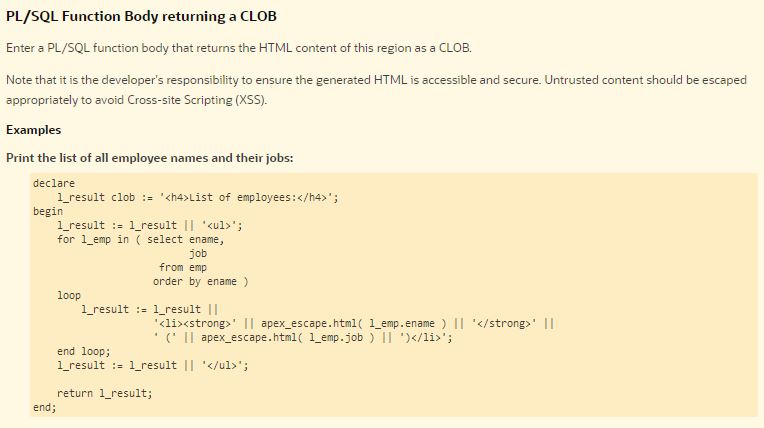
In order to make the region refreshable, the APEX team had to change the way you use it. You no longer call the "HTP" package to add your content to a global output buffer. Instead, you have to concatenate and return your content as a string (varchar2 or clob). The way it's suggested in the online help is like this:


There are several things I don't like about this:

  • You have to declare a local variable
  • You have to clutter the code with concatenation
  • You cannot split your code into subroutines unless you pass around your local variable holding the final result
  • You have to rewrite every piece of existing code (if you want to use the new region type)

Instead, I want to be able to (continue to) write code like this:

Notice the use of "apex_htp" in the above code; this is a package that does not (yet) exist, but read on!

Or, to give a more complex and real-world example which uses several subprocedures that all write out to the global buffer:


What I think the APEX team should have done

When the APEX team decided that they needed a new region type with a different architecture, instead of just throwing the existing region type into the murky "legacy" territory, they should have made the transition as smooth as possible, by offering a drop-in replacement to the existing HTP package.

I immediately suggested this when I saw the latest APEX version, and as I said on Twitter I think it's a strange decision to hide away the existing method as "legacy" when you are replacing it with a worse dev experience that is not yet fully baked.

To fix this, I've submitted an idea to the APEX Ideas app, to suggest that the APEX team include a new package in the next APEX version that can be used as a drop-in replacement for the HTP package. Using this package with existing code should be as easy as replacing "htp.p" with "apex_htp.p" and adding a single RETURN statement at the end of the region process code.

The spec for such a package could look like the below image. I've already made a working prototype for myself, calling it "xtp", and with a (temporary) synonym I can also call it using "apex_htp", but the point of this blog post (and the submitted idea) is to get this included in APEX itself, where it should have been from day 1 of APEX 22.2. Go and vote today for this idea if you are using PL/SQL Dynamic Content regions!


For those interested in the (just a quick prototype) package body, here it is on GitHub.


Tuesday, October 11, 2022

Joel Kallman Day 2022: APEX Caching #joelkallmanday

 I'm writing a short blog post today as part of the Joel Kallman Day.


"Server-Side Caching" is probably an under-utilized feature of Oracle APEX. It's very easy to use, and can have an amazing impact on the performance of your APEX application, and make it (even) more scalable.


What is APEX Server Caching?

Here's how the help text explains it:

"Select how the Oracle APEX engine can cache HTML text on the server side. If caching can be used, it emits the cached result instead of computing it again. This cuts down on expensive computation time on the server. This feature is unrelated to the browser's caching capabilities."

In other words, if you have a report, or a chart, or some content generated dynamically by PL/SQL, the APEX engine can store the final result (the HTML text) of that content and just display that instead of having to re-run a query or execute your code.


What can be cached?

You can cache whole Pages, or individual Regions.


Cache settings

You can choose how to cache (by session, by user, or for everyone) and how long to cache. You can also select one or more items; if the value of these items change, the cache will automatically be invalidated and refreshed on the next view. You can also combine this with a more complex Condition.


APEX API packages related to caching

The following packages are related to caching:


APEX Dictionary View

The view APEX_APPLICATION_CACHING gives you information about caching, useful for debugging and monitoring.


Bonus: Tip

On pages where you use caching, create a button to clear the cache immediately (and perhaps conditionally display the button for admins/developers). This will make your life as a developer easier. Remember that any changes you as a developer make to reports, etc. will no longer be immediately visible if they are cached!


Monday, October 11, 2021

Joel Kallman Day 2021: Oracle Database Express Edition (XE) 21c

The "Oracle Tech Network Appreciation Day" has been renamed to "Joel Kallman Day" in honor of Joel Kallman, who along with Mike Hichwa was one of the original developers of Oracle Application Express (APEX). Joel suddenly and tragically passed away during the pandemic earlier this year.

Joel at APEX World in Rotterdam, 2019


The "Joel Kallman Day" is about appreciating some piece of Oracle tech. In 2016, I wrote about the free Oracle Express Edition (XE) database. It just so happens that the latest Oracle XE version, 21c, was released for Linux a month ago, and for Windows just a few days ago.

Therefore, my blog post for Joel Kallman Day 2021 is about Oracle Express Edition, a great (and free!) way to get started with Oracle, PL/SQL, APEX and databases in general. You can download the software from oracle.com/xe and there's also docs and videos showing how to install and get started.

To give the new version a test drive, I created a Windows Server VM on Microsoft Azure, and then downloaded and installed XE 21c along with APEX and the Thoth Gateway for IIS.

The Azure VM size I selected for this test was "Standard B2s (2 vcpus, 4 GiB memory)". In Azure it costs about USD 40 per month.

Just for fun, here are some timings:


Time to...
... provision new VM in Azure: 5 minutes
... first login to VM: 2 minutes
... download a real browser: 1 minute
... download 21c XE: 30 seconds
... unzip 21c XE: 30 seconds
... install 21c XE: 15 minutes

... download APEX 21.1: 1 minute
... unzip APEX 21.1: 3 minutes
... install APEX 21.1: 8 minutes

... install IIS: 2 minutes
... install Thoth Gateway: 1 minute

... first login in APEX (total time): 39 minutes


Here's a screenshot showing APEX 21.1 in action on Oracle Database XE 21c on Windows Server 2019 with IIS and Thoth Gateway. The page rendering time is not too shabby! :-)


So, a big thanks to Oracle for providing a great, free database, and thanks to Joel and everybody on the APEX team for their excellent work. #letswreckthistogether


Thursday, July 29, 2021

Ten years since Mythbusters: Stored Procedures Edition

Today it's exactly ten years since I published my blog post called Mythbusters: Stored Procedures Edition

Using "stored procedures" (ie storing and executing code in your database, next to the data, instead of in a middle tier or client) is a practice that is provably both efficient and secure, yet it is often dismissed as "wrong".

My original blog post looks at the usual reasons given against the use of stored procedures for "business logic" (or for anything at all, really) and explains why they tend to be myths (or outright lies), repeated so many times that they are taken as the truth. Take a moment to read the article now.

Publishing the article proved that advocating for the use of stored procedures, which had gone out of fashion already by 2011, was controversial. It caused an immediate spike in my blog traffic, receiving almost 20 000 page views in a single day (at the time, my blog had perhaps a few hundred page views per day on average). The article was picked up by Hacker News and generated a lively discussion there.

So, where are we in 2021, ten years later?

Mainstream development (still) uses imperative, object-oriented 3GL languages (Java, .NET, etc) running in the middle tier or client, dragging data out from the database to process it, with data access usually abstracted through an ORM. Which, predictably, results in suboptimal performance.

The myths about stored procedures are still prevalent. Ask a random Java/.NET developer today, and I bet he will claim that it's impossible to version control stored procedures (myth #1). In that case, please send him a link to that 10-year old article...


Sunday, November 8, 2020

New version of Quick PL/SQL, a code generator for PL/SQL

I've released a new version of Quick PL/SQL, the code generator for PL/SQL based on the same concept as QuickSQL in APEX, but for PL/SQL code. The initial version was released in August 2018.

The online version is available (as before) here: tinyurl.com/quickplsql2

The source code is available on my GitHub.

This release (version 1.2) has a few improvements. The first is syntax highlighting of the generated code (right hand side of the page). This relies on the CodeMirror library which is bundled with APEX. Unfortunately it only supports SQL, not PL/SQL, so not all code is properly highlighted, but it's better than nothing.


The second improvement is a "Quick CRUD" button which opens a dialog that allows you to specify a table name (and optionally the name of the primary key column and the package name):


Based on this it creates the markup required for a complete "CRUD package" in the Input section, which saves you from remembering the markup syntax, and saves you from typing a lot of boilerplate markup as well.

Then, as before, just click on "Generate" to have the final PL/SQL generated for you.


Enjoy! :-)


Sunday, December 8, 2019

Translation enhancements in APEX 18 and 19

The Oracle Application Express (APEX) documentation summarizes the translation process thus:

"To translate an application developed in App Builder, you must map the primary and target language, seed and export text to a translation file, translate the text, apply the translation file, and publish the translated application."

When you go to Shared Components and then click "Translate Application", this process is illustrated by a list:

So the "default" approach is to download the XLIFF file and use a third-party tool to do the translation by editing that file.

However, it is also possible to edit the translations directly from within APEX. Click on "Translation Repository" under Translation Utilities to access this editor.


A few simple, but very useful enhancements have been made to the Translation Repository pages in the last couple of APEX versions.

 In APEX 19, there is now a new column available called "Translated" which indicates whether the original string has been translated or not. Using this column it is easy to filter out the strings already translated.


The popup edit window for the translation has a checkbox, added in APEX 18, that allows you to update all existing occurrences of the source string with a new translation. This is useful if you have, for example, 100 buttons with the label "Save Changes" because you only need to do the translation once.


Also in APEX 18, a "Grid Edit" page was added so you could edit the translations using a tabular form. In APEX 19, this tabular form was replaced with an interactive grid.


This interactive grid also includes the "Translated" column that can be used to filter out the translations which are already done.

Note that sorting by the "Translate From" or "Translate To" columns in the interactive grid is not possible (if you try you'll get an "ORA-00932: inconsistent datatypes: expected - got NCLOB" error). But the list of available columns include "Translate From (Partial)" and "Translate To (Partial)" which extracts the first part of the string as a regular varchar2 (usually the strings to translate are not that long so you'll see the full string in the "Partial" column). If you need to sort the strings (I find it useful to sort alphabetically by the source string in order to find identical strings and use copy/paste to update the translation), use these "Partial" columns to set up the sorting.


Thanks to Joel Kallmann for taking the time to add these small but very useful enhancements into APEX based on my feedback.


Sunday, June 16, 2019

APEX custom Theme Style performance

When you create an application in Oracle Application Express (APEX) using the Universal Theme, the application comes with a few default "Theme Styles" which are essentially various stylesheets that you can switch between to go from the default blue (called "Vita") to, for example, the dark grey style (called "Vita - Slate").

You can use the Theme Roller in Oracle Application Express (APEX) to customize the colors and other settings, and by saving these you create your own Theme Styles. In this video, Shakeeb from the Oracle APEX team demonstrates how to use the Theme Roller, and he also briefly mentions that the generated stylesheet for custom theme styles can be placed into the filesystem for better performance.


I recorded a video myself to discuss the details of how custom Theme Styles affect the performance of your APEX application, and how you can move the Theme Style generated stylesheets to a web server to maximize performance and minimize bandwidth consumption:


Another issue that I did not mention in the video is that when you pick an icon for your application, APEX creates an app-icon.svg file (for the logo itself) and app-icon.css (that references the svg file), and places both those files in your Static Application Files.

Now since these files (and all other Static Application Files) are stored in the database, they require a database hit to retrieve, instead of fetching them from (and caching them on) the web server filesystem.


So if you want to maximize performance, I suggest that you remove the reference to the logo CSS file from your application (and delete the files from the Static Application Files).


If you really want that logo icon, you could of course place the .svg and .css files on the web server and reference them from there instead.


Thursday, April 25, 2019

Thoth Gateway version 1.4.3 now available

I've updated the Thoth Gateway (a PL/SQL web gateway similar to mod_plsql and ORDS, but written in .NET that allows you to run APEX and PL/SQL Web Toolkit applications using Microsoft IIS web server).


The latest release is version 1.4.3. It fixes a few minor issues, but more importantly it is compiled against the latest ODP.NET Managed Driver.

Among other things, this version of the Managed Driver supports Oracle Advanced Security Option (ASO) encryption; without this certain operations such as APEX file uploads would cause "OracleInternal.Network.NetworkException: ORA-12537: Network Session: End of file" errors against an Oracle 18c database.

When upgrading to Thoth Gateway v1.4.3 or later, please make sure you also copy the Oracle.ManagedDataAccess.dll file in addition to the PLSQLGatewayModule.dll file to make sure you have the correct library.

Enjoy!


Wednesday, January 30, 2019

APEX Plugin: Execute PL/SQL code and return content to page (updated)

Oracle APEX has a built-in Dynamic Action called "Execute PL/SQL Code" that executes a block of PL/SQL code on the server via an Ajax call (ie does not do a regular submit and reload of the whole page).

But what if you want to do something on the server AND also return some content back to the client? Back in 2012 I released an APEX Dynamic Action plugin called "Execute PL/SQL Code and Return Content" that allows you to do just that. Read the original blog post for more information.


Since then, the APEX framework has evolved and the old Ajax workhorse function called "htmldb_Get" has been deprecated and replaced with functions in the "apex.server" namespace. Hence I have updated my plugin to use the modern API.

You can find the updated version (1.1) of the plugin on my GitHub page for APEX plugins. Note that the new plugin has been exported from APEX 18.1 and therefore requires at least that version to import and use.

Enjoy! :-)


Thursday, August 9, 2018

Quick PL/SQL, a code generator for PL/SQL based on simple markup

Maybe you've heard about "Quick SQL", a utility (previously a separate application, now part of APEX 18.1 itself) that generates SQL scripts based on a simple markup language. Quick SQL is a real time-saver and allows you to go from idea to prototype to working application in an instant.

Inspired by Quick SQL, I've created a similar utility, called "Quick PL/SQL", that does the same thing, except it generates PL/SQL code (packages with functions and procedures, with standard comment blocks, formatting, etc.) based on a simple markup.

I've recorded a couple of videos to show the tool in action.

Here is an introduction which explains the basic input syntax and the output options:


And here is another video which explains how to create standard CRUD-style (Create, Read, Update, Delete) APIs for your tables:


Try it out for yourself here: https://apex.oracle.com/pls/apex/f?p=QUICKPLSQL:HOME&c=MULEDEV or via this shortcut: https://tinyurl.com/quickplsql2

Of course, I wouldn't mind if this functionality becomes available as part of the QuickSQL utility that is built into APEX! :-)


Monday, March 19, 2018

Thoughts about the APEX_UTIL package

The APEX_UTIL package in Oracle Application Express is a mixed bag of "miscellaneous" stuff.

From the documentation: "You can use the APEX_UTIL package to get and set session state, get files, check authorizations for users, reset different states for users, get and purge cache information and also to get and set preferences for users."


It's clear that, over time, a lot of stuff has been placed here that really belongs elsewhere, or in its own package. By splitting up this package, it should be easier for the developer to find the functions and procedures he is looking for.

Here are my thoughts on how the APEX_UTIL package could be refactored. I'm not saying remove all this from the package in the next APEX release, but move the code to new/other packages and just leave wrappers in the APEX_UTIL package that call the new package, so that old code continues to work. Mark these as deprecated in the docs, and maybe remove after a few more releases.

Move to a new APEX_CACHE package:

  CACHE_GET_DATE_OF_PAGE_CACHE Function
  CACHE_GET_DATE_OF_REGION_CACHE Function
  CACHE_PURGE_BY_APPLICATION Procedure
  CACHE_PURGE_BY_PAGE Procedure
  CACHE_PURGE_STALE Procedure
  CLEAR_APP_CACHE Procedure
  CLEAR_PAGE_CACHE Procedure
  CLEAR_USER_CACHE Procedure
  PURGE_REGIONS_BY_APP Procedure
  PURGE_REGIONS_BY_NAME Procedure
  PURGE_REGIONS_BY_PAGE Procedure
 
Move to a new APEX_USER package:

  CHANGE_CURRENT_USER_PW Procedure
  CHANGE_PASSWORD_ON_FIRST_USE Function
  CREATE_USER Procedure
  CREATE_USER_GROUP Procedure
  CURRENT_USER_IN_GROUP Function
  DELETE_USER_GROUP Procedure Signature 1
  DELETE_USER_GROUP Procedure Signature 2
  EDIT_USER Procedure
  END_USER_ACCOUNT_DAYS_LEFT Function
  EXPIRE_END_USER_ACCOUNT Procedure
  EXPIRE_WORKSPACE_ACCOUNT Procedure
  EXPORT_USERS Procedure
  FETCH_USER Procedure Signature 1
  FETCH_USER Procedure Signature 2
  FETCH_USER Procedure Signature 3
  GET_FIRST_NAME Function
  GET_LAST_NAME Function
  GET_USER_ID Function
  GET_USER_ROLES Function
  GET_USERNAME Function
  GET_EMAIL Function
  SET_USERNAME Procedure
  SET_EMAIL Procedure
  SET_FIRST_NAME Procedure
  SET_LAST_NAME Procedure
  LOCK_ACCOUNT Procedure
  PASSWORD_FIRST_USE_OCCURRED Function
  UNEXPIRE_END_USER_ACCOUNT Procedure
  UNEXPIRE_WORKSPACE_ACCOUNT Procedure
  UNLOCK_ACCOUNT Procedure
  WORKSPACE_ACCOUNT_DAYS_LEFT Function
  STRONG_PASSWORD_CHECK Procedure
  STRONG_PASSWORD_VALIDATION Function
  GET_ACCOUNT_LOCKED_STATUS Function
  REMOVE_USER Procedure
  RESET_AUTHORIZATIONS Procedure [DEPRECATED]
  PUBLIC_CHECK_AUTHORIZATION Function [DEPRECATED]
  RESET_PASSWORD Procedure
  RESET_PW Procedure
  GET_AUTHENTICATION_RESULT Function
  SET_AUTHENTICATION_RESULT Procedure
  SET_CUSTOM_AUTH_STATUS Procedure
  GET_GROUPS_USER_BELONGS_TO Function
  GET_GROUP_ID Function
  GET_GROUP_NAME Function
  SET_GROUP_GROUP_GRANTS Procedure
  SET_GROUP_USER_GRANTS Procedure
  IS_LOGIN_PASSWORD_VALID Function
  IS_USERNAME_UNIQUE Function
  GET_ATTRIBUTE Function
  SET_ATTRIBUTE Procedure
 
Move to a new APEX_PRINT package:

  DOWNLOAD_PRINT_DOCUMENT Procedure Signature 1
  DOWNLOAD_PRINT_DOCUMENT Procedure Signature 2
  DOWNLOAD_PRINT_DOCUMENT Procedure Signature 3
  DOWNLOAD_PRINT_DOCUMENT Procedure Signature 4
  GET_PRINT_DOCUMENT Function Signature 1
  GET_PRINT_DOCUMENT Function Signature 2
  GET_PRINT_DOCUMENT Function Signature 3
  GET_PRINT_DOCUMENT Function Signature 4
 
Move to APEX_IR package (this has already been done):

  IR_CLEAR Procedure [DEPRECATED]
  IR_DELETE_REPORT Procedure [DEPRECATED]
  IR_DELETE_SUBSCRIPTION Procedure [DEPRECATED]
  IR_FILTER Procedure [DEPRECATED]
  IR_RESET Procedure [DEPRECATED]

Move to APEX_SESSION package:

  GET_SESSION_LANG Function
  GET_SESSION_STATE Function
  GET_SESSION_TERRITORY Function
  GET_SESSION_TIME_ZONE Function
  SET_SESSION_HIGH_CONTRAST_OFF Procedure
  SET_SESSION_HIGH_CONTRAST_ON Procedure
  SET_SESSION_LANG Procedure
  SET_SESSION_LIFETIME_SECONDS Procedure
  SET_SESSION_MAX_IDLE_SECONDS Procedure
  SET_SESSION_SCREEN_READER_OFF Procedure
  SET_SESSION_SCREEN_READER_ON Procedure
  SET_SESSION_STATE Procedure
  SET_SESSION_TERRITORY Procedure
  SET_SESSION_TIME_ZONE Procedure
  GET_EDITION Function
  SET_EDITION Procedure
  SET_SECURITY_GROUP_ID Procedure
  FETCH_APP_ITEM Function
  GET_NUMERIC_SESSION_STATE Function
  GET_CURRENT_USER_ID Function
  IS_HIGH_CONTRAST_SESSION Function
  IS_HIGH_CONTRAST_SESSION_YN Function
  IS_SCREEN_READER_SESSION Function
  IS_SCREEN_READER_SESSION_YN Function
  SET_CURRENT_THEME_STYLE Procedure [DEPRECATED]
  GET_DEFAULT_SCHEMA Function
  SET_WORKSPACE_Procedure

Move to APEX_EXPORT package:

  GET_SUPPORTING_OBJECT_SCRIPT Function
  GET_SUPPORTING_OBJECT_SCRIPT Procedure
 
Move to APEX_PAGE package: 

  GET_HIGH_CONTRAST_MODE_TOGGLE Function
  GET_SCREEN_READER_MODE_TOGGLE Function
  SHOW_HIGH_CONTRAST_MODE_TOGGLE Procedure
  SHOW_SCREEN_READER_MODE_TOGGLE Procedure

Leave in APEX_UTIL (for now):

  CLOSE_OPEN_DB_LINKS Procedure
  COUNT_CLICK Procedure
  CUSTOM_CALENDAR Procedure
  INCREMENT_CALENDAR Procedure
  SUBMIT_FEEDBACK Procedure
  SUBMIT_FEEDBACK_FOLLOWUP Procedure
  GET_FEEDBACK_FOLLOW_UP Function
  STRING_TO_TABLE Function [DEPRECATED]
  TABLE_TO_STRING Function [DEPRECATED]
  SAVEKEY_NUM Function
  SAVEKEY_VC2 Function
  KEYVAL_NUM Function
  KEYVAL_VC2 Function
  HOST_URL Function
  URL_ENCODE Function
  REDIRECT_URL Procedure
  PREPARE_URL Function
  GET_HASH Function
  GET_SINCE Function
  GET_PREFERENCE Function
  SET_PREFERENCE Procedure
  REMOVE_PREFERENCE Procedure
  REMOVE_SORT_PREFERENCES Procedure
  GET_BUILD_OPTION_STATUS Function Signature 1
  GET_BUILD_OPTION_STATUS Function Signature 2
  SET_BUILD_OPTION_STATUS Procedure
  GET_BLOB_FILE_SRC Function
  GET_FILE Procedure
  GET_FILE_ID Function
  HTML_PCT_GRAPH_MASK Function
  FIND_SECURITY_GROUP_ID Function
  FIND_WORKSPACE Function
  GET_APPLICATION_STATUS Function
  GET_GLOBAL_NOTIFICATION Function
  SET_GLOBAL_NOTIFICATION Procedure
  SET_APP_BUILD_STATUS Procedure
  SET_APPLICATION_STATUS Procedure


These are just my suggestions, but I do hope the APEX developer team will do some kind of refactoring (even if not exactly as suggested above) in future releases of APEX.

If you would like to see it done differently, please leave feedback in the comment field below! :-)


Sunday, February 25, 2018

APEX Authentication with Microsoft account

In the upcoming Oracle Application Express (APEX) 5.2 release, support has been added for so-called "Social Sign-In" authentication. This means that your users can login to an APEX application using an external authentication provider. In APEX 5.2, there is built-in support for Google and Facebook accounts. There is also support for "Generic OAuth Providers" and "OpenID Connect Providers". This blog post describes how you can use the "OpenID Connect Provider" to set up authentication with a Microsoft account, such as an Outlook.com account.


Here is how to do it:

A. Register the APEX application with Microsoft


1. Go to Microsoft Application Registration Portal. Note that you need a Microsoft account, such as an Outlook.com email account, to login and use this portal:

https://apps.dev.microsoft.com/

2. Add an app (enter a descriptive name, your users will see this name during the consent prompt in step 20 below). An Application ID gets generated. Click "Generate New Password" to generate a password.

3. Click "Add platform" and choose "Web". Enter the APEX callback URL as the "Redirect URL", for the APEX 5.2 Early Adopter this is:

https://apexea.oracle.com/pls/apex/apex_authentication.callback

4. Add the URL of the APEX app as the "Home Page URL":

https://apexea.oracle.com/pls/apex/f?p=your_app_alias:10


5. Click "Save"


B. Setup APEX Credentials


6. In APEX, go to Shared Components and click on "Credentials"

7. Create a new Credential and give it a name (for example "Azure OpenID Credentials"). Select "OAuth2 Client Credentials Flow" as the credential type.

8. Add the Application ID from step 2 above as the "Client ID", and the password from step 2 above as the "Client Secret".

9. Save the credentials.

C. Setup APEX Authentication Scheme


10. Go to Shared Components and click on "Authentication Schemes"

11. Create a new authentication scheme and give it a name (for example "Azure AD OpenID"). Select "Social Sign-In" as the scheme type.

12. As credential store, select the credentials created in step 9 ("Azure OpenID Credentials").

13. As authentication provider, select "OpenID Connect Provider".

14. As discovery URL, use the following:

https://login.microsoftonline.com/common/v2.0/.well-known/openid-configuration

15. As scope, type "email" (without the quotes)

16. As username attribute, type "email" (without the quotes)

17. Save the authentication scheme.

D. Test the Login


18. Go to the home page of your application:

https://apexea.oracle.com/pls/apex/f?p=your_app_alias:10

19. You should be redirected to a Microsoft login page. Log in with a Microsoft account (such as yourname@outlook.com).

20. You should be prompted to allow the APEX application to log you in and retrieve your email address to identify you. Accept this.

21. You should see the home page of your APEX application, and the value of APP_USER should now be equal to the email address you logged in with at Microsoft.

Switching between authentication schemes in the same APEX session


APEX version 5.2 also includes a new attributte for authentication schemes called "Switch in Session" that can be either Enabled or Disabled. If enabled, the current session's authentication scheme can be changed by passing APEX_AUTHENTICATION=scheme name in a URL's request parameter.


You can use this to present users with multiple login options. For example, you can have the standard APEX Authentication (or your own table-based authentication) set as the current authentication scheme, and then add another button to the login page which switches the authentication scheme to the Microsoft scheme (or Facebook, or Google, etc).


The screenshot above shows an example of a standard APEX login page where I have added an extra button (called "LOGIN_MICROSOFT"), set the icon CSS class to "fa-windows" to get the Windows logo on the button, and set the action attribute of the button to redirect to page 10 (the home page of the application) and also setting the request of the link to "APEX_AUTHENTICATION=name_of_microsoft_auth_scheme". Clicking this button should redirect to a Microsoft page for login, and then redirect the user back to the requested page.

Wednesday, February 21, 2018

Using the Slack webhook API from PL/SQL

Slack is a web-based chat room popular with many companies. Slack also has an API that can be used to post messages to a given "channel" or chat room. The simplest API offered is the "webhook" integration, which is "a simple way to post messages from external sources into Slack. They make use of normal HTTP requests with a JSON payload that includes the message text and some options."


To create a new Slack webhook, login to Slack and go to "Apps" in the left sidebar menu. Click "Manage apps..." and click "Custom Integrations" and then "Incoming Webhooks". Click on "Add Configuration" to create a new webhook. Specify the channel the webhook will post in, and click "Add incoming webhooks integration".


Next, take a note of the Webhook URL:


Then go to the Alexandria PL/SQL Utility Library and install the SLACK_UTIL_PKG package in your database schema. Modify your database Network ACL settings to include "hooks.slack.com" (port 443) to allow connections to the Slack site from the database.

Then use the package like this (see also demo script):


In addition to application-specific messages you could perhaps also set up the database (via a background job) to notify you when you are about to run out of disk space, when the number of APEX page views reach a certain threshold, when a specific user logs in, and so on. Use your imagination! :-)


Saturday, February 10, 2018

Pivot Table plugin for APEX (Updated)

Some years ago I created an APEX region plugin for displaying the results of a query as a Pivot Table. You can read the original blog post about that here.

The plugin proved quite popular, but people were having problems using it with APEX 5 due to a jQuery versioning conflict.

I've now updated the plugin so it works with APEX, both 5.0 and 5.1.


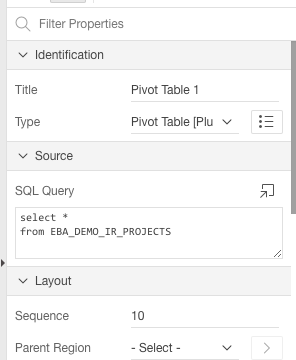
To use it, simply add a region to the page, change the region type to "Pivot Table" and write an SQL query as the region source:


On the region attributes page, specify the options. I've added some help text to explain the various options. Note that you can have more than one Pivot Table region on the same page, but be sure to use a unique name in the "DOM Element Name" attribute for each pivot table.


I've also added/enabled some extra features such as spreadsheet export (via TSV - tab separated values) and charting.


It should be noted that the plugin is just an APEX wrapper for the Javascript Pivot Table component by Nicolas Kruchten who did all the hard work. I merely packaged it up for use with APEX.

You can download the plugin from my APEX plugins page. Enjoy! :-)


Wednesday, October 18, 2017

Oracle XE 12c becomes Oracle XE 18c

Oracle Database, Express Edition (XE) is a free version of the Oracle Database, currently available as version 11g (11.2) for Windows and Linux.
A planned new version of Oracle XE based on 12c (12.2) was first mentioned back in 2013. Now we are in 2017 and Oracle has changed its version numbering, aiming for yearly releases of the database, which means that after 12c comes 18c (in 2018) and 19c (in 2019) and so on.

According to information coming out at this year's Oracle OpenWorld, the next version of Oracle Database Express Edition (XE) will therefore be Oracle XE 18c.

Below are the details known so far about this upcoming version. Disclaimer: I've collected this information from tweets and blogs, so nothing is official yet. Time will tell as to what is true. UPDATE: Gerald Venzl from Oracle has confirmed the below to be "all true" :-)

  • The next version of Oracle Express Edition (XE) will be 18c. (Source: Chris Saxon, Twitter)
  • Oracle XE 18c is expected in Q1 of 2018. (Source: AMIS blog). UPDATE: Oracle XE 18c "is currently planned between March and August 2018 and might change". (Source: Gerald Venzl, Twitter)
  • There will be yearly releases of Oracle Express Edition (XE), ie Oracle XE 19c in 2019, etc. (Source: Franck Pachot, Twitter).
  • There will be simultaneous releases of XE for Linux and Windows. (Source: Gerald Venzl, Twitter)
  • Limits for XE 18c will be 2 GB of memory, 12GB of storage (with basic/advanced compression bringing real capacity up to around 40GB), 2 CPUs and 4 pluggable databases. (Source: AMIS blog and Lucas Jellema, Twitter)
  • Express Edition (XE) will actually include "nearly all" of the features from Enterprise Edition (EE)! (Source: Franck Pachot, Twitter and Chris Saxon, Twitter).
  • Express Edition (XE) will still be free for both development and production. (Source: Chris Saxon, Twitter).
  • There will be no support (except through community/forums) for XE, and no bug fixes/patches. Still, with a yearly release cycle that means bugs will be fixed by upgrading to the latest release. (Source: Franck Pachot and Bob Bryla, Twitter)


If most, or even some, of the above is true, this is really great news! I understand we should thank Gerald Venzl at Oracle for this, as he is the guy working on bringing us all this goodness! Thanks in advance, Gerald! :-)


Monday, October 9, 2017

ODC Appreciation Day: The PL/SQL Language

Like last year, Tim Hall of oracle-base.com fame suggested we should all do an "ODC Appreciation Day" in honor of the Oracle Developer Community (ODC), by blogging about our favorite Oracle product or feature.

My personal favorite, after the database itself, is the PL/SQL language that runs inside the database.


Here's what's great about it:
  • Simple (and therefore easy to understand and quick to learn)
  • Runs everywhere the Oracle database runs (any operating system)
  • Seamlessly integrated with SQL
  • Great performance, not least because it runs in the database server alongside your data, thus eliminating a lot of mid-tier overhead 

I made a presentation a while back that goes into greater detail about what makes PL/SQL great, take a look at PL/SQL: The Good Parts.


Thanks ODC!


Tuesday, March 21, 2017

Using VS Code for PL/SQL development

I've been using Sublime Text as my main editor for PL/SQL development for many years, but I'm now in the process of switching to Visual Studio Code (VS Code).


Some good reasons to use VS Code:
  • Multi-platform (Windows, OS X, Linux)
  • Free, open source
  • Lightweight, fast (enough)
  • Large ecosystem of extensions
  • Built-in Git support
  • Can be adapted to PL/SQL coding via a plsql language extension (syntax highlighting, go to/peek definition, go to symbol) and PL/SQL compilation using sqlplus via a Task Runner (see below for PL/SQL specifics)

Installing VS Code and extensions

Download VS Code from https://code.visualstudio.com/ and run the installer.

Start VS Code and click the Extensions icon.
  • Search for "plsql" and install the "xyz.plsql-language" extension
 The following are all optional but recommended:
  • Search for "git history" and install the "donjayamanne.githistory" extension
  • Search for "better merge" and install the "pprice.better-merge" extension (update 24.09.2017: this extension is now part of VS Code itself and does not need to be installed separately)
  • Search for "git lens" and install the "eamodio.gitlens" extension
  • Search for "tag" and install the "formulahendry.auto-close-tag" extension
  • Search for "blackboard" and install the "gerane.Theme-Blackboard" extension
  • Search for "material icon" and install the "PKief.material-icon-theme" extension
  • Search for "plsql" and install the "apng.orclapex-autocomplete" extension (added 02.01.2018)
Click on "Reload" to restart VS Code with the new extensions loaded.

Your list of extensions should now look something like this:


Click File, Preferences, Color Theme and select the "Blackboard" theme.
Click File, Preferences, File Icon Theme and select the "Material Icon" theme.

Configuring a Task Runner to compile PL/SQL code

Click File, Open Folder and open a folder containing your PL/SQL code.
Click View, Command Palette and enter "task" then select "Configure Task Runner", select "Others".

Copy the following text and paste it into the tasks.json file:


Adjust the connection string as appropriate to your environment.

Copy the following text and save it as _show_errors.sql in the project root folder:


Linux and Mac: Copy the following text and save it as _run_sqlplus.sh in the project root folder (remember to chmod +x the file to make it executable).


Windows: Copy the following text and save it as _run_sqlplus.bat in the project root folder.


Optionally create a login.sql file in project root folder and add:


Editing code

The PL/SQL language extension by xyz provides syntax highlighting for PL/SQL, as well as a couple of very useful code navigation features.

You can go to a "symbol" (ie a function or procedure) inside a package by pressing Shift+Ctrl+O and typing the name of the symbol:


You can go to the definition of a function or procedure by pressing F12 when the cursor is on the function or procedure name (or right-click on the function or procedure name and select either "Go to definition", or "Peek definition" to see the definition in a popup window without leaving the current file).


Snippets

You can define your own snippets for frequently used code; see this how-to article. I recommend that you create snippets for frequently used code blocks such as if/then/else statements, case statements, and larger code blocks such as the skeleton for a package, procedure or function.

Building code

To build (compile) the current file into the database, press Shift+Ctrl+B (or click View, Command Palette, and type "build" to search for the relevant command).

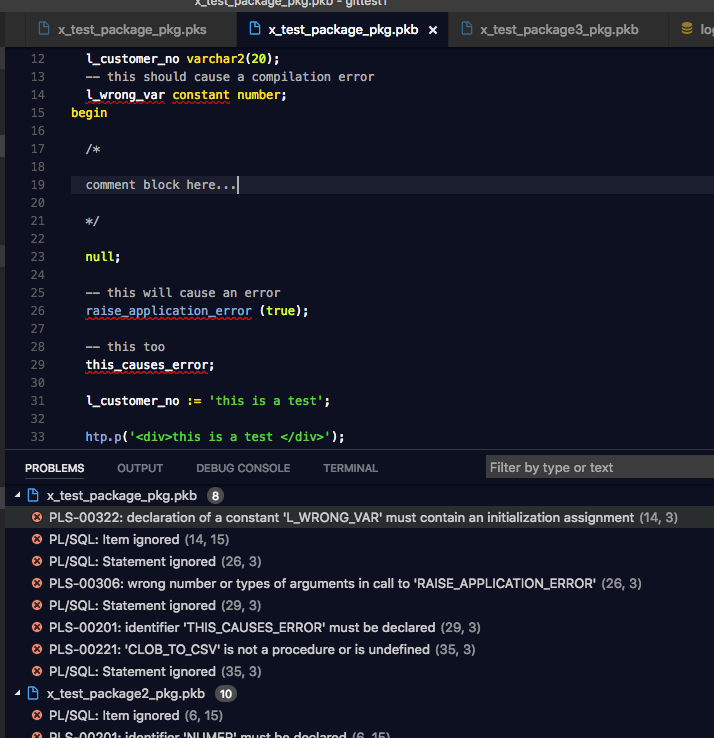
The build task runs sqlplus and passes it the filename of the current file. This creates or replaces the object in the database (you can see the commands being executed in the "Output" pane in VS Code). The build task then queries user_errors to get any errors and warnings from the database, and these are shown in the "Problems" pane in VS Code.


You can click on each problem to jump to the relevant line of code. You'll also see squiggly lines under the errors in the code itself, and you can hover over the text to see a tooltip containing the error message.

Note that since the build task queries the user_errors view without any filters, you get to see all errors in the schema, not just the errors for the current file. I actually like this, because it instantly shows me if there are any other problems in the schema that I might not otherwise be aware of.

Also, the build task assumes that you have one file per database object (ie separate files for package specifications and package bodies), and that the filenames match the database object names. This makes sense to me and I assume that's how most people organize their files, but you can tweak the _show_errors.sql script to generate output appropriate to your setup.


Version control with Git

VS Code has great built-in support for Git. I recommend installing a couple of git-related extensions (see above), but other than that, I'll just refer you to the official tutorial for using Git in VS Code.


That's it, enjoy using VS Code for PL/SQL development! :-)