I've updated the Thoth Gateway (a PL/SQL web gateway similar to mod_plsql and ORDS, but written in .NET that allows you to run APEX and PL/SQL Web Toolkit applications using Microsoft IIS web server).
The latest release is version 1.4.3. It fixes a few minor issues, but more importantly it is compiled against the latest ODP.NET Managed Driver.
Among other things, this version of the Managed Driver supports Oracle Advanced Security Option (ASO) encryption; without this certain operations such as APEX file uploads would cause "OracleInternal.Network.NetworkException: ORA-12537: Network Session: End of file" errors against an Oracle 18c database.
When upgrading to Thoth Gateway v1.4.3 or later, please make sure you also copy the Oracle.ManagedDataAccess.dll file in addition to the PLSQLGatewayModule.dll file to make sure you have the correct library.
Enjoy!
Thursday, April 25, 2019
Wednesday, January 30, 2019
APEX Plugin: Execute PL/SQL code and return content to page (updated)
Oracle APEX has a built-in Dynamic Action called "Execute PL/SQL Code" that executes a block of PL/SQL code on the server via an Ajax call (ie does not do a regular submit and reload of the whole page).
But what if you want to do something on the server AND also return some content back to the client? Back in 2012 I released an APEX Dynamic Action plugin called "Execute PL/SQL Code and Return Content" that allows you to do just that. Read the original blog post for more information.
Since then, the APEX framework has evolved and the old Ajax workhorse function called "htmldb_Get" has been deprecated and replaced with functions in the "apex.server" namespace. Hence I have updated my plugin to use the modern API.
You can find the updated version (1.1) of the plugin on my GitHub page for APEX plugins. Note that the new plugin has been exported from APEX 18.1 and therefore requires at least that version to import and use.
Enjoy! :-)
But what if you want to do something on the server AND also return some content back to the client? Back in 2012 I released an APEX Dynamic Action plugin called "Execute PL/SQL Code and Return Content" that allows you to do just that. Read the original blog post for more information.
Since then, the APEX framework has evolved and the old Ajax workhorse function called "htmldb_Get" has been deprecated and replaced with functions in the "apex.server" namespace. Hence I have updated my plugin to use the modern API.
You can find the updated version (1.1) of the plugin on my GitHub page for APEX plugins. Note that the new plugin has been exported from APEX 18.1 and therefore requires at least that version to import and use.
Enjoy! :-)
Labels:
Ajax,
Apex,
Apex plugins,
database-centric architecture
Thursday, August 9, 2018
Quick PL/SQL, a code generator for PL/SQL based on simple markup
Maybe you've heard about "Quick SQL", a utility (previously a separate application, now part of APEX 18.1 itself) that generates SQL scripts based on a simple markup language. Quick SQL is a real time-saver and allows you to go from idea to prototype to working application in an instant.
Inspired by Quick SQL, I've created a similar utility, called "Quick PL/SQL", that does the same thing, except it generates PL/SQL code (packages with functions and procedures, with standard comment blocks, formatting, etc.) based on a simple markup.
I've recorded a couple of videos to show the tool in action.
Here is an introduction which explains the basic input syntax and the output options:
And here is another video which explains how to create standard CRUD-style (Create, Read, Update, Delete) APIs for your tables:
Try it out for yourself here: https://apex.oracle.com/pls/apex/f?p=QUICKPLSQL:HOME&c=MULEDEV or via this shortcut: https://tinyurl.com/quickplsql2
Of course, I wouldn't mind if this functionality becomes available as part of the QuickSQL utility that is built into APEX! :-)
Inspired by Quick SQL, I've created a similar utility, called "Quick PL/SQL", that does the same thing, except it generates PL/SQL code (packages with functions and procedures, with standard comment blocks, formatting, etc.) based on a simple markup.
I've recorded a couple of videos to show the tool in action.
Here is an introduction which explains the basic input syntax and the output options:
And here is another video which explains how to create standard CRUD-style (Create, Read, Update, Delete) APIs for your tables:
Try it out for yourself here: https://apex.oracle.com/pls/apex/f?p=QUICKPLSQL:HOME&c=MULEDEV or via this shortcut: https://tinyurl.com/quickplsql2
Of course, I wouldn't mind if this functionality becomes available as part of the QuickSQL utility that is built into APEX! :-)
Monday, March 19, 2018
Thoughts about the APEX_UTIL package
The APEX_UTIL package in Oracle Application Express is a mixed bag of "miscellaneous" stuff.
From the documentation: "You can use the APEX_UTIL package to get and set session state, get files, check authorizations for users, reset different states for users, get and purge cache information and also to get and set preferences for users."
It's clear that, over time, a lot of stuff has been placed here that really belongs elsewhere, or in its own package. By splitting up this package, it should be easier for the developer to find the functions and procedures he is looking for.
Here are my thoughts on how the APEX_UTIL package could be refactored. I'm not saying remove all this from the package in the next APEX release, but move the code to new/other packages and just leave wrappers in the APEX_UTIL package that call the new package, so that old code continues to work. Mark these as deprecated in the docs, and maybe remove after a few more releases.
Move to a new APEX_CACHE package:
CACHE_GET_DATE_OF_PAGE_CACHE Function
CACHE_GET_DATE_OF_REGION_CACHE Function
CACHE_PURGE_BY_APPLICATION Procedure
CACHE_PURGE_BY_PAGE Procedure
CACHE_PURGE_STALE Procedure
CLEAR_APP_CACHE Procedure
CLEAR_PAGE_CACHE Procedure
CLEAR_USER_CACHE Procedure
PURGE_REGIONS_BY_APP Procedure
PURGE_REGIONS_BY_NAME Procedure
PURGE_REGIONS_BY_PAGE Procedure
Move to a new APEX_USER package:
CHANGE_CURRENT_USER_PW Procedure
CHANGE_PASSWORD_ON_FIRST_USE Function
CREATE_USER Procedure
CREATE_USER_GROUP Procedure
CURRENT_USER_IN_GROUP Function
DELETE_USER_GROUP Procedure Signature 1
DELETE_USER_GROUP Procedure Signature 2
EDIT_USER Procedure
END_USER_ACCOUNT_DAYS_LEFT Function
EXPIRE_END_USER_ACCOUNT Procedure
EXPIRE_WORKSPACE_ACCOUNT Procedure
EXPORT_USERS Procedure
FETCH_USER Procedure Signature 1
FETCH_USER Procedure Signature 2
FETCH_USER Procedure Signature 3
GET_FIRST_NAME Function
GET_LAST_NAME Function
GET_USER_ID Function
GET_USER_ROLES Function
GET_USERNAME Function
GET_EMAIL Function
SET_USERNAME Procedure
SET_EMAIL Procedure
SET_FIRST_NAME Procedure
SET_LAST_NAME Procedure
LOCK_ACCOUNT Procedure
PASSWORD_FIRST_USE_OCCURRED Function
UNEXPIRE_END_USER_ACCOUNT Procedure
UNEXPIRE_WORKSPACE_ACCOUNT Procedure
UNLOCK_ACCOUNT Procedure
WORKSPACE_ACCOUNT_DAYS_LEFT Function
STRONG_PASSWORD_CHECK Procedure
STRONG_PASSWORD_VALIDATION Function
GET_ACCOUNT_LOCKED_STATUS Function
REMOVE_USER Procedure
RESET_AUTHORIZATIONS Procedure [DEPRECATED]
PUBLIC_CHECK_AUTHORIZATION Function [DEPRECATED]
RESET_PASSWORD Procedure
RESET_PW Procedure
GET_AUTHENTICATION_RESULT Function
SET_AUTHENTICATION_RESULT Procedure
SET_CUSTOM_AUTH_STATUS Procedure
GET_GROUPS_USER_BELONGS_TO Function
GET_GROUP_ID Function
GET_GROUP_NAME Function
SET_GROUP_GROUP_GRANTS Procedure
SET_GROUP_USER_GRANTS Procedure
IS_LOGIN_PASSWORD_VALID Function
IS_USERNAME_UNIQUE Function
GET_ATTRIBUTE Function
SET_ATTRIBUTE Procedure
Move to a new APEX_PRINT package:
DOWNLOAD_PRINT_DOCUMENT Procedure Signature 1
DOWNLOAD_PRINT_DOCUMENT Procedure Signature 2
DOWNLOAD_PRINT_DOCUMENT Procedure Signature 3
DOWNLOAD_PRINT_DOCUMENT Procedure Signature 4
GET_PRINT_DOCUMENT Function Signature 1
GET_PRINT_DOCUMENT Function Signature 2
GET_PRINT_DOCUMENT Function Signature 3
GET_PRINT_DOCUMENT Function Signature 4
Move to APEX_IR package (this has already been done):
IR_CLEAR Procedure [DEPRECATED]
IR_DELETE_REPORT Procedure [DEPRECATED]
IR_DELETE_SUBSCRIPTION Procedure [DEPRECATED]
IR_FILTER Procedure [DEPRECATED]
IR_RESET Procedure [DEPRECATED]
Move to APEX_SESSION package:
GET_SESSION_LANG Function
GET_SESSION_STATE Function
GET_SESSION_TERRITORY Function
GET_SESSION_TIME_ZONE Function
SET_SESSION_HIGH_CONTRAST_OFF Procedure
SET_SESSION_HIGH_CONTRAST_ON Procedure
SET_SESSION_LANG Procedure
SET_SESSION_LIFETIME_SECONDS Procedure
SET_SESSION_MAX_IDLE_SECONDS Procedure
SET_SESSION_SCREEN_READER_OFF Procedure
SET_SESSION_SCREEN_READER_ON Procedure
SET_SESSION_STATE Procedure
SET_SESSION_TERRITORY Procedure
SET_SESSION_TIME_ZONE Procedure
GET_EDITION Function
SET_EDITION Procedure
SET_SECURITY_GROUP_ID Procedure
FETCH_APP_ITEM Function
GET_NUMERIC_SESSION_STATE Function
GET_CURRENT_USER_ID Function
IS_HIGH_CONTRAST_SESSION Function
IS_HIGH_CONTRAST_SESSION_YN Function
IS_SCREEN_READER_SESSION Function
IS_SCREEN_READER_SESSION_YN Function
SET_CURRENT_THEME_STYLE Procedure [DEPRECATED]
GET_DEFAULT_SCHEMA Function
SET_WORKSPACE_Procedure
Move to APEX_EXPORT package:
GET_SUPPORTING_OBJECT_SCRIPT Function
GET_SUPPORTING_OBJECT_SCRIPT Procedure
Move to APEX_PAGE package:
GET_HIGH_CONTRAST_MODE_TOGGLE Function
GET_SCREEN_READER_MODE_TOGGLE Function
SHOW_HIGH_CONTRAST_MODE_TOGGLE Procedure
SHOW_SCREEN_READER_MODE_TOGGLE Procedure
Leave in APEX_UTIL (for now):
CLOSE_OPEN_DB_LINKS Procedure
COUNT_CLICK Procedure
CUSTOM_CALENDAR Procedure
INCREMENT_CALENDAR Procedure
SUBMIT_FEEDBACK Procedure
SUBMIT_FEEDBACK_FOLLOWUP Procedure
GET_FEEDBACK_FOLLOW_UP Function
STRING_TO_TABLE Function [DEPRECATED]
TABLE_TO_STRING Function [DEPRECATED]
SAVEKEY_NUM Function
SAVEKEY_VC2 Function
KEYVAL_NUM Function
KEYVAL_VC2 Function
HOST_URL Function
URL_ENCODE Function
REDIRECT_URL Procedure
PREPARE_URL Function
GET_HASH Function
GET_SINCE Function
GET_PREFERENCE Function
SET_PREFERENCE Procedure
REMOVE_PREFERENCE Procedure
REMOVE_SORT_PREFERENCES Procedure
GET_BUILD_OPTION_STATUS Function Signature 1
GET_BUILD_OPTION_STATUS Function Signature 2
SET_BUILD_OPTION_STATUS Procedure
GET_BLOB_FILE_SRC Function
GET_FILE Procedure
GET_FILE_ID Function
HTML_PCT_GRAPH_MASK Function
FIND_SECURITY_GROUP_ID Function
FIND_WORKSPACE Function
GET_APPLICATION_STATUS Function
GET_GLOBAL_NOTIFICATION Function
SET_GLOBAL_NOTIFICATION Procedure
SET_APP_BUILD_STATUS Procedure
SET_APPLICATION_STATUS Procedure
These are just my suggestions, but I do hope the APEX developer team will do some kind of refactoring (even if not exactly as suggested above) in future releases of APEX.
If you would like to see it done differently, please leave feedback in the comment field below! :-)
From the documentation: "You can use the APEX_UTIL package to get and set session state, get files, check authorizations for users, reset different states for users, get and purge cache information and also to get and set preferences for users."
It's clear that, over time, a lot of stuff has been placed here that really belongs elsewhere, or in its own package. By splitting up this package, it should be easier for the developer to find the functions and procedures he is looking for.
Here are my thoughts on how the APEX_UTIL package could be refactored. I'm not saying remove all this from the package in the next APEX release, but move the code to new/other packages and just leave wrappers in the APEX_UTIL package that call the new package, so that old code continues to work. Mark these as deprecated in the docs, and maybe remove after a few more releases.
Move to a new APEX_CACHE package:
CACHE_GET_DATE_OF_PAGE_CACHE Function
CACHE_GET_DATE_OF_REGION_CACHE Function
CACHE_PURGE_BY_APPLICATION Procedure
CACHE_PURGE_BY_PAGE Procedure
CACHE_PURGE_STALE Procedure
CLEAR_APP_CACHE Procedure
CLEAR_PAGE_CACHE Procedure
CLEAR_USER_CACHE Procedure
PURGE_REGIONS_BY_APP Procedure
PURGE_REGIONS_BY_NAME Procedure
PURGE_REGIONS_BY_PAGE Procedure
Move to a new APEX_USER package:
CHANGE_CURRENT_USER_PW Procedure
CHANGE_PASSWORD_ON_FIRST_USE Function
CREATE_USER Procedure
CREATE_USER_GROUP Procedure
CURRENT_USER_IN_GROUP Function
DELETE_USER_GROUP Procedure Signature 1
DELETE_USER_GROUP Procedure Signature 2
EDIT_USER Procedure
END_USER_ACCOUNT_DAYS_LEFT Function
EXPIRE_END_USER_ACCOUNT Procedure
EXPIRE_WORKSPACE_ACCOUNT Procedure
EXPORT_USERS Procedure
FETCH_USER Procedure Signature 1
FETCH_USER Procedure Signature 2
FETCH_USER Procedure Signature 3
GET_FIRST_NAME Function
GET_LAST_NAME Function
GET_USER_ID Function
GET_USER_ROLES Function
GET_USERNAME Function
GET_EMAIL Function
SET_USERNAME Procedure
SET_EMAIL Procedure
SET_FIRST_NAME Procedure
SET_LAST_NAME Procedure
LOCK_ACCOUNT Procedure
PASSWORD_FIRST_USE_OCCURRED Function
UNEXPIRE_END_USER_ACCOUNT Procedure
UNEXPIRE_WORKSPACE_ACCOUNT Procedure
UNLOCK_ACCOUNT Procedure
WORKSPACE_ACCOUNT_DAYS_LEFT Function
STRONG_PASSWORD_CHECK Procedure
STRONG_PASSWORD_VALIDATION Function
GET_ACCOUNT_LOCKED_STATUS Function
REMOVE_USER Procedure
RESET_AUTHORIZATIONS Procedure [DEPRECATED]
PUBLIC_CHECK_AUTHORIZATION Function [DEPRECATED]
RESET_PASSWORD Procedure
RESET_PW Procedure
GET_AUTHENTICATION_RESULT Function
SET_AUTHENTICATION_RESULT Procedure
SET_CUSTOM_AUTH_STATUS Procedure
GET_GROUPS_USER_BELONGS_TO Function
GET_GROUP_ID Function
GET_GROUP_NAME Function
SET_GROUP_GROUP_GRANTS Procedure
SET_GROUP_USER_GRANTS Procedure
IS_LOGIN_PASSWORD_VALID Function
IS_USERNAME_UNIQUE Function
GET_ATTRIBUTE Function
SET_ATTRIBUTE Procedure
Move to a new APEX_PRINT package:
DOWNLOAD_PRINT_DOCUMENT Procedure Signature 1
DOWNLOAD_PRINT_DOCUMENT Procedure Signature 2
DOWNLOAD_PRINT_DOCUMENT Procedure Signature 3
DOWNLOAD_PRINT_DOCUMENT Procedure Signature 4
GET_PRINT_DOCUMENT Function Signature 1
GET_PRINT_DOCUMENT Function Signature 2
GET_PRINT_DOCUMENT Function Signature 3
GET_PRINT_DOCUMENT Function Signature 4
Move to APEX_IR package (this has already been done):
IR_CLEAR Procedure [DEPRECATED]
IR_DELETE_REPORT Procedure [DEPRECATED]
IR_DELETE_SUBSCRIPTION Procedure [DEPRECATED]
IR_FILTER Procedure [DEPRECATED]
IR_RESET Procedure [DEPRECATED]
Move to APEX_SESSION package:
GET_SESSION_LANG Function
GET_SESSION_STATE Function
GET_SESSION_TERRITORY Function
GET_SESSION_TIME_ZONE Function
SET_SESSION_HIGH_CONTRAST_OFF Procedure
SET_SESSION_HIGH_CONTRAST_ON Procedure
SET_SESSION_LANG Procedure
SET_SESSION_LIFETIME_SECONDS Procedure
SET_SESSION_MAX_IDLE_SECONDS Procedure
SET_SESSION_SCREEN_READER_OFF Procedure
SET_SESSION_SCREEN_READER_ON Procedure
SET_SESSION_STATE Procedure
SET_SESSION_TERRITORY Procedure
SET_SESSION_TIME_ZONE Procedure
GET_EDITION Function
SET_EDITION Procedure
SET_SECURITY_GROUP_ID Procedure
FETCH_APP_ITEM Function
GET_NUMERIC_SESSION_STATE Function
GET_CURRENT_USER_ID Function
IS_HIGH_CONTRAST_SESSION Function
IS_HIGH_CONTRAST_SESSION_YN Function
IS_SCREEN_READER_SESSION Function
IS_SCREEN_READER_SESSION_YN Function
SET_CURRENT_THEME_STYLE Procedure [DEPRECATED]
GET_DEFAULT_SCHEMA Function
SET_WORKSPACE_Procedure
Move to APEX_EXPORT package:
GET_SUPPORTING_OBJECT_SCRIPT Function
GET_SUPPORTING_OBJECT_SCRIPT Procedure
Move to APEX_PAGE package:
GET_HIGH_CONTRAST_MODE_TOGGLE Function
GET_SCREEN_READER_MODE_TOGGLE Function
SHOW_HIGH_CONTRAST_MODE_TOGGLE Procedure
SHOW_SCREEN_READER_MODE_TOGGLE Procedure
Leave in APEX_UTIL (for now):
CLOSE_OPEN_DB_LINKS Procedure
COUNT_CLICK Procedure
CUSTOM_CALENDAR Procedure
INCREMENT_CALENDAR Procedure
SUBMIT_FEEDBACK Procedure
SUBMIT_FEEDBACK_FOLLOWUP Procedure
GET_FEEDBACK_FOLLOW_UP Function
STRING_TO_TABLE Function [DEPRECATED]
TABLE_TO_STRING Function [DEPRECATED]
SAVEKEY_NUM Function
SAVEKEY_VC2 Function
KEYVAL_NUM Function
KEYVAL_VC2 Function
HOST_URL Function
URL_ENCODE Function
REDIRECT_URL Procedure
PREPARE_URL Function
GET_HASH Function
GET_SINCE Function
GET_PREFERENCE Function
SET_PREFERENCE Procedure
REMOVE_PREFERENCE Procedure
REMOVE_SORT_PREFERENCES Procedure
GET_BUILD_OPTION_STATUS Function Signature 1
GET_BUILD_OPTION_STATUS Function Signature 2
SET_BUILD_OPTION_STATUS Procedure
GET_BLOB_FILE_SRC Function
GET_FILE Procedure
GET_FILE_ID Function
HTML_PCT_GRAPH_MASK Function
FIND_SECURITY_GROUP_ID Function
FIND_WORKSPACE Function
GET_APPLICATION_STATUS Function
GET_GLOBAL_NOTIFICATION Function
SET_GLOBAL_NOTIFICATION Procedure
SET_APP_BUILD_STATUS Procedure
SET_APPLICATION_STATUS Procedure
These are just my suggestions, but I do hope the APEX developer team will do some kind of refactoring (even if not exactly as suggested above) in future releases of APEX.
If you would like to see it done differently, please leave feedback in the comment field below! :-)
Sunday, February 25, 2018
APEX Authentication with Microsoft account
In the upcoming Oracle Application Express (APEX) 5.2 release, support has been added for so-called "Social Sign-In" authentication. This means that your users can login to an APEX application using an external authentication provider. In APEX 5.2, there is built-in support for Google and Facebook accounts. There is also support for "Generic OAuth Providers" and "OpenID Connect Providers". This blog post describes how you can use the "OpenID Connect Provider" to set up authentication with a Microsoft account, such as an Outlook.com account.
Here is how to do it:
1. Go to Microsoft Application Registration Portal. Note that you need a Microsoft account, such as an Outlook.com email account, to login and use this portal:
https://apps.dev.microsoft.com/
2. Add an app (enter a descriptive name, your users will see this name during the consent prompt in step 20 below). An Application ID gets generated. Click "Generate New Password" to generate a password.
3. Click "Add platform" and choose "Web". Enter the APEX callback URL as the "Redirect URL", for the APEX 5.2 Early Adopter this is:
https://apexea.oracle.com/pls/apex/apex_authentication.callback
4. Add the URL of the APEX app as the "Home Page URL":
https://apexea.oracle.com/pls/apex/f?p=your_app_alias:10
5. Click "Save"
6. In APEX, go to Shared Components and click on "Credentials"
7. Create a new Credential and give it a name (for example "Azure OpenID Credentials"). Select "OAuth2 Client Credentials Flow" as the credential type.
8. Add the Application ID from step 2 above as the "Client ID", and the password from step 2 above as the "Client Secret".
9. Save the credentials.
10. Go to Shared Components and click on "Authentication Schemes"
11. Create a new authentication scheme and give it a name (for example "Azure AD OpenID"). Select "Social Sign-In" as the scheme type.
12. As credential store, select the credentials created in step 9 ("Azure OpenID Credentials").
13. As authentication provider, select "OpenID Connect Provider".
14. As discovery URL, use the following:
https://login.microsoftonline.com/common/v2.0/.well-known/openid-configuration
15. As scope, type "email" (without the quotes)
16. As username attribute, type "email" (without the quotes)
17. Save the authentication scheme.
18. Go to the home page of your application:
https://apexea.oracle.com/pls/apex/f?p=your_app_alias:10
19. You should be redirected to a Microsoft login page. Log in with a Microsoft account (such as yourname@outlook.com).
20. You should be prompted to allow the APEX application to log you in and retrieve your email address to identify you. Accept this.
21. You should see the home page of your APEX application, and the value of APP_USER should now be equal to the email address you logged in with at Microsoft.
APEX version 5.2 also includes a new attributte for authentication schemes called "Switch in Session" that can be either Enabled or Disabled. If enabled, the current session's authentication scheme can be changed by passing APEX_AUTHENTICATION=scheme name in a URL's request parameter.
You can use this to present users with multiple login options. For example, you can have the standard APEX Authentication (or your own table-based authentication) set as the current authentication scheme, and then add another button to the login page which switches the authentication scheme to the Microsoft scheme (or Facebook, or Google, etc).
The screenshot above shows an example of a standard APEX login page where I have added an extra button (called "LOGIN_MICROSOFT"), set the icon CSS class to "fa-windows" to get the Windows logo on the button, and set the action attribute of the button to redirect to page 10 (the home page of the application) and also setting the request of the link to "APEX_AUTHENTICATION=name_of_microsoft_auth_scheme". Clicking this button should redirect to a Microsoft page for login, and then redirect the user back to the requested page.
Here is how to do it:
A. Register the APEX application with Microsoft
1. Go to Microsoft Application Registration Portal. Note that you need a Microsoft account, such as an Outlook.com email account, to login and use this portal:
https://apps.dev.microsoft.com/
2. Add an app (enter a descriptive name, your users will see this name during the consent prompt in step 20 below). An Application ID gets generated. Click "Generate New Password" to generate a password.
3. Click "Add platform" and choose "Web". Enter the APEX callback URL as the "Redirect URL", for the APEX 5.2 Early Adopter this is:
https://apexea.oracle.com/pls/apex/apex_authentication.callback
4. Add the URL of the APEX app as the "Home Page URL":
https://apexea.oracle.com/pls/apex/f?p=your_app_alias:10
5. Click "Save"
B. Setup APEX Credentials
6. In APEX, go to Shared Components and click on "Credentials"
7. Create a new Credential and give it a name (for example "Azure OpenID Credentials"). Select "OAuth2 Client Credentials Flow" as the credential type.
8. Add the Application ID from step 2 above as the "Client ID", and the password from step 2 above as the "Client Secret".
9. Save the credentials.
C. Setup APEX Authentication Scheme
10. Go to Shared Components and click on "Authentication Schemes"
11. Create a new authentication scheme and give it a name (for example "Azure AD OpenID"). Select "Social Sign-In" as the scheme type.
12. As credential store, select the credentials created in step 9 ("Azure OpenID Credentials").
13. As authentication provider, select "OpenID Connect Provider".
14. As discovery URL, use the following:
https://login.microsoftonline.com/common/v2.0/.well-known/openid-configuration
15. As scope, type "email" (without the quotes)
16. As username attribute, type "email" (without the quotes)
17. Save the authentication scheme.
D. Test the Login
18. Go to the home page of your application:
https://apexea.oracle.com/pls/apex/f?p=your_app_alias:10
19. You should be redirected to a Microsoft login page. Log in with a Microsoft account (such as yourname@outlook.com).
20. You should be prompted to allow the APEX application to log you in and retrieve your email address to identify you. Accept this.
21. You should see the home page of your APEX application, and the value of APP_USER should now be equal to the email address you logged in with at Microsoft.
Switching between authentication schemes in the same APEX session
APEX version 5.2 also includes a new attributte for authentication schemes called "Switch in Session" that can be either Enabled or Disabled. If enabled, the current session's authentication scheme can be changed by passing APEX_AUTHENTICATION=scheme name in a URL's request parameter.
You can use this to present users with multiple login options. For example, you can have the standard APEX Authentication (or your own table-based authentication) set as the current authentication scheme, and then add another button to the login page which switches the authentication scheme to the Microsoft scheme (or Facebook, or Google, etc).
The screenshot above shows an example of a standard APEX login page where I have added an extra button (called "LOGIN_MICROSOFT"), set the icon CSS class to "fa-windows" to get the Windows logo on the button, and set the action attribute of the button to redirect to page 10 (the home page of the application) and also setting the request of the link to "APEX_AUTHENTICATION=name_of_microsoft_auth_scheme". Clicking this button should redirect to a Microsoft page for login, and then redirect the user back to the requested page.
Labels:
Apex,
authentication,
azure,
Microsoft Office,
Windows
Wednesday, February 21, 2018
Using the Slack webhook API from PL/SQL
Slack is a web-based chat room popular with many companies. Slack also has an API that can be used to post messages to a given "channel" or chat room. The simplest API offered is the "webhook" integration, which is "a simple way to post messages from external sources into Slack. They make use of normal HTTP requests with a JSON payload that includes the message text and some options."
To create a new Slack webhook, login to Slack and go to "Apps" in the left sidebar menu. Click "Manage apps..." and click "Custom Integrations" and then "Incoming Webhooks". Click on "Add Configuration" to create a new webhook. Specify the channel the webhook will post in, and click "Add incoming webhooks integration".
Then go to the Alexandria PL/SQL Utility Library and install the SLACK_UTIL_PKG package in your database schema. Modify your database Network ACL settings to include "hooks.slack.com" (port 443) to allow connections to the Slack site from the database.
Then use the package like this (see also demo script):
In addition to application-specific messages you could perhaps also set up the database (via a background job) to notify you when you are about to run out of disk space, when the number of APEX page views reach a certain threshold, when a specific user logs in, and so on. Use your imagination! :-)
To create a new Slack webhook, login to Slack and go to "Apps" in the left sidebar menu. Click "Manage apps..." and click "Custom Integrations" and then "Incoming Webhooks". Click on "Add Configuration" to create a new webhook. Specify the channel the webhook will post in, and click "Add incoming webhooks integration".
Next, take a note of the Webhook URL:
Then go to the Alexandria PL/SQL Utility Library and install the SLACK_UTIL_PKG package in your database schema. Modify your database Network ACL settings to include "hooks.slack.com" (port 443) to allow connections to the Slack site from the database.
Then use the package like this (see also demo script):
In addition to application-specific messages you could perhaps also set up the database (via a background job) to notify you when you are about to run out of disk space, when the number of APEX page views reach a certain threshold, when a specific user logs in, and so on. Use your imagination! :-)
Labels:
Alexandria,
API,
cloud,
fat database,
https,
json,
oracle,
pl/sql,
REST,
Slack
Saturday, February 10, 2018
Pivot Table plugin for APEX (Updated)
Some years ago I created an APEX region plugin for displaying the results of a query as a Pivot Table. You can read the original blog post about that here.
The plugin proved quite popular, but people were having problems using it with APEX 5 due to a jQuery versioning conflict.
I've now updated the plugin so it works with APEX, both 5.0 and 5.1.
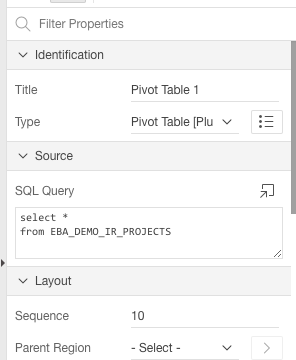
To use it, simply add a region to the page, change the region type to "Pivot Table" and write an SQL query as the region source:
On the region attributes page, specify the options. I've added some help text to explain the various options. Note that you can have more than one Pivot Table region on the same page, but be sure to use a unique name in the "DOM Element Name" attribute for each pivot table.
I've also added/enabled some extra features such as spreadsheet export (via TSV - tab separated values) and charting.
It should be noted that the plugin is just an APEX wrapper for the Javascript Pivot Table component by Nicolas Kruchten who did all the hard work. I merely packaged it up for use with APEX.
You can download the plugin from my APEX plugins page. Enjoy! :-)
The plugin proved quite popular, but people were having problems using it with APEX 5 due to a jQuery versioning conflict.
I've now updated the plugin so it works with APEX, both 5.0 and 5.1.
To use it, simply add a region to the page, change the region type to "Pivot Table" and write an SQL query as the region source:
On the region attributes page, specify the options. I've added some help text to explain the various options. Note that you can have more than one Pivot Table region on the same page, but be sure to use a unique name in the "DOM Element Name" attribute for each pivot table.
I've also added/enabled some extra features such as spreadsheet export (via TSV - tab separated values) and charting.
It should be noted that the plugin is just an APEX wrapper for the Javascript Pivot Table component by Nicolas Kruchten who did all the hard work. I merely packaged it up for use with APEX.
You can download the plugin from my APEX plugins page. Enjoy! :-)
Subscribe to:
Posts (Atom)