Showing posts with label sql. Show all posts

Tuesday, March 21, 2017

Using VS Code for PL/SQL development

I've been using Sublime Text as my main editor for PL/SQL development for many years, but I'm now in the process of switching to Visual Studio Code (VS Code).


Some good reasons to use VS Code:
  • Multi-platform (Windows, OS X, Linux)
  • Free, open source
  • Lightweight, fast (enough)
  • Large ecosystem of extensions
  • Built-in Git support
  • Can be adapted to PL/SQL coding via a plsql language extension (syntax highlighting, go to/peek definition, go to symbol) and PL/SQL compilation using sqlplus via a Task Runner (see below for PL/SQL specifics)

Installing VS Code and extensions

Download VS Code from https://code.visualstudio.com/ and run the installer.

Start VS Code and click the Extensions icon.
  • Search for "plsql" and install the "xyz.plsql-language" extension
 The following are all optional but recommended:
  • Search for "git history" and install the "donjayamanne.githistory" extension
  • Search for "better merge" and install the "pprice.better-merge" extension (update 24.09.2017: this extension is now part of VS Code itself and does not need to be installed separately)
  • Search for "git lens" and install the "eamodio.gitlens" extension
  • Search for "tag" and install the "formulahendry.auto-close-tag" extension
  • Search for "blackboard" and install the "gerane.Theme-Blackboard" extension
  • Search for "material icon" and install the "PKief.material-icon-theme" extension
  • Search for "plsql" and install the "apng.orclapex-autocomplete" extension (added 02.01.2018)
Click on "Reload" to restart VS Code with the new extensions loaded.

Your list of extensions should now look something like this:


Click File, Preferences, Color Theme and select the "Blackboard" theme.
Click File, Preferences, File Icon Theme and select the "Material Icon" theme.

Configuring a Task Runner to compile PL/SQL code

Click File, Open Folder and open a folder containing your PL/SQL code.
Click View, Command Palette and enter "task" then select "Configure Task Runner", select "Others".

Copy the following text and paste it into the tasks.json file:


Adjust the connection string as appropriate to your environment.

Copy the following text and save it as _show_errors.sql in the project root folder:


Linux and Mac: Copy the following text and save it as _run_sqlplus.sh in the project root folder (remember to chmod +x the file to make it executable).


Windows: Copy the following text and save it as _run_sqlplus.bat in the project root folder.


Optionally create a login.sql file in project root folder and add:


Editing code

The PL/SQL language extension by xyz provides syntax highlighting for PL/SQL, as well as a couple of very useful code navigation features.

You can go to a "symbol" (ie a function or procedure) inside a package by pressing Shift+Ctrl+O and typing the name of the symbol:


You can go to the definition of a function or procedure by pressing F12 when the cursor is on the function or procedure name (or right-click on the function or procedure name and select either "Go to definition", or "Peek definition" to see the definition in a popup window without leaving the current file).


Snippets

You can define your own snippets for frequently used code; see this how-to article. I recommend that you create snippets for frequently used code blocks such as if/then/else statements, case statements, and larger code blocks such as the skeleton for a package, procedure or function.

Building code

To build (compile) the current file into the database, press Shift+Ctrl+B (or click View, Command Palette, and type "build" to search for the relevant command).

The build task runs sqlplus and passes it the filename of the current file. This creates or replaces the object in the database (you can see the commands being executed in the "Output" pane in VS Code). The build task then queries user_errors to get any errors and warnings from the database, and these are shown in the "Problems" pane in VS Code.
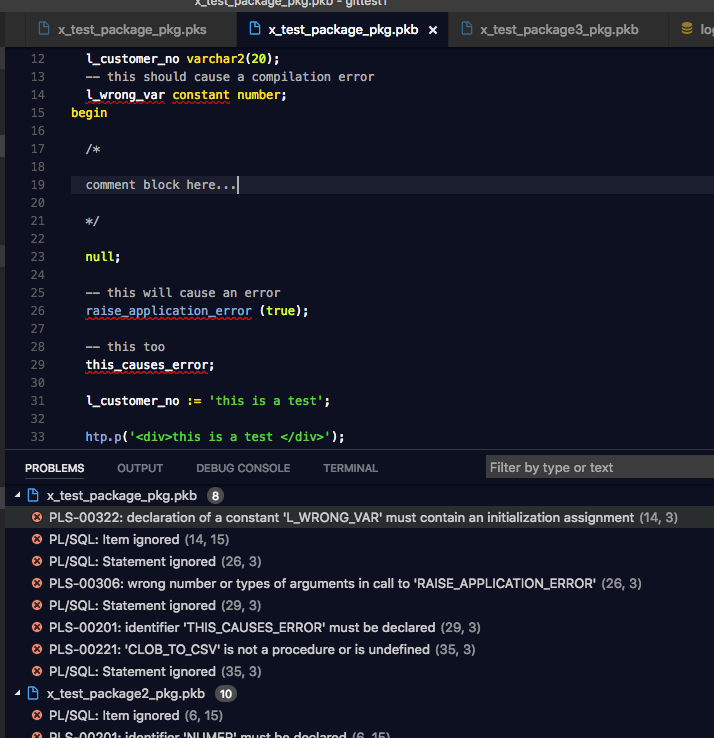

You can click on each problem to jump to the relevant line of code. You'll also see squiggly lines under the errors in the code itself, and you can hover over the text to see a tooltip containing the error message.

Note that since the build task queries the user_errors view without any filters, you get to see all errors in the schema, not just the errors for the current file. I actually like this, because it instantly shows me if there are any other problems in the schema that I might not otherwise be aware of.

Also, the build task assumes that you have one file per database object (ie separate files for package specifications and package bodies), and that the filenames match the database object names. This makes sense to me and I assume that's how most people organize their files, but you can tweak the _show_errors.sql script to generate output appropriate to your setup.


Version control with Git

VS Code has great built-in support for Git. I recommend installing a couple of git-related extensions (see above), but other than that, I'll just refer you to the official tutorial for using Git in VS Code.


That's it, enjoy using VS Code for PL/SQL development! :-)


Tuesday, July 7, 2015

Longer names coming to Oracle?

Have you ever, like me, been silently finger-counting the number of characters in a table name, column name or procedure name that you are about to create in the Oracle Database, to make sure it is short enough? It appears those days will soon (?) be at an end...

The current limit on names (identifiers such as table names, column names, procedure names, parameter names, etc) in Oracle SQL and PL/SQL is 30 characters. Here is what you see when you do a describe of the the user_tab_columns dictionary view in Oracle 11g:


But what do we see if we do the same on an Oracle 12c database? The database on apex.oracle.com was upgraded to 12c some time ago, so let's try the same there:


Interesting...! Looks like the new limit will be 128 characters. All the relevant views such as user_arguments, user_identifiers and user_objects have been likewise altered.

Mind you, as of version 12.1.0.2.0, it's still not possible to actually create objects with long names:


But it appears that the preparations have been done to allow longer names, so I'm guessing this will become possible in the next version (12.2?).

The world moves forward... it will be great to stop worrying about short names (but let's not go crazy and turn our PL/SQL into the equivalent of this silliness !).


Friday, May 25, 2012

A friend in need: Flashback Query


"It is sayd, that at the nede the frende is knowen."
- William Caxton: "Sonnes of Aymon" (1489)
"I say, that when you screw up, Flashback Query is a friend indeed!"
- Morten Braten: "SQLs of Oracle" (2012)

The Flashback Query feature of Oracle (10g) can be really helpful when you run that UPDATE or DELETE statement and then, after the COMMIT, you discover that you made a mistake!

Wouldn't it be nice to be able to look back and see what the data looked like before you messed things up? With a Flashback Query you can do just that:


-- see the data as it was 10 minutes ago
select *
from emp
as of timestamp systimestamp - interval '10' minute
where empno = 7369


Or you can see a history of changes:


-- history of all changes last 20 minutes
select empno, ename, sal, job,
  versions_operation,
  versions_starttime,
  versions_endtime,
  versions_xid
from emp
versions between timestamp systimestamp - interval '20' minute and systimestamp
where empno = 7369
order by versions_endtime nulls last


I've found this useful several times lately, so I'm adding it to the blog as a quick reminder, as I always struggle to remember that funky interval syntax thingy.

Saturday, April 10, 2010

SELECT * FROM spreadsheet (or How to parse a CSV file using PL/SQL)


I recently needed to retrieve/download a comma-separated values (CSV) file from a website, and insert the data in an Oracle database table.

After googling around a bit, I found various pieces of the solution on AskTom, ExpertsExchange and other sites, which I put together in the following generic utility package for CSV files.

Usage


Because I have implemented the main parsing routine as a pipelined function, you can process the data either using straight SQL, or in a PL/SQL program.


For example, you can retrieve a download a CSV file as a clob directly from the web and return it as a table with a single statement:


select *
from table(csv_util_pkg.clob_to_csv(httpuritype('http://www.foo.example/bar.csv').getclob()))


And maybe do a direct insert via INSERT .. SELECT :

insert into my_table (first_column, second_column)
select c001, c002
from table(csv_util_pkg.clob_to_csv(httpuritype('http://www.foo.example/bar.csv').getclob()))


You can of course also use SQL to filter the results (although this may affect performance):

select *
from table(csv_util_pkg.clob_to_csv(httpuritype('http://www.foo.example/bar.csv').getclob()))
where c002 = 'Chevy'


Or you can do it in a more procedural fashion, like this:

create table x_dump
(clob_value clob,
 dump_date date default sysdate,
 dump_id number);


declare
  l_clob clob;

  cursor l_cursor
  is
  select csv.*
  from x_dump d, table(csv_util_pkg.clob_to_csv(d.clob_value)) csv
  where d.dump_id = 1;

begin

  l_clob := httpuritype('http://www.foo.example/bar.csv').getclob();
  insert into x_dump (clob_value, dump_id) values (l_clob, 1);
  commit;
  dbms_lob.freetemporary (l_clob);

  for l_rec in l_cursor loop
    dbms_output.put_line ('row ' || l_rec.line_number || ', col 1 = ' || l_rec.c001);
  end loop;

end;


Auxiliary functions


There are a few additional functions in the package that are not necessary for normal usage, but may be useful if you are doing any sort of lower-level CSV parsing. The csv_to_array function operates on a single CSV-encoded line (so to use this you would have to split the CSV lines yourself first, and feed them one by one to this function):

declare
  l_array t_str_array;
  l_val varchar2(4000);
begin

  l_array := csv_util_pkg.csv_to_array ('10,SMITH,CLERK,"1200,50"');

  for i in l_array.first .. l_array.last loop
    dbms_output.put_line('value ' || i || ' = ' || l_array(i));
  end loop;

  -- should output SMITH
  l_val := csv_util_pkg.get_array_value(l_array, 2);
  dbms_output.put_line('value = ' || l_val);

  -- should give an error message stating that there is no column called DEPTNO because the array does not contain seven elements
  -- leave the column name out to fail silently and return NULL instead of raising exception
  l_val := csv_util_pkg.get_array_value(l_array, 7, 'DEPTNO');
  dbms_output.put_line('value = ' || l_val);

end;


Installation


In order to compile the package, you will need these SQL types in your schema:

create type t_str_array as table of varchar2(4000);
/

create type t_csv_line as object (
  line_number  number,
  line_raw     varchar2(4000),
  c001         varchar2(4000),
  c002         varchar2(4000),
  c003         varchar2(4000),
  c004         varchar2(4000),
  c005         varchar2(4000),
  c006         varchar2(4000),
  c007         varchar2(4000),
  c008         varchar2(4000),
  c009         varchar2(4000),
  c010         varchar2(4000),
  c011         varchar2(4000),
  c012         varchar2(4000),
  c013         varchar2(4000),
  c014         varchar2(4000),
  c015         varchar2(4000),
  c016         varchar2(4000),
  c017         varchar2(4000),
  c018         varchar2(4000),
  c019         varchar2(4000),
  c020         varchar2(4000)
);
/

create type t_csv_tab as table of t_csv_line;
/


UPDATE 04.04.2012: The latest version of the package itself (CSV_UTIL_PKG) can be found as part of the Alexandria Utility Library for PL/SQL.


Performance


On my test server (not my laptop), it takes about 35 seconds to process 12,000 rows in CSV format. I don't consider this super-fast, but probably fast enough for many CSV processing scenarios.

If you have any performance-enhancing tips, do let me know!

Bonus: Exporting CSV data


You can also use this package to export CSV data, for example by using a query like this.

select csv_util_pkg.array_to_csv (t_str_array(company_id, company_name, company_type)) as the_csv_data
from company
order by company_name

THE_CSV_DATA
--------------------------------
260,Acorn Oil & Gas,EXT
261,Altinex,EXT
262,Amerada Hess,EXT
263,Atlantic Petroleum,EXT
264,Beryl,EXT
265,BG,EXT
266,Bow Valley Energy,EXT
267,BP,EXT

This might come in handy, even in these days of XML and JSON ... :-)

Tuesday, April 6, 2010

Using TRUNC and ROUND on dates

Maybe this is old news to some, but I recently became aware that it is possible to use TRUNC and ROUND not just on a NUMBER, but also on a DATE value.

For example, you can get the start of the month for a given date (using TRUNC), or the "closest" start of the month, rounded forward or backwards in time appropriate (using ROUND):

select sysdate,
  trunc(sysdate, 'YYYY') as trunc_year,
  trunc(sysdate, 'MM') as trunc_month,
  round(sysdate, 'MM') as round_month,
  round(sysdate + 15, 'MM') as round_month2
from dual

The above gives the following results:

SYSDATE                   TRUNC_YEAR                TRUNC_MONTH               ROUND_MONTH               ROUND_MONTH2              
------------------------- ------------------------- ------------------------- ------------------------- ------------------------- 
06.04.2010 20:10:56       01.01.2010 00:00:00       01.04.2010 00:00:00       01.04.2010 00:00:00       01.05.2010 00:00:00       


Somewhat related to this topic is the relatively obscure (?) EXTRACT function, which allows you to extract a part of a DATE:

select sysdate,
  extract(day from sysdate) as extract_day,
  extract(month from sysdate) as extract_month,
  extract(year from sysdate) as extract_year
from dual

Which gives the following results:

SYSDATE                   EXTRACT_DAY            EXTRACT_MONTH          EXTRACT_YEAR           
------------------------- ---------------------- ---------------------- ---------------------- 
06.04.2010 20:13:01       6                      4                      2010                   

If you try to extract the "hour", "minute" or "second" from a DATE, however, you get an ORA-30076: invalid extract field for extract source.

For some reason, these only work on TIMESTAMP values, not on the DATE datatype (which seems like an arbitrary limitation to me). Nevertheless:

select systimestamp,
  extract(hour from systimestamp) as extract_hour,
  extract(minute from systimestamp) as extract_minute,
  extract(second from systimestamp) as extract_second
from dual

The above gives the following results:

SYSTIMESTAMP  EXTRACT_HOUR           EXTRACT_MINUTE         EXTRACT_SECOND         
------------- ---------------------- ---------------------- ---------------------- 
06.04.2010 20.17.12,047000000 +02:00 18                     17                     12,047